

Building and grading exams by hand used to take real time: writing the questions, tracking down who’d actually finished, grading every response manually, then reconciling it into a spreadsheet someone would inevitably ask you to reformat. That process doesn’t hold up anymore, and it doesn’t have to.
Learning how to create an online exam today means picking the right platform, not building a process from scratch. Tools like ProProfs Quiz Maker handle template selection, automated grading, security, and reporting in one place, which is what actually makes it possible to run exams at scale without adding headcount.
Online exams aren’t a nice-to-have anymore. Between remote hiring, distributed teams, and compliance programs that need an audit trail, they’ve become basic infrastructure for anyone who needs to verify what someone actually knows.
This guide walks through exactly how to create an online exam, step by step, so you spend less time on admin and more time on what the results actually tell you.
What Is an Online Exam?
An online exam is a formal, graded assessment delivered over the internet, usually with time limits, identity or security controls, and a permanent record of the result. It differs from a casual quiz in scope and consequence: the outcome is meant to certify something, not just check comprehension.
That distinction shapes almost every decision that follows. A quiz can tolerate a wrong guess; an exam usually can’t, because someone downstream, an employer, a regulator, an accreditation body, is going to treat the result as fact. That’s why exams carry heavier security, stricter timing, and an audit trail that a quiz never needs.
A five-question knowledge check doesn’t need proctoring or a large question bank, but a licensure exam does. Getting that scope right before building anything is what the rest of this guide is built around.
Online Exam vs. Quiz vs. Test: What’s the Difference?
Before you settle on an online exam format, it helps to know what separates the three, because a lot of “my exam feels wrong” complaints trace back to picking the wrong format for the stakes involved.
| Dimension | Quiz | Test | Exam |
| Duration | 5–15 min | 20–60 min | 60–180+ min |
| Stakes | Low (formative) | Medium | High (summative/certification) |
| Scope | Single concept | Unit/module | Full course/program |
| Purpose | Knowledge check | Progress measurement | Mastery evaluation |
| Typical use | Training reinforcement | Module assessment | Certification, hiring, finals |
If you’re building a certification exam and treating it like a weekly quiz, security-wise, that’s usually where things go wrong later.
Start creating impactful online exams today to boost learning and performance across your organization!
How to Create an Online Exam, Step by Step
Whichever online exam format fits, the build process below stays mostly the same. This walkthrough uses ProProfs Quiz Maker, but the sequence holds regardless of platform.
Step 1: Pick a Template, Use AI, or Start From Scratch
Before touching the builder, spend two minutes deciding why this exam exists. Training assessment, pre-employment screen, certification exam, or student evaluation? Each needs a different security level and scoring approach, and skipping this step is the single most common reason people rebuild an exam halfway through.
Online exam creation gets a lot faster once you’ve picked your starting point. A template library is the quickest route; ProProfs has 100,000+ ready-to-use templates, including 200+ skill assessments built by subject matter experts, so you’re rarely starting from a blank page.
Skip templates entirely, and an AI quiz maker will make an online exam from almost nothing. Enter a topic, set a few guidelines, or upload a document, and it generates a complete question set in one pass. You can even build a quiz from a Google Doc, which turns existing training material into an exam without retyping a word of it.

Let ProProfs AI Build a Quiz
Already have your questions written? Start from scratch. Type them in manually or upload the full set at once using AI-powered question import, so an Excel sheet or a Word doc becomes a live exam without you re-entering a single line.
Step 2: Add Questions
This is usually the part people get stuck on when they create an online exam for the first time. You’ve stared at a blank question field for twenty minutes and nothing good comes out. Skip that entirely and pull from the question library, or generate what you need instantly with AI.
Question format matters more than people give it credit for.
ProProfs Quiz Maker supports 20+ question types, and pulling from more than one keeps an exam from rewarding test-taking skill over actual knowledge. Multiple-choice and true/false cover straightforward recall. Checkbox questions handle “select all that apply” situations where more than one answer is correct. Fill-in-the-blank and matching test recall and comprehension more directly than multiple-choice can. Essay questions get at reasoning, not just the right answer. Drag-and-drop and hotspot formats test spatial or visual understanding that a text question can’t touch, and video-response or audio-response questions let you assess pronunciation, verbal reasoning, or a practical demonstration that a written answer never could.
As a rule of thumb: multiple-choice and true/false for recall, scenario-based and case-study questions for judgment (especially useful if you create an online assessment test for hiring), drag-and-drop and hotspot for anything visual, and essay or audio/video response when you care how someone got to the answer, not just whether they got there.
Build your question pool at 3–5x the number of questions your final exam needs, and organize it by topic, difficulty, and skill area. That’s what makes creating an online test for 20 students or 2,000 employees an equally manageable job. Without a real pool, you’re rewriting the exam every time you need a second version.
Step 3: Automate Grading
Manually grading exams is the part nobody misses. Set up automated scoring while building the test, and a graded quiz tool calculates results, applies custom scores, and shares reports without anyone touching a spreadsheet.
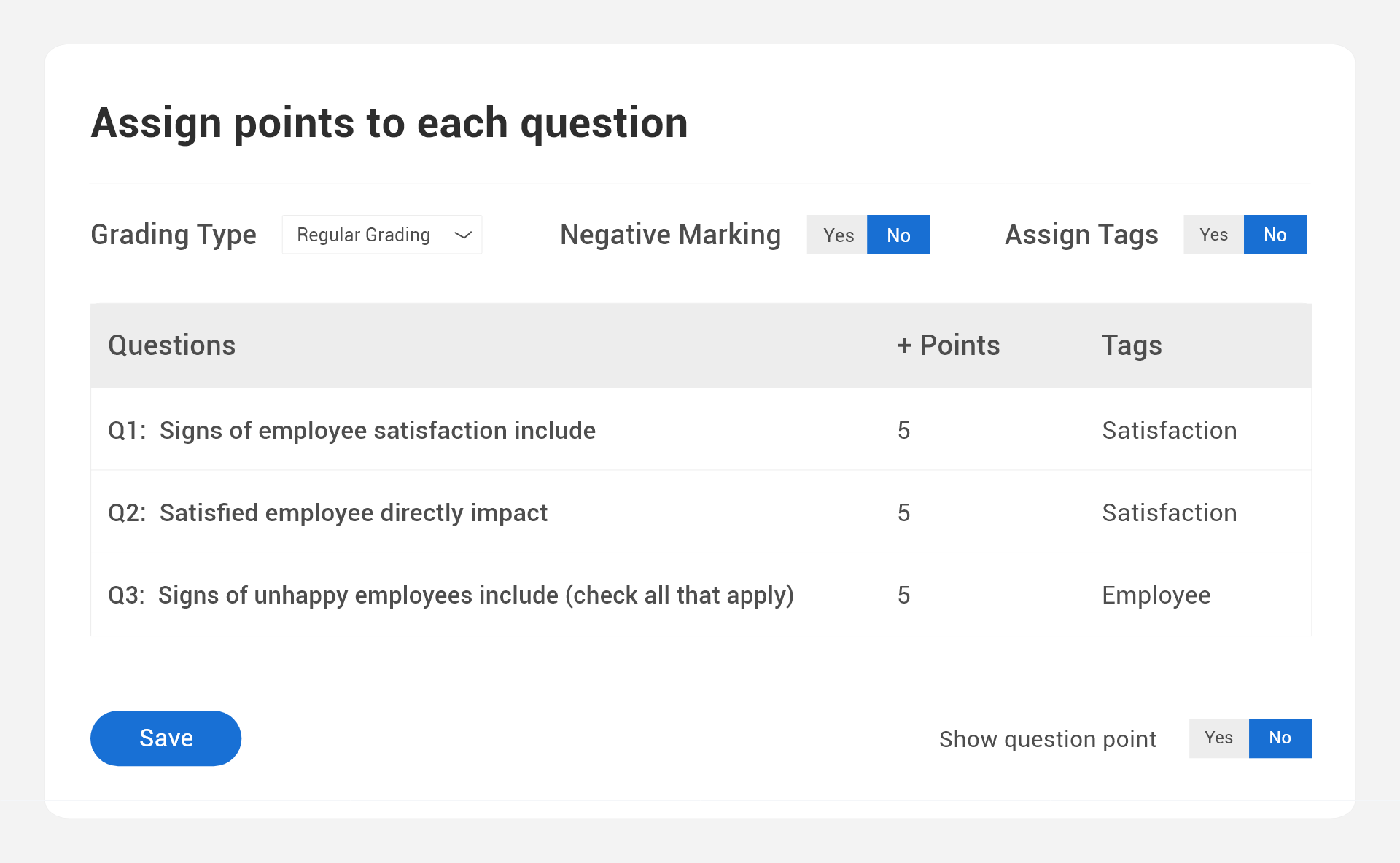
A few things worth setting deliberately:
- Points per question. Assign values as questions are added so the system scores automatically on submission.
- Partial credit. Let learners earn some credit for partially correct answers instead of losing the whole point.
- Custom scoring. Weight specific answer choices differently when some wrong answers are worse than others.
- Negative marking. Deduct points for wrong answers to discourage blind guessing.
For essay and open-ended questions, AI-assisted scoring applies a rubric consistently across every submission, which matters more than it sounds like it should once the same open-ended prompt has been graded three hundred times and consistency starts to drift.
Step 4: Add Instant Feedback
Configure feedback to show explanations the moment a question is answered instead of making learners wait for a full grade report. There are a few ways to do this: a single general remark for every answer, feedback tied to each specific answer choice, or different messaging for correct versus incorrect responses.
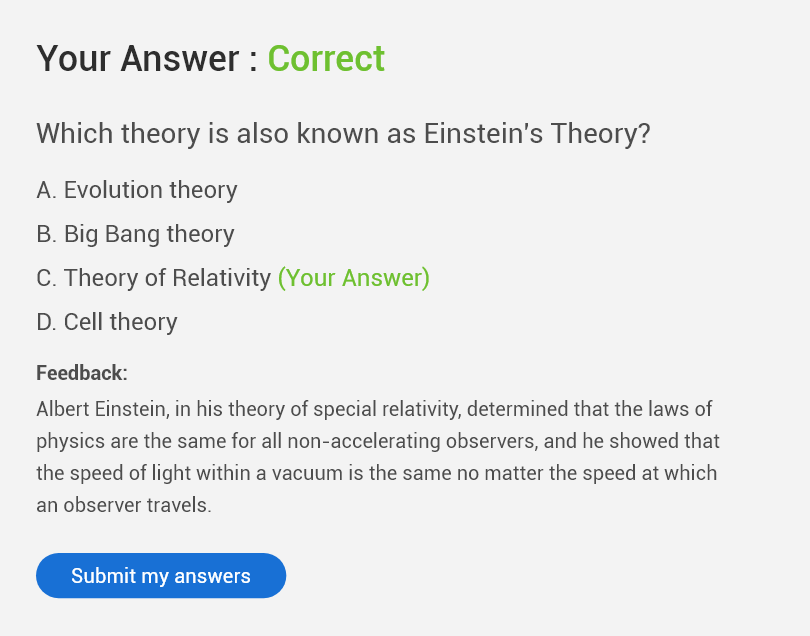
Nebraska’s Health Department uses reference information in its feedback to support test-takers through the material, not just grade them on it, a good example of feedback doing more than confirming right or wrong.
Research on spaced practice and corrective feedback consistently shows learners retain information longer when they get immediate explanations rather than none. It costs nothing to turn on and it’s one of the highest-leverage settings in the whole builder.
Watch: How Barry Hoffman, a New York math teacher, uses ProProfs’ instant feedback to boost retention
Step 5: Configure the Exam Settings
This is where you decide how the exam behaves: who can access it, what they see, and when. At minimum, set:
- Access: password-protect the exam, or restrict it further (more on this below).
- Notifications: automatic alerts to test-takers and stakeholders on submission and results.
- Result visibility: immediate scores, or held for manual review first.
- Layout: all questions at once or one per page, and whether learners can revisit answers before submitting.
- Availability window: specific start and end dates so the exam isn’t open indefinitely.
Get the security-specific settings right and you’ll thank yourself later. There’s a full section on that coming up, so don’t over-engineer this step. Configure the basics now and come back for the anti-cheating layer once you know your stakes.
Watch this short video to learn how to configure exam settings:
Step 6: Customize the Look and Feel
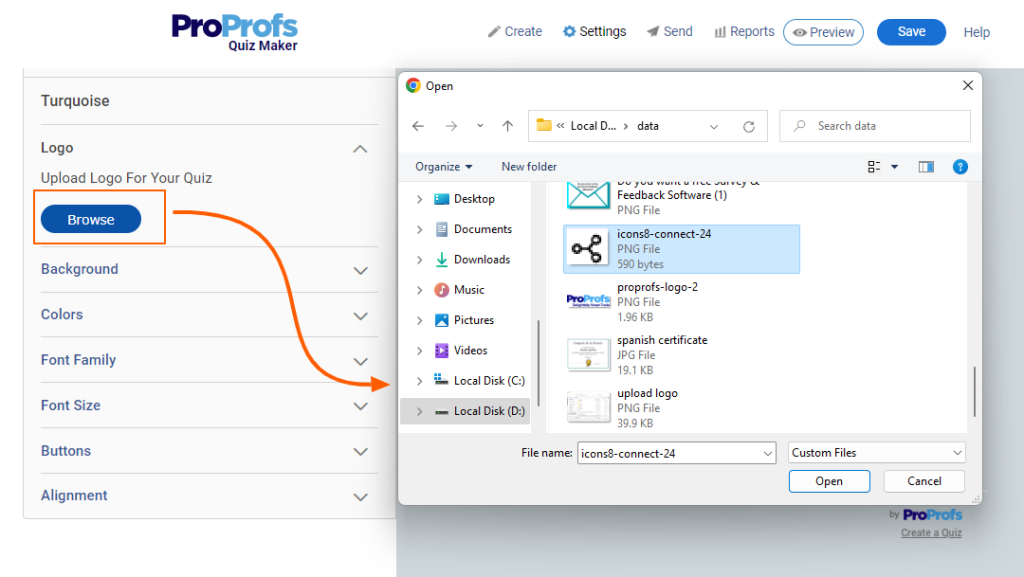
Add a logo, match brand colors and theme, and drop in images, video, or documents to give questions context. Confirm it’s mobile-responsive too. If half of the test-takers are on a phone and the layout doesn’t hold up, that’s a completion-rate problem that was avoidable.
Step 7: Assign the Exam to Learners
Once you create an online exam, sharing it is the easy part. Send it by email, assign it inside a classroom, or embed it directly on a website with a controlled availability window.
For large-scale rollouts, upload learner lists via CSV, automate enrollment through an API, or generate QR codes for in-person distribution. Any of those beats adding two thousand people one at a time.
For hiring, connect the exam to an applicant tracking system using API integration, so candidate scores flow straight into the recruitment pipeline. Recruiters review scores, not a stack of resumes.
Watch: How to Share Your Exam With Learners
Step 8: Set Up Completion Certificates
Certificates matter more than they sound like they should. For certification and compliance programs, they’re not optional. With a platform like ProProfs Quiz Maker, certificates are generated automatically the moment someone passes: logo, name, score, date, whatever fields are chosen.
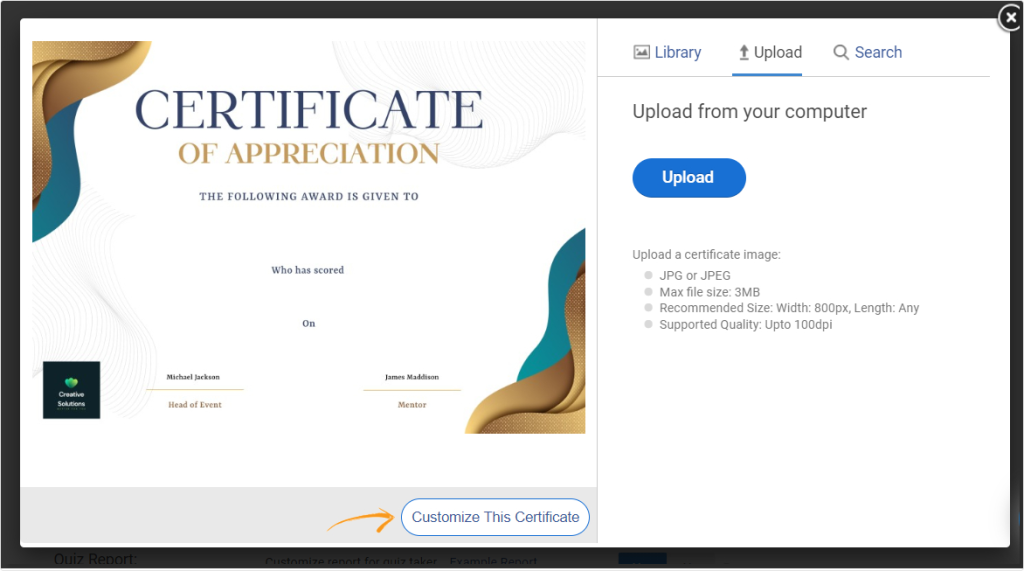
For compliance-heavy programs, set expiry dates and automated recertification reminders too. That keeps the whole thing audit-ready without anyone personally tracking who’s due for renewal on a spreadsheet somewhere.
At this point, that’s the full sequence for how to create an online exam from a blank page to a built, secure, gradable, shareable one. The rest of this guide covers how to make it better: tighter security, smarter format choices, and what to actually do with the results once they come in.
Securing Your Exam Without Making It Miserable
Cheating in online exams nearly doubled during COVID, from 29.9% to 54.7% of students self-reporting dishonest behavior (Newton & Essex, 2024). And it’s gotten harder to catch: a 2024 University of Reading study found ChatGPT-generated exam answers went undetected 94% of the time, and scored higher on average than human submissions (Scarfe et al., 2024).
The good news: layered security actually works. Proctored students score an average of 17 points lower than unproctored students on identical exams, a fairly blunt confirmation that security measures deter dishonesty rather than just annoying honest test-takers (Alessio et al., 2017).
Here’s what that layering looks like in practice:
- Password protection and private links keep the exam off the open internet.
- Unique logins or SSO confirm the person taking the exam is who they say they are.
- IP restriction limits access to approved networks or locations.
- Randomization. A shuffled question pool means no two test-takers see an identical set, which makes answer-sharing far less useful.
- Browser lockdown blocks tab-switching and copying content mid-exam.
- Time limits. A timed exam forces reliance on actual knowledge instead of a second browser tab.
- Proctoring, live or AI-reviewed, flags suspicious behavior like face changes, prolonged eye movement away from the screen, or repeated tab attempts. Not every learner is comfortable with webcam tracking, and you don’t have to default to it. Screen recording or tab-switch monitoring alone is a lighter option that still protects integrity.
Not every exam needs every layer. Match the control to the risk:
| Level | Stakes | What to Enable |
| 1 | Low (practice, formative) | Question shuffling + time limits |
| 2 | Medium (training, onboarding) | Add browser lockdown + password protection |
| 3 | High (certification, hiring) | Add webcam proctoring + screen recording + IP restriction |
| 4 | Critical (licensure, compliance) | Add identity verification + AI-powered proctoring + full audit trail |
If you allow reattempts, control them deliberately. Set a limit, add a 24-to-48-hour delay before a retake so learners actually review what they got wrong instead of guessing their way through a second time, and pull from your question pool so a reattempt isn’t just the same exam memorized from round one.
And design at least some questions to resist AI tools directly: scenario-based, image-anchored, or multimedia prompts require reasoning that a copy-paste into ChatGPT doesn’t solve nearly as cleanly as a straight recall question does.
Matching the Exam to the Job
“What are learners supposed to do after learning the course? Figure that out and build the appropriate interactive elements in the course.”
Tom Kuhlmann, VP of Community at Articulate, author of The Rapid E-Learning Blog
How you make an online exam for a certification program looks nothing like how you’d make one for a Tuesday knowledge check, and treating them the same is where a lot of exams go wrong before the first question is even written.
- Training and onboarding: low-to-medium stakes. Short, frequent, with instant feedback, reinforcing what was just taught.
- Pre-employment screening: medium stakes. Timed, auto-graded, tied directly to the job, integrated with your ATS to rank candidates automatically.
- Certification and compliance: high stakes. Proctoring, randomized pools, certificate issuance, and an audit trail for regulatory proof.
- Academic exams: stakes vary by weight in the final grade. A practice run beforehand cuts both anxiety and the support tickets that follow.
Get this backwards when you make an online exam and it shows up mid-exam: lock a routine training check down like it’s a bar exam and completion rates tank from the friction alone; leave a certification exam as loose as a pop quiz and the results won’t survive an audit.
In practice, that plays out differently depending on who’s building it. K-12 teachers lean on weekly reading checks and end-of-unit assessments with visual aids for younger learners. Higher-ed instructors run open-book timed essay exams or scenario-based questions for courses where a single right answer doesn’t really exist. Corporate trainers use role-based quizzes through onboarding and compliance cycles. Certification bodies run secure, proctored exams in IT, finance, healthcare, or legal compliance with automatic certificate issuance on the other end.
Making the Exam Engaging
A dull, text-heavy exam doesn’t just bore people, it directly hurts completion rates. When test-takers hit wall after wall of plain text with no visual variety, they disengage, rush, or drop out before the last question. If your completion rates are low, that’s usually a design problem, not a difficulty problem.
Add images or video to give questions context. Use audio or video clips to test listening comprehension or practical skills. Lean on drag-and-drop and hotspot formats where a static question just can’t capture what you’re actually testing.
Glenn Wilkinson, a film studies teacher in Northern Ireland, embeds short movie clips directly into his exams and asks students to analyze how the director tells the story through film language. Students engage more because the question genuinely requires them to think it through, not recall a definition.
Making Test Day Less Stressful
Layout choices that help: one question per page instead of a long scroll, a visible progress bar so learners know how much is left, and the option to review and change answers before final submission. Small changes, but they measurably reduce the panic that shows up in low scores that don’t actually reflect what someone knows.
Run a practice test first. Tech issues and unfamiliar layouts rattle even well-prepared learners. A quick practice run lets them check device compatibility, get used to the one-question-per-page format and timer, and walk into the real exam without a single surprise waiting for them.
Reading Your Results and Actually Doing Something About Them
Building the exam is half the job of learning how to create an online exam that actually earns trust. What you do with the results is where the value actually shows up, and this is the part most teams skip because it takes more effort than just glancing at a pass rate.
Your analytics should track five things after every assessment:
- Pass/fail rate by cohort. If one team or class consistently underperforms, that’s a training gap, not an individual problem.
- Item difficulty. Questions over 90% correct are too easy to tell you anything. Questions under 30% are probably ambiguous or genuinely untaught.
- Item discrimination. Good questions separate prepared test-takers from unprepared ones. If your top and bottom scorers get a question right at the same rate, that question isn’t doing its job.
- Time-on-task. If everyone spends four minutes on a question built for ninety seconds, it’s either confusing or under-taught.
- Completion and dropout rate. High abandonment is almost always a length or layout problem, not a content problem.
AI-powered reporting handles the heavy lifting here, removing the need to manually cross-reference spreadsheets to find the one question that’s quietly failing everyone. Performance can also be compared across cohorts or departments in one dashboard, exported for further analysis, and, if the data needs to live somewhere else entirely, SCORM/Tin Can and API support sends it straight to a learning record store.
Use what’s found to do three things: fix or cut low-discrimination questions, flag undertaught topics for retraining, and share cohort-level results with the managers or instructors who can actually act on them.
Using the Same Exam for Hiring, Training, and Certification
The same platform covers three different jobs depending on your goal.
Pre-employment screening filters candidates on job-specific competencies before anyone gets to the interview stage, part of why 81% of employers now say they should weigh skills over degrees when hiring. Share it as a public link, let candidates take it without creating an account, and results rank automatically. Recruiters review scores, not a stack of resumes.
Employee training assessments confirm the training actually landed. Assign by role or department, set a passing threshold, and automate reminders for anyone who hasn’t finished. Fail, and someone’s routed back to the material. Pass, and it’s logged for the compliance trail.
Certification and compliance exams need the strictest version of all this: proctoring, randomized banks, strict time limits, and automated certificates with expiry dates and recertification scheduling. For regulated fields like healthcare, finance, aviation, or legal, that also means an audit-ready record of every attempt, score, and certificate issued.
Scaling From 30 Test-Takers to 30,000
Running an exam for one class and running it for an entire company shouldn’t need different tools, or dramatically more time. That’s the real test of good online exam creation: whether the same five-minute setup still works whether 30 people or 30,000 are being tested.
Here’s what that actually looks like: separate admin accounts so each department or instructor manages their own scope without touching anyone else’s. Departmental classrooms so the same exam gets assigned to fifteen teams without rebuilding it fifteen times. Bulk learner import so five hundred employees go in as one CSV upload, not five hundred manual entries. Scheduling and reminders that run themselves, so the exam opens, nudges stragglers, and closes on its own. Centralized analytics that can be drilled into by team or location. SSO and API integration so nobody’s juggling a separate login just for exams.
Making an exam for 50 people or 50,000 should take the same amount of setup time. The platform handles the coordination so the focus stays on what the exam is actually measuring.
Keeping a Record Without the Filing Cabinet
Every result gets stored and organized automatically, which sounds minor until you’re the person digging through a filing cabinet or a scattered folder of spreadsheets looking for one candidate’s score from eighteen months ago. Past records pull up in a few clicks, long-term progress is trackable without reassembling old reports by hand, and transcripts export on demand for evaluations, certifications, or a compliance audit that landed on someone’s desk with two days’ notice.
Build the Exam Once. Let It Run Itself After That
The full sequence: pick a starting point, build a real question pool, automate the grading, layer in the right amount of security for the stakes involved, and actually read what the results say afterward. That’s the complete answer to how to create an online exam that holds up under scrutiny, not just one that technically works on the first try.
The programs that get the most out of this treat it as a system, not a one-off task. Build the exam once, well, and the automation, the analytics, and the security controls keep working long after the initial setup is done. Whether the goal is testing students, screening candidates, or running a compliance program, ProProfs Quiz Maker handles the coordination so nobody’s rebuilding the wheel every time the stakes change.
Frequently Asked Questions
How do I make an online exam for free?
Most online exam makers, including ProProfs Quiz Maker, offer a free forever plan for a limited number of questions or test-takers. You can build and share a basic exam without a credit card, then upgrade once you need higher volume, proctoring, or advanced reporting.
What software should I use to create an online exam?
Any dedicated online exam maker with automated grading, security controls, and reporting built in. Look for a question bank, proctoring options, and certificate generation if you're running certification or compliance exams, not just a form builder repurposed for testing.
What's the best way to create an online exam quickly?
Use a template or an AI quiz maker. Enter your topic or upload existing material, and a full question set generates in seconds. It's the fastest route to online exam creation when you're working against a deadline.
How long should an online exam be?
That depends on the stakes. A training check might run 15–20 minutes; a certification exam can run 60–180 minutes. Match duration to how much material and how many competencies you're actually assessing, not to a round number.
How do I stop cheating on an online exam?
Layer your controls to the stakes: password protection and unique logins as a baseline, then browser lockdown, question randomization, and proctoring for higher-stakes exams. No single feature stops cheating on its own; the layering is what works.
What's the difference between an online exam format for training versus certification?
The online exam format for training is short and low-stakes, built for reinforcement. The format for certification runs longer, requires proctoring and randomized question banks, and produces an audit-ready record because the result has to hold up to outside scrutiny.
Can I create an online exam without writing every question myself?
Yes. Pull from a question library, generate questions with AI from a topic or uploaded document, or import an existing question set from Excel or Word. Manual writing is one option among several, not a requirement.
Is online exam creation different for training versus hiring?
Yes. Online exam creation for training leans on frequent, low-stakes checks with instant feedback. Creation for hiring or certification adds proctoring, randomized question banks, and a formal audit trail, because the results carry a lot more weight once someone's job depends on them.
Let ProProfs AI Build a Quiz

 We'd love your feedback!
What did you like & how can we make it even better?
 Thanks for your feedback!
 Ask Your Question
Have a question? Get expert help to make your decision easier.