I’ve watched a hiring manager greenlight a candidate because they sounded fast and confident in the room, then watch that same hire struggle for months because the interview never actually tested the skill the job needed. That gap is what online assessment tools exist to close.
A resume tells you what someone claims. An interview tells you how they perform under ten minutes of pressure with an audience. Neither tells you whether they can do the job.
According to Hiring Statistics in 2025, 43% of bad hires come down to rushed decisions, and once the wrong person is in the seat, morale drops 32%, and productivity drops 36% for everyone working next to them. That’s not a hiring problem. That’s math, and it compounds every week when the wrong person stays on payroll.
Structured assessments move the test earlier, before the offer goes out, instead of after the ninety-day review. Catch the mismatch there, and it costs you a rejection email instead of a severance package.
Here’s where I’d actually spend the budget: what each of these platforms gets right, where they fall short, what they cost for real, and which one earns a spot depending on what you’re actually solving for.
What Are Online Assessment Tools?
The platforms that matter for HR and TA teams go beyond basic quiz builders. You need:
- Multiple question formats beyond MCQ, including scenario-based, situational judgment, and skills simulations
- Anti-cheating controls that actually work at scale, not just an honor system
- Automated scoring and ranking so you’re not manually comparing 80 candidates
- Analytics that surface patterns, not just individual scores
- Shareable links so candidates can take tests without logging into your LMS
8 Best Online Assessment Platforms
I evaluated all the online assessment platforms against fit for HR and hiring use cases specifically, looking at question type depth, security controls, reporting granularity, pricing transparency, and Capterra ratings from verified users. Here’s where they land.
Choosing the right online assessment tool can be challenging. This quick video breaks down some of the most popular options and shows how they compare in real-world assessment scenarios.
| Tool | Best For | User Rating | Price |
| ProProfs Quiz Maker | Easily Creating Secure Quizzes & Assessments With AI or Templates | 4.5/5 | Free plan available; Paid plan starts at $19.99/month |
| TestGorilla | Candidate Screening and Pre-Employment Testing | 4.1/5 | Starts at $135/month |
| SpeedExam | Secure High-Stakes Exams at Scale | 4.8/5 | Starts at $37/month |
| Testportal | AI-Powered Assessments With Smart Proctoring | 4.6/5 | Starts at $35/month |
| Moodle | Summative Assessments With Structured Grading Control | 4.3/5 | Starts at $170/year |
| Inspera | Proctored High-Stakes Institutional Exams | 3.9/5 | Custom Quote |
| Mentimeter | Conducting Live Quizzes and Interactive Training Sessions | 4.4/5 | Starts at €14/presenter/month |
| Socrative | Annual Certifications and Live Knowledge Checks | 4.4/5 | Starts at $10/seat/month |
1. ProProfs Quiz Maker – Best for Easily Creating Secure Quizzes & Assessments With AI or Templates
ProProfs Quiz Maker is what I reach for when I need a live, secure, branded assessment without spending half a day on setup. I’ve used it across hiring screens, onboarding quizzes, and compliance programs.
The AI can generate quizzes by entering a topic, uploading a document, pasting a webpage, or even using a YouTube video, and it creates quizzes with answers and explanations in seconds. I drop in a job description PDF or training document, and it builds a full test with explanations in minutes.

Let ProProfs AI Build a Quiz
This online assessment platform supports 20+ question types, including scenario-, image-, and video-based formats, which matter when MCQs alone don’t surface real job readiness. Question banks with pooling ensure every candidate gets a different draw from the same set, so comparison stays fair even when no two tests look identical.
Security comes built-in, not bolted on as an upgrade. Browser lockdown, IP tracking, webcam monitoring, and screen proctoring are standard. Time limits are configurable per question, and certificates are automatically generated when someone meets the passing threshold.
Pros:
- AI quiz generator builds full assessments from PDFs, DOC, PPT, videos, webpages, or a text prompt
- 20+ question types, including scenario-based, image-based, drag-and-drop, and video response formats
- Automated scoring with regular, partial, and custom grading options, plus instant feedback and AI-powered evaluation for faster and more accurate assessments
- Advanced anti-cheating controls: automated webcam and screen proctoring, browser lockdown, IP tracking, and question randomization
- Question banks with pooling randomize questions per attempt, so no two candidates get the same test
- Browser lockdown, IP tracking, webcam monitoring, and screen proctoring are built in as standard
- Instant feedback with explanations that turn every attempt into a learning opportunity
- Auto-generated branded certificates with scheduled recertification support
- Time limits are configurable for the full assessment or per individual question
- 100,000+ customizable templates and a library of over 1,000,000 ready-made questions
- Mobile-friendly quizzes accessible on most devices
- 70+ language support for global learner populations
Cons:
- No dark mode, which affects comfort during extended use
- Cloud-only; no on-premise version available
User Rating: 4.5/5 (Capterra)
Price: Free for short quizzes and essential features. Paid plans start at $19.99/month and scale to $199.99/month on Enterprise for larger teams.
Create an Auto-graded Assessment in Minutes
2. TestGorilla – Best for Candidate Screening and Pre-Employment Testing
I started using TestGorilla when we needed to cut first-round interview volume without cutting candidate quality. The bet was that structured, skills-based screening would surface better candidates faster than resume review, and it did. The test library is the core differentiator: over 400 validated assessments covering cognitive ability, situational judgment, personality, and role-specific job knowledge.
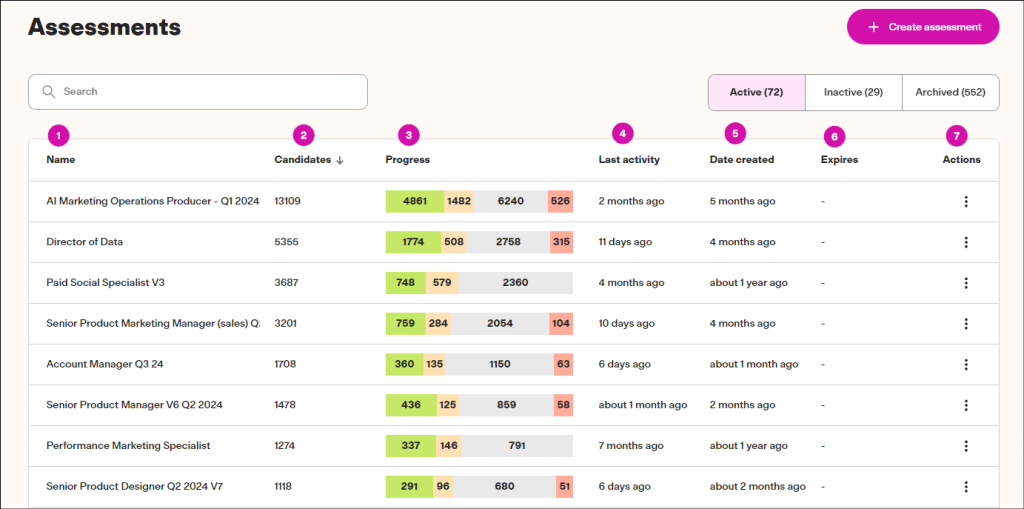
The operational shift that mattered most was automated candidate ranking. Instead of manually comparing 80 submissions, I’d log in, and the top performers were already sorted. The candidate-facing interface is also cleaner than most tools I’ve tested, which matters because a clunky assessment experience creates dropout and reflects poorly on your employer brand.
TestGorilla connects with major ATS platforms, including Greenhouse, Lever, and Workable, so results flow into your existing hiring workflow. You can also combine pre-built tests with custom questions for roles where the off-the-shelf library doesn’t quite match the job.
Pros:
- 400+ validated pre-built tests covering technical, cognitive, personality, and role-specific skills
- Automated candidate ranking surfaces top performers without manual score comparison
- Structured screening removes resume-based bias from the initial evaluation stage
- Clean, mobile-friendly candidate interface that reduces assessment dropout rates
- ATS integrations with Greenhouse, Lever, Workable, and other major hiring platforms
- Custom test building combines pre-built assessments with proprietary questions for role-fit screening
Cons:
- Annual pricing at $1,700+/year is prohibitive for small teams that need monthly billing flexibility
- Free trial access is limited; some users report not being able to fully evaluate the test suite before purchase
User Rating: 4.1/5 (Capterra)
Pricing: Paid plans start at $135/month
3. SpeedExam – Best for Secure High-Stakes Exams at Scale
I was managing a certification program that needed to run for thousands of concurrent test-takers, and the platforms I tested before SpeedExam either crashed under load or required infrastructure I didn’t have. SpeedExam handled it without issue. Users consistently cite 5,000 simultaneous tests as a benchmark it meets reliably, and that scalability is what makes it worth considering for large-scale compliance and certification programs.
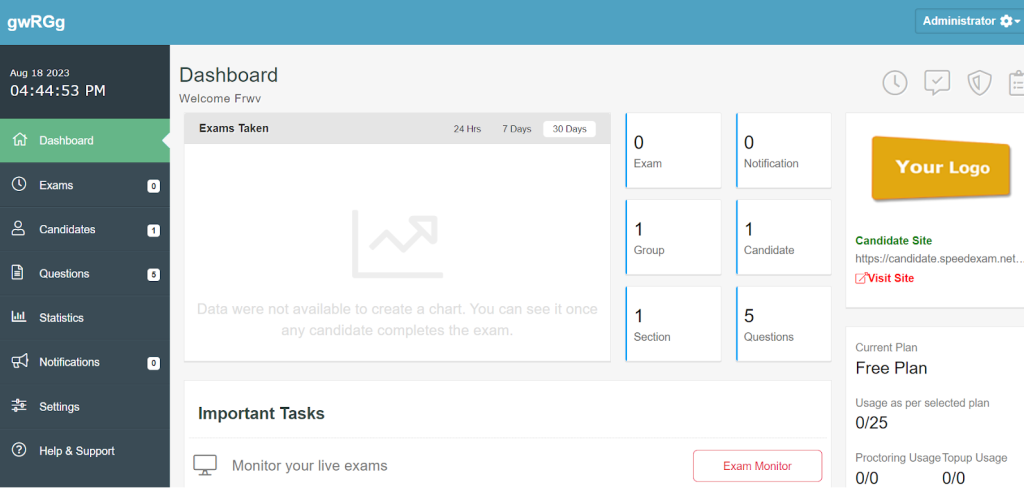
Ten question types cover the formats most compliance programs actually need, and question-level analytics show which items have the highest failure rates, which is useful when iterating on exam content across multiple cycles. Branded certificates are customizable enough that they don’t look like a third-party output.
The main friction is support quality. The platform is stable, but the response quality when something goes wrong is inconsistent. Some users report re-explaining the same issue multiple times before getting a resolution, worth planning around before any live exam window.
Pros:
- Handles thousands of simultaneous exams without performance issues or crashes
- 10 question types, including MCQ, matching, fill-in-the-blank, and video and audio formats
- Branded, customizable certificates tied to configurable pass thresholds
- Sub-admin roles for exam managers, content creators, and data entry operators
- Question-level analytics identify high-failure items for ongoing content improvement
- Consistently rated among the most affordable options for large-scale certification programs
Cons:
- Support response quality is inconsistent; some users report needing to re-explain issues before getting a resolution
- Locating a specific question within a large exam bank can be difficult when troubleshooting
User Rating: 4.8/5 (Capterra)
Pricing: Paid plan starts at $37/month
4. Testportal – Best for AI-Powered Assessments With Smart Proctoring
I started using Testportal when I needed a platform that could handle both routine staff knowledge checks and credentialing programs without requiring separate tools. The interface is clean enough that non-technical HR team members could set up and send assessments without training, and automatic grading eliminated the manual scoring that was slowing down our compliance tracking cycle.
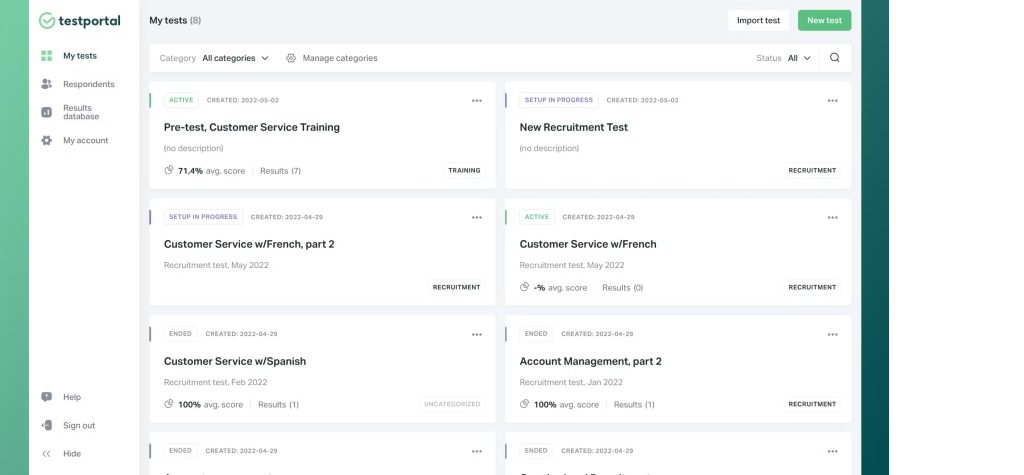
AI-supported question creation speeds up authoring considerably. I generate a starting set from existing policy documents or training materials and refine from there, which works especially well for new product knowledge or policy rollouts where content exists but questions don’t. Smart proctoring monitors session behavior automatically without a live proctor, making it practical for distributed teams taking assessments across time zones.
Customer support stands out consistently in user reviews, and from my experience it’s warranted. That responsiveness during initial setup makes a real difference in how quickly adoption takes hold across the team.
Pros:
- AI-supported question creation generates assessment content directly from source materials
- Smart proctoring monitors session behavior automatically without requiring a live proctor
- Automatic grading eliminates manual scoring time on high-frequency staff assessments
- Supports a wide range of question types for varied, role-relevant assessment design
- Customer support is consistently rated as fast, responsive, and genuinely helpful
- Value for money rated 4.8/5 by verified Capterra users
Cons:
- Cannot edit an active assessment after it has been sent; requires creating a new version
- Smaller verified review base on Capterra compared to more established platforms
User Rating: 4.6/5 (Capterra)
Pricing: Paid plans start at $35/month
5. Moodle – Best for Summative Assessments With Structured Grading Control
Moodle works best when documentation precision is as important as assessment delivery. I’ve used it in compliance environments where every retake, deadline, and score had to be logged in a way that could survive an audit. Grading controls are more granular than most platforms: open and close dates, attempt limits, passing thresholds, and retake rules are all set independently and apply consistently across every cohort.
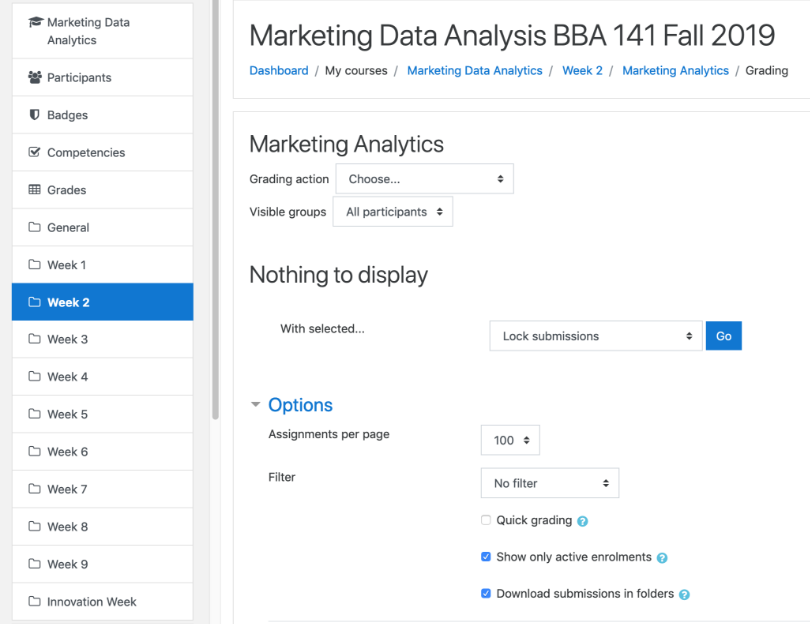
Submission flexibility covers more than quizzes. File uploads, text entries, and offline grading workflows sit within the same structure, which matters when some competencies are better shown through submission than a timed test. Rubric-based grading with marking guides keeps scoring consistent across multiple assessors, which is important when evaluation consistency needs to hold up to scrutiny.
For organizations with IT resources to self-host, the core software is free with no per-user cost, which fundamentally changes the cost profile for teams with that capacity.
Pros:
- Granular grading policy controls, including open and close dates, attempt limits, and retake access rules
- Multiple submission formats, including online text, file uploads, and offline grading workflows
- Rubric-based grading with marking guides supports consistent scoring across multiple assessors
- Core software is free for self-hosting with no per-user cost
- Centralized, exportable records support compliance documentation and audit readiness
Cons:
- Self-hosting requires IT resources that many HR teams don’t have in-house
- Limited real-time communication tools for participants during active assessment sessions
- Occasional server uptime issues reported on self-hosted instances
User Rating: 4.3/5 (Capterra)
Pricing: Paid plans start at $170/year.
6. Inspera – Best for Proctored High-Stakes Institutional Exams
Inspera is the platform I’ve seen referenced most often when the conversation involves regulated certification, professional licensing, or accreditation audits where a failed proctoring event carries real institutional consequences. It’s built for environments where exam administration is a formal, multi-stakeholder process with defined policies and audit requirements at every stage.
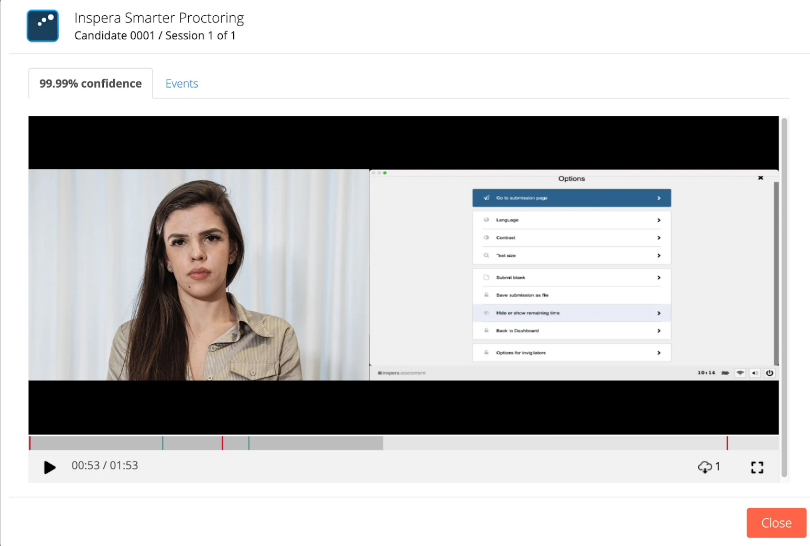
The proctoring infrastructure is the core differentiator. Live, recorded, or hybrid proctoring modes are available depending on policy requirements, and behavioral monitoring flags irregular activity for human review rather than automated disqualification, keeping a trained reviewer in the loop on anything consequential. Identity verification runs before exam access is granted.
Pricing opacity is a real friction point for HR and procurement teams. There’s no public pricing, which complicates internal budget approval. The platform also has limited support for complex technical formatting within exam content, which matters if your certification program involves diagramming or formula rendering.
Pros:
- Flexible proctoring modes, including live, recorded, and hybrid, depending on program policy
- Automated identity verification before exam access is granted
- Full exam lifecycle in one platform covering authoring, delivery, grading, and reporting
- Behavioral monitoring flags irregular activity for human review rather than automated action
- Designed for multi-department, multi-location institutional deployment at scale
Cons:
- Limited support for complex technical formatting and diagramming within exam content
- No dedicated tool for comparing similar essay responses side-by-side during grading
- Pricing is only available on request, which complicates budget planning in structured procurement processes
User Rating: 3.9/5 (Capterra)
Pricing: Custom Quote
7. Mentimeter – Best for Conducting Live Quizzes and Interactive Training Sessions
Mentimeter works best in live training environments where immediate audience response matters more than formal scoring. I’ve used it during onboarding sessions and workshops when I needed real-time feedback on comprehension without stopping to run a graded assessment. Participants join from any device using a code with no account required, and responses appear on a shared screen as they arrive.
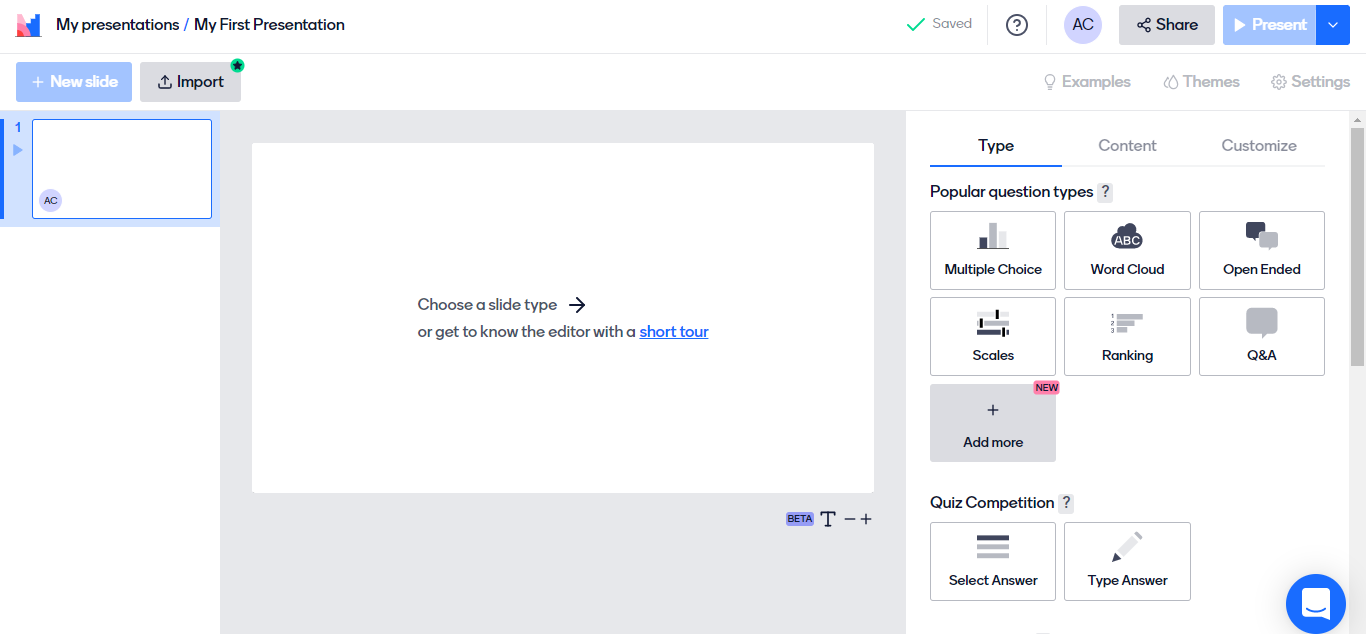
The format variety earns it a place in an HR toolkit. Polls, word clouds, Q&A, and quizzes all mix within one session, giving a dynamic read on the room. Pre-designed templates make setup fast for recurring onboarding programs where the same material runs for every new cohort.
If you need individual scores, pass/fail records, or any audit trail, Mentimeter is the wrong choice. But for live instructional moments where the goal is engagement and real-time comprehension visibility rather than documented evaluation, it does that job better than anything else here.
Pros:
- Real-time live quiz delivery with instant visual response display on a shared screen
- Multiple session formats including polls, word clouds, Q&A, and quizzes within a single session
- Participants join from any device with a code; no account or installation required
- Pre-designed templates simplify setup for recurring onboarding and training programs
- Quick Slides feature lets you add contextual content mid-session without switching tools
Cons:
- Some users reported difficulties when trying to upload existing presentations into the platform.
- During team-based activities, using codes to vote can become confusing and cumbersome at scale.
User Rating: 4.4/5 (Capterra)
Pricing: Paid plans start at €14/presenter/month.
8. Socrative – Best for Annual Certifications and Live Knowledge Checks
I’ve used Socrative most often for annual compliance refreshers where I need a quick, repeatable assessment that every employee can access without logging into a complex system. The room-based format is simple enough that participants who aren’t comfortable with new technology can get started without hand-holding, and bulk import via CSV means I’m not manually entering hundreds of staff members before each annual cycle.
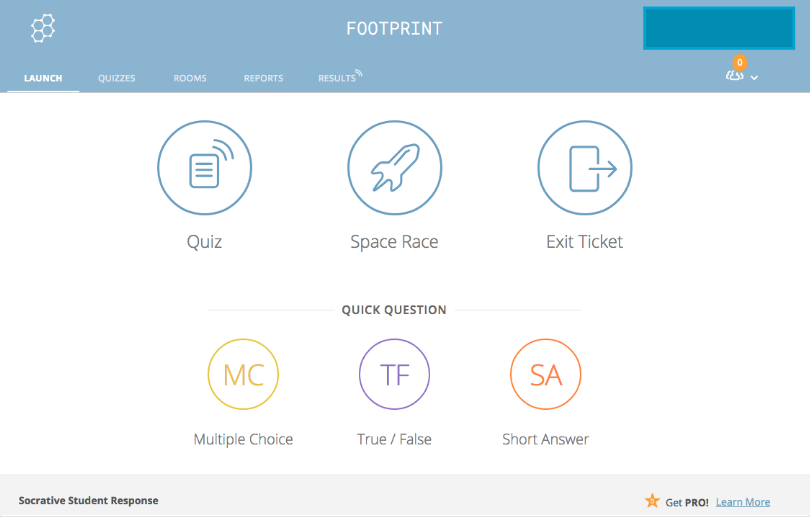
Live response tracking lets me address any question tripping up most of the group before moving on, rather than discovering at the end that half the room misunderstood a compliance requirement. Socrative supports up to 200 participants per room, and multiple rooms let you run parallel sessions for different departments simultaneously.
The variety of questions is the main constraint. There’s no support for complex question formats, which limits it to text-based knowledge checks, sufficient for compliance validations and annual policy refreshers but not for role-specific skills evaluations.
Pros:
- Real-time response tracking lets you see answers as they come in and adjust the session accordingly
- Supports up to 200 participants in a single active room
- Bulk staff import via CSV or Excel eliminates manual participant entry before each cycle
- Multiple rooms allow simultaneous parallel sessions for different departments or locations
- Organized folder structure simplifies managing recurring assessments across terms and annual cycles
Cons:
- Limited question type variety with no support for complex or technical assessment formats
- Interface navigation can feel unintuitive for first-time users unfamiliar with the platform
User Rating: 4.4/5 (Capterra)
Pricing: Paid plans start at $10/seat/month
My Top 3 Online Assessment Tool Picks
After evaluating all eight online testing tools against real hiring and compliance use cases, these three stood out as the strongest choices depending on what your team is actually trying to solve.
ProProfs Quiz Maker
If I had to pick one online testing tool for an HR team building a structured assessment process from scratch, this would be it. The AI quiz generator, built-in proctoring, automated grading, and certification all sit in one platform, which means I’m not stitching together separate online testing tools for each stage of the assessment workflow. It works equally well for a quick hiring screen and a formal compliance certification, and the free plan is functional enough to test it properly before committing to a paid tier.
TestGorilla
For teams where pre-employment screening is the primary use case, TestGorilla is the most purpose-built option on this list. The validated test library, automated candidate ranking, and ATS integrations are specifically designed for hiring workflows, and the structured approach to skills-based evaluation is the most direct path I’ve seen to reducing first-round interview volume without introducing new bias. It’s the right choice when hiring volume justifies the annual investment.
SpeedExam
When scale is the constraint, specifically running hundreds or thousands of concurrent assessments without infrastructure concerns, SpeedExam is the tool I’d trust. I’ve seen larger platforms buckle under concurrent load that SpeedExam handles without issue. For organizations running large-scale compliance certification cycles, annual training validations, or multi-location onboarding programs, its combination of concurrency, affordability, and clean certificate management makes it the most operationally reliable option at volume.
How I Tested and Ranked These Online Assessment Tools
Picking online testing tools for a list like this is not something I take lightly. I followed a systematic approach to make sure every recommendation is fair, grounded, and actually useful for an HR manager or talent acquisition lead making a real decision about their hiring and compliance programs.
- User Reviews and Ratings: I started with verified feedback on Capterra, looking for patterns across reviews rather than isolated opinions. If multiple HR professionals or hiring managers flagged the same limitation or praised the same feature consistently, that shaped the assessment. Single outlier reviews, positive or negative, didn’t move the needle on their own.
- Essential Features and Functionality: I focused on what actually drives assessment quality for hiring and compliance use cases: question type depth, anti-cheating controls, reporting granularity, AI capabilities, ATS integration, and whether the tool genuinely delivers on its claimed use case. A tool that lists “analytics” as a feature but only surfaces a total score did not rank highly, regardless of how polished the interface looks.
- Ease of Use: If building your first assessment takes more than 20 minutes, that friction compounds every time you create a new one. Tools with clear creation flows and minimal technical requirements ranked higher. An HR manager without IT support should be able to build and launch an assessment independently on day one without raising a support ticket.
- Customer Support: Assessment failures, ATS sync issues, and candidate access problems are common across platforms. I looked at support availability, response times cited in user reviews, and how well teams assist during setup and during live exam windows, not just after something breaks between cycles.
- Value for Money: I evaluated value based on what you realistically get at the tier most HR teams would actually use, not just the cheapest entry plan. Free plans were assessed on how functional they are before upgrade pressure kicks in, because many HR teams are working within tight budgets or need to demonstrate ROI before requesting a software purchase.
- Personal Experience and Expert Observations: I factored in firsthand observations and patterns from HR professionals running real assessments across hiring, onboarding, and compliance use cases. If a tool consistently created operational friction or consistently delivered on its claims in real workflows, that showed up in the final ranking regardless of how the marketing described it.
Why Does Choosing the Right Assessment Tool Actually Matter?
Most assessment failures I’ve seen aren’t tool problems. They’re fit problems. The tool was built for course delivery, not candidate evaluation. Or it was built for K-12 classrooms, not compliance tracking. Here’s what’s actually at stake:
- Inconsistent screening means different candidates are evaluated on different criteria, which exposes you to biased claims
- No audit trail means you can’t justify a hiring decision 6 months later if someone pushes back
- Manual grading at volume is slow, error-prone, and takes your team away from actual hiring work
- No proctoring on high-stakes assessments means your results aren’t trustworthy for certification or compliance
- Shallow analytics means you learn “who passed,” not “where does this cohort consistently fail.”
- Platform instability during a high-volume hiring window means retakes, frustrated candidates, and scores from that session you can no longer fully trust.
Stop Guessing and Start Hiring on Evidence
The right online assessment tool doesn’t replace judgment. It gives you reliable data to make better decisions. Many teams still rely on Google Forms, spreadsheets, and manual grading, but a dedicated assessment platform brings consistency, speed, and confidence to hiring, training, and compliance programs.
If you’re hiring, look for automated scoring, question randomization, and ATS integrations. For compliance and certification, features like browser lockdown, proctoring, audit-ready reports, and recertification tracking are essential. The best assessment creation software supports both without adding unnecessary complexity.
ProProfs Quiz Maker combines secure assessments, AI-powered quiz creation, automated grading, and reporting in one easy-to-use platform. You can create assessments in minutes and scale them as your needs grow.
Take the next step by creating a pilot assessment and evaluating the results before scaling your program.
Frequently Asked Questions
What is the difference between an online assessment tool and a pre-employment testing platform?
Online assessment tools support hiring, onboarding, compliance, and certification. Pre-employment platforms like TestGorilla focus specifically on candidate screening with validated tests, ATS integrations, and ranking features. Choose based on whether you need hiring only or multiple use cases.
Can online assessment tools integrate with my ATS?
Yes. Assessment creation software like TestGorilla integrates with ATS platforms such as Greenhouse and Lever. ProProfs Quiz Maker offers API access for custom integrations. Always verify compatibility with your existing hiring stack before purchasing.
What is the most cost-effective online assessment tool for small HR teams?
ProProfs Quiz Maker offers a functional free plan and low-cost paid options. Testportal provides AI-assisted assessment creation starting at $35/month. Moodle is free if your team can handle self-hosting and maintenance.
How do I set up a fair, bias-resistant hiring assessment?
Use the same assessment for every candidate, focus on job-relevant skills, and prioritize work-sample or scenario-based questions. Define scoring criteria before reviewing results and evaluate responses independently of candidate identity.
How do I prevent cheating in online hiring or compliance assessments?
Use question randomization, question pools, browser lockdown, IP tracking, and time monitoring. For high-stakes exams, add webcam proctoring. Creating proprietary, job-specific questions also reduces answer-sharing risks.
Can assessment tools issue certificates automatically?
Yes. Assessment creation software like ProProfs Quiz Maker and SpeedExam automatically generate certificates based on completion or passing scores. Many also support branded templates and recertification reminders.
What is the best assessment tool for compliance training validation?
ProProfs Quiz Maker works well for most organizations with automated grading, certificates, and recertification tracking. SpeedExam is ideal for large-scale compliance testing, while Respondus strengthens exam security in LMS environments.
How should I evaluate a candidate's soft skills through an online assessment?
Use situational judgment tests and work-sample assessments that mirror real job tasks. These methods are more predictive of performance than personality tests, which are best used as discussion points during interviews.
What happens if the assessment platform crashes during a hiring window?
Look for platforms with autosave and session recovery built in, so an interrupted attempt doesn't force a full retake. If a candidate's connection drops mid-assessment, a tool that resumes from the last saved point protects both the candidate experience and the integrity of that score. Confirm this with the vendor before you run anything live, since not every platform recovers gracefully.
Are online assessment tools accessible to candidates with slower internet or older devices?
Accessibility varies by platform. Some load in a lightweight browser view that works on older devices and slower connections, while others require heavier proctoring software that can lock out candidates with limited bandwidth or hardware. If you're testing candidates from varied locations, ask about minimum device and connection requirements before rolling out an assessment, so you're not screening out qualified people for reasons that have nothing to do with the role.
Let ProProfs AI Build a Quiz

 We'd love your feedback!
What did you like & how can we make it even better?
 Thanks for your feedback!
 Ask Your Question
Have a question? Get expert help to make your decision easier.