LinkedIn quizzes have created a new wave in the era of social networking.
That’s because LinkedIn is the go-to place if you’re looking to hire employees, expand your network, or use it as a marketing tool.
It’s the biggest professional social networking website to help people find their perfect job or internship, build a professional network, develop new skills, and discover businesses.
LinkedIn has over 1.3 billion users worldwide, which not only makes it a huge virtual network but one of the biggest professional content producers on the planet.
Over the years, companies have effectively used LinkedIn for hiring professionals, marketing, and lead generation.
And when we consider posting engaging content like quizzes and assessments on LinkedIn, things look even more promising.
These quizzes can effectively drive traffic, generate leads, and effortlessly find the right people for your business. But how do you create these quizzes, and what kind of questions should you use?
Read on and let’s explore more about LinkedIn quizzes, starting with the reasons to create a quiz on LinkedIn.
Reasons to Create a Quiz on LinkedIn
As we mentioned above, LinkedIn has millions of users on its platform, which means all its posts, including quizzes, have a huge potential of getting noticed by a large number of people.
But that’s not all. Let’s take a look at some other benefits.
1.Audience Engagement
Quizzes can be visually appealing, meaning that attractive quizzes are a great way to attract and engage audiences on social networks.
And here’s some solid survey data from the Content Marketing Institute to support this:
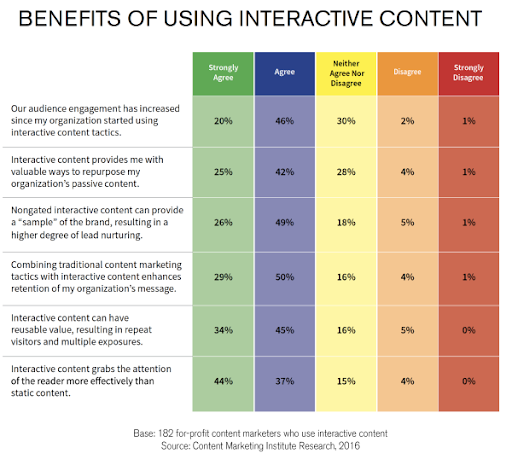
This is an amazing prospect, especially when you consider that creating quizzes only takes a few minutes when you use the right tool.
With a LinkedIn quiz maker, you can instantly build engaging and professional quizzes tailored for your audience.
Here are some examples of audience engagement quizzes for LinkedIn:
- Which Career Is Suitable For Me?
- What Type Of Marketer Are You?
- What Do You Know About Big Data Tool?
- Corporate Social Responsibility & Sustainability Quiz
- Just How Agile Are You?
- Professionalism and Ethics Quiz
- Do You Know About Data Privacy?
2. Lead Generation
Quizzes attract a lot of attention from the audience, and when you share these quizzes on social media platforms like LinkedIn, exposure drastically increases.
Generating leads from quizzes is as simple as adding a lead form at the end of every quiz, and your email list will automatically start populating.
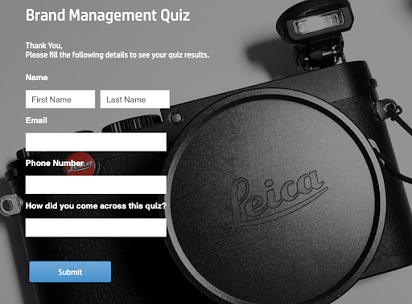
This way, you can get far more people to take your quizzes, and then you can segment all the users at the end to target them with the most relevant content.
Here are some examples of lead generation quizzes:
- What Jobs Am I Qualified For?
- What Do You Know About FOREX Trading?
- Can You Pass In Business Insurance Quiz?
- What Is Your Perfect Travel Destination?
- What Smartwatch Should I Get?
- Vocabulary Quiz: How Strong Is Your English Vocabulary?
- What Sport Is For Me?
Simply adding a lead form at the end of a quiz can give you an average of up to 55% opt-in rate. You can even customize the lead form to improve the quality of your leads and only receive the data that is relevant to you.
Best practices to improve opt-in form conversions
- Customize your lead form for every quiz or post
- Make your opt-in forms visually appealing
- Focus on providing value to the users
- Do not ask for a lot of information
- Use A/B testing to figure out which forms work best
If you’re using LinkedIn quizzes for B2B outreach, the lead form fields you choose matter more than most people realize. A generic “Name + Email” form gives you a contact. A smart form gives you a segmented pipeline.
For B2B audiences, add fields that tell you exactly who you’re talking to: job title, department, company size, location, certification status, or hiring timeline. You don’t need all of them; pick two or three that map to how your sales team qualifies leads. A recruiter answering “How many hires do you make per quarter?” tells you far more than their email address.
Keep it to three fields maximum. Every additional field drops completion rates. The goal is segmentation, not a survey.
3. Gather Insights
A scored quiz is a great way to get close to your audience and know them better.
A quiz taker’s answers reveal their level of understanding, knowledge gaps, and other important information you can use to better serve your audience.
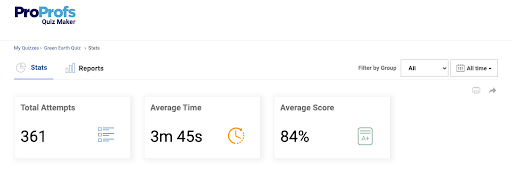
On the other hand, personality quizzes will give you insights into the needs, preferences, and overall persona of the quiz takers.
Quizzes also speak a lot about how the users behave and interact with your brand. For instance, the number of people who attempted the quiz, the number of people who bounced in the middle, and the number of people who signed up right after the quiz provides metrics that indicate the behavior of users.
Here are some examples of quizzes to generate insights:
- What Is Your Unique Contribution To The World?
- Customer Service Skill Test Questions and Answers
- Conflict Management Styles Assessment
- Know Everything About Insurance Policies- Insurance Quiz
- Customer Service Skills Test Questions And Answers
- Sales Quiz- How To Overcome Objections
All of this information is stored within your quiz maker tool, and you can easily access this information through automatically generated and easy-to-digest reports and analytics. The right quiz maker tool will also have a dashboard with all the information organized in an accessible and visually pleasing way.
Collecting insights is only useful if you act on them.
If you’re running a quiz for your team or before a training program, the results show exactly where to focus. Low scores on compliance questions mean that the department needs a refresher before the next audit. Strong scores mean you can skip the basics and move to advanced content.
For hiring managers, quiz results help you rank candidates on the same criteria before interviews. For sales and marketing teams, they show which leads are ready to buy and which ones need more nurturing.
Treat analytics as a routing system, not a report. Set a pass score, define the next step for each outcome, and let the results guide what happens next.
4. Increase Traffic
At this point, we know that social media quizzes are insanely popular for generating engagement.
But that’s not all because these quizzes also work great when it comes to driving traffic to your website and landing pages.
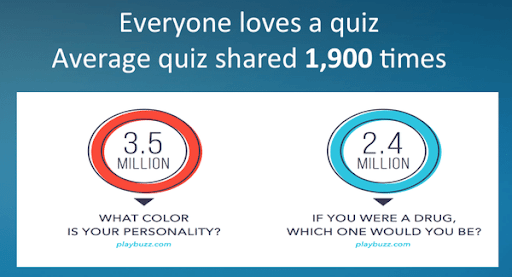
All it takes is just simply plugging the link to your website on your quiz, and people will automatically click on it.
You can create a quiz for your website and share the link on your LinkedIn post to drive steady traffic from your professional network.
There are also a few ways in which you can approach this:
- Simply add a link to your quiz in the LinkedIn post
- Create an automatic redirect
- Create an appealing call-to-action button
People on social media platforms like LinkedIn love to explore new things, including things about themselves.
This is perfect for deploying personality quizzes and gives your quiz takers an avenue for self-discovery. Once the quiz takers are satisfied, they would like to explore more by directing themselves towards your website and landing pages.
Here are some examples of self-discovery personality quizzes:
- What Motivates You?
- What Trade Should I Learn?
- Do You Have Fear of Rejection?
- Which Country Best Fits Your Personality?
- How Difficult Are You?
- What Is Your Red Flag?
- Am I Individualistic?
Explore More Personality Quizzes
5. Boost Sales
The hardest part about selling products and services online is getting your potential customers engaged enough to place an order.
The average conversion rate of websites is only 2.35% which means that over 97% of the potential buyers do not convert. This is where quizzes can come in handy.
You can use a product recommendation quiz to help potential buyers understand their personality and lead them to the products that best fit their needs.
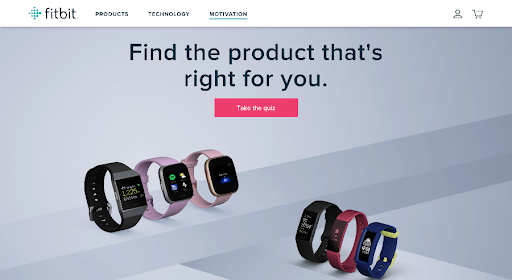
These quizzes have some really fun and interactive questions about the buyer’s self-discovery, which can help them understand what they really want.
Here are some examples of quizzes to boost sales:
- Fashion Style Quiz: What Clothing Style Suits Me?
- What Book Genre Is Right For You?
- What Business Should I Start?
Now that you know some of the biggest reasons to create quizzes on LinkedIn, let’s take a look at how to create these quizzes.
Steps to Create a Quiz on LinkedIn
Creating a LinkedIn quiz is extremely simple. The process can be divided into two parts, which are:
- Creating a quiz using an online quiz maker
- Sharing the quiz on LinkedIn
Let’s start with the first part.
Creating a Quiz
The initial step is to make a quiz on LinkedIn using an online quiz maker tool. For this instance, we will be using ProProfs Quiz Maker because it offers fast and easy quiz creating tools.
Step 1- Click ‘Create a quiz‘ in the dashboard.
Step 2- Choose between a ‘personality’ or ‘scored’ quiz.
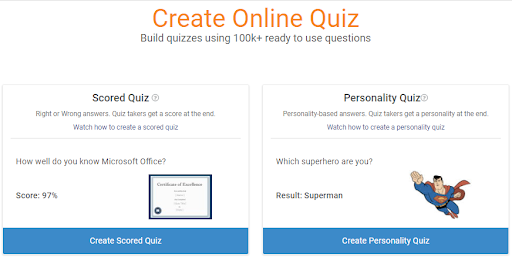
Now, one thing to note is that personality quizzes are great for grabbing attention on social media platforms.
People are curious by nature, so quizzes like “Which (blank) are you like” or “Which (blank) are you” pop up on platforms like LinkedIn, a ton of people feel compelled to go on a little self-exploration.
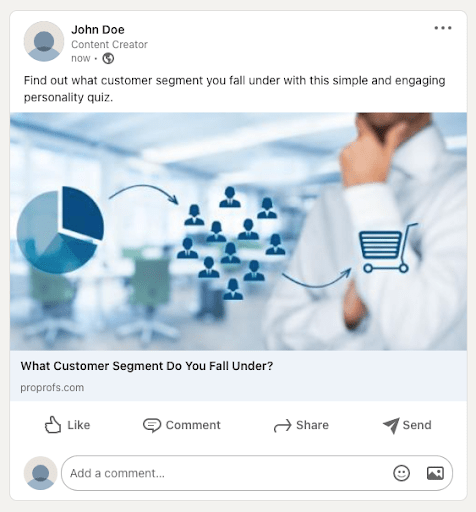
For instance: “What Customer Segment Do You Fall Under?” allows people to explore their buying behavior.
Personality quizzes work great for both B2B and B2C interaction because every business is in one form or another selling to individual users, who are quite intrigued by such personality quizzes.
Step 3- Pick a template or create from scratch.

Tip: Use templates if you want to save time and don’t need to modify a lot of things. Start from scratch if you want to take the time to customize things.
If setup time is a concern, this is where you save most of it.
ProProfs Quiz Maker offers 100,000+ ready question banks, so you’re rarely starting from scratch. For onboarding, compliance, or screening, you can get a quiz ready in minutes.
Once set up, everything is reusable. Pass scores, attempts, anti-cheating settings, and certifications all carry forward. What used to take hours now takes minutes.
Step 4- Add questions, answer options, images, and videos.
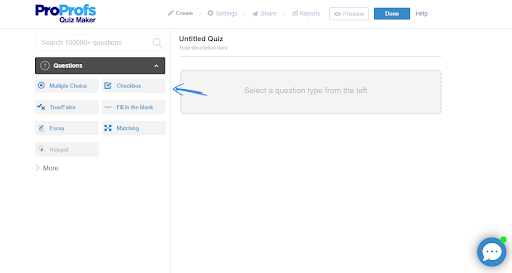
Using the right set of questions is one of the most important things that you need to keep in mind when building your quiz.
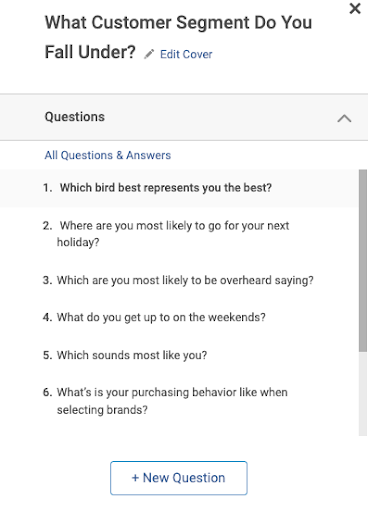
Always try to keep your questions less than or equal to 10, irrespective of your audience type (B2B/B2C). This will allow you to respect your quiz taker’s time and ensure they finish the quiz.
Also, keep the questions relevant. Let’s say your quiz aims to find out the perfect career for individuals, so choose questions that can help unravel the professional aptitude, competencies, and preferences of the quiz taker.
Step 5- Configure quiz settings.
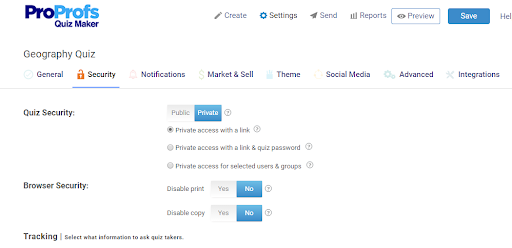
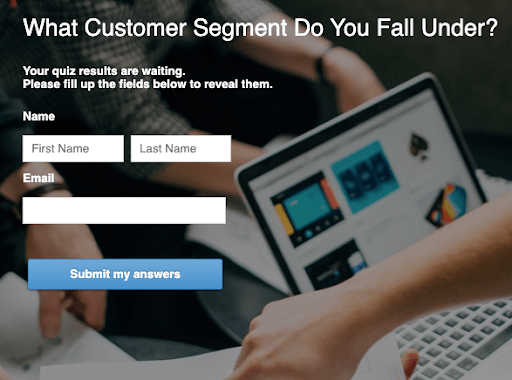
You can also customize your lead form from the settings tab by scrolling down the security header.
Because quizzes allow you to interact with people, they work great for obtaining leads. You can also use their responses to build better customer relationships and services (especially in a B2B setting).
Also, you know that your quiz takers saw something appealing in your quiz, so you can even customize your lead forms in a way to continue your conversations with them and extract more information.
Step 7- Click Save.
Quick tip: It’s always recommended to use a LinkedIn quiz maker that has a library of questions and templates to make the process faster and more efficient.
Get Started With ProProfs Quiz Maker
Sharing the Quiz on LinkedIn
Now that you have created your quiz, the last thing to do is share it on LinkedIn for people to see. It’s extremely easy to do this, just follow these simple steps:
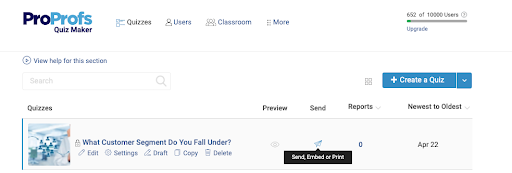
Step 1- Locate your quiz in the dashboard.
Step 2- Click ‘Send’
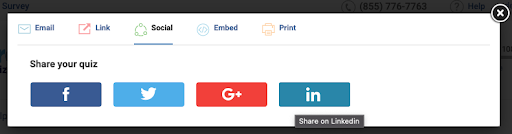
Step 3- Select ‘Social’ and click on the LinkedIn logo.
Step 4- Select ‘Share in a post’
Step 5- Write a caption and change comment settings
Make sure your quiz has a good caption to go with it so that all your hard work wasn’t in vain.
Remember, you are out there to attract big businesses and individual users as well, so take some time and think about your caption. Read different options out loud to see what sounds best.
A good caption will not only let your audience know what the quiz is about, but also what they will get out of it.
So let your creative juices flow and write something that intrigues and attracts people.
Step 6- Click ‘Post’
Once done, your quiz will be posted on your feed which you can view right after posting it. The quiz takers can simply click on the quiz, and they will be automatically redirected to the quiz page within seconds.
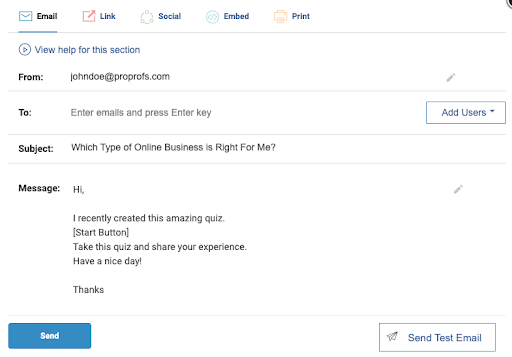
Quick Tip: You can share your quiz even further by directly sending it to business personnel via messages, email.
Or you can embed your quiz link on landing pages to increase the reach and visibility.
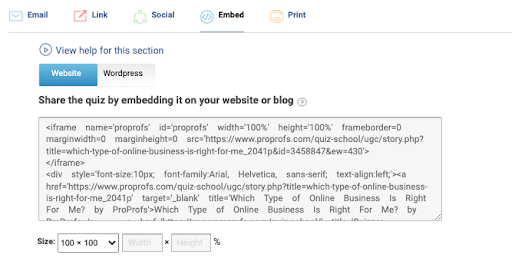
Let’s look at how these quizzes can be attempted with the help of a practical example:
Quiz- What’s Your Unique Contribution To The World?
Now you know how to create some of the most effective quizzes on LinkedIn. Let’s finally go through some of the tips to make your quiz perform better on LinkedIn.
Watch: How to Create an Online Quiz in Under 5 Mins
How Are Professionals Actually Using LinkedIn Quizzes? (Beyond Likes and Shares)
Most LinkedIn quiz advice stops at engagement metrics. Your actual buyers are thinking about something more specific: will this tell me what I need to know, fast, without creating a mountain of admin work afterward?
The answer depends on what you’re trying to accomplish. Here are the four use cases where LinkedIn quizzes consistently deliver real outcomes.
Onboarding Readiness and Policy Awareness
Before you spend three hours onboarding a new hire or contractor, a short quiz tells you what they already know. A 7-question pre-assessment covering your core SOPs, safety policies, or role-specific procedures takes five minutes to complete and immediately shows you where to spend your onboarding time.
The same logic applies to policy updates. Instead of sending a PDF and hoping people read it, share a short quiz on LinkedIn or via a direct link. You get completion tracking, a reportable audit trail, and, if you set a pass score and allow re-attempts, a built-in accountability mechanism.
Compliance Training Checks
Compliance teams use LinkedIn quizzes to verify policy awareness before training begins, not just after. Running a knowledge gap analysis upfront means your training sessions address actual gaps rather than covering ground people already know.
With a question bank and category-based scoring, you can see results by department or team, not just by individual. That makes it easy to identify which groups need targeted intervention before your next compliance deadline.
Pre-Hire Screening Without Slowing Down Recruiting
A structured pre-employment assessment on LinkedIn can cut first-round interview time significantly. Instead of scheduling calls with every applicant, share a scored quiz as part of your application process. Candidates who clear the pass score move forward; those who don’t get a polite redirect.
One recruiting team at a mid-size logistics company used a 7-question skills quiz to pre-screen over 80 applicants before scheduling a single call. They filled the role in less time with a stronger shortlist. The quiz took about 20 minutes to build using a template and a pre-loaded question bank.
For roles where domain knowledge matters, such as compliance specialists, technical roles, or licensed positions, a candidate screening quiz also gives you a defensible, objective basis for your shortlist. No more gut-feel filtering that you’d struggle to justify later.
Role-Based Skills Verification for Current Teams
You don’t need a new hire to justify running an assessment. A role-based quiz helps you understand where your existing team stands on a specific skill or knowledge area before you invest in training, certification, or upskilling.
Set an attempt limit, assign it to the right people via a shared link, and let the reporting dashboard show you results by role or group. The goal isn’t to evaluate performance; it’s to route people toward the right development resources based on what they actually need.
What Do You Do With Quiz Results Once People Start Responding?
This is the question the rest of the internet skips. Most guides end at “post your quiz.” But the results are where the actual value is, and what you do with them depends entirely on why you ran the quiz in the first place.
If you ran it for lead generation
Your results are a segmentation tool. Sort responses by score range or by specific answer patterns, and you’ll have a cleaner picture of where each lead sits in the funnel than almost any other touchpoint gives you. High scorers on a product knowledge quiz are sales-ready. Low scorers need more nurturing. Route them accordingly rather than treating every opt-in the same way.
If you ran it for hiring
Use the pass score as your first filter. Anyone who clears it gets moved to the next stage. Anyone who doesn’t get a polite, automated message, ProProfs lets you set this up so it runs without you touching it. Keep the results on file. If a strong candidate applies again in six months, you have a baseline to compare against.
If you ran it for training or compliance
The reporting dashboard breaks results down by individual, by question, and, if you’ve tagged questions by category, by topic area. That means you can see not just who passed, but where the gaps cluster. A team that scores 90% on product knowledge but 55% on data privacy policy needs a targeted intervention on that one topic, not a full retraining program.
Set up automated certification for anyone who clears the pass threshold. The certificate is generated and sent without manual input. For compliance reporting, you have a timestamped record of who completed what and when.
If you ran it for audience engagement
Follow up within 48 hours while your brand is still top of mind. Share the aggregate results as a follow-up post, “68% of respondents didn’t know X,” makes for a strong LinkedIn post that extends the life of the original quiz and generates a second wave of engagement. Link the follow-up to a resource, a guide, or your product page.
Tips to Make a LinkedIn Quiz Perform Better
Creating a quiz is just 50% of the task; the rest is making sure that your quiz performs the way you intend it to.
Here are some tips that you can use to ensure you get the maximum performance out of your LinkedIn quizzes.
1. Use a Mix of Different Question Types
Quiz questions can have many different formats that include multiple-choice questions, fill-in-the-blank questions, drop-down, essay-type questions, etc. The type of questions you include in your quizzes depends entirely on the topic of those quizzes.
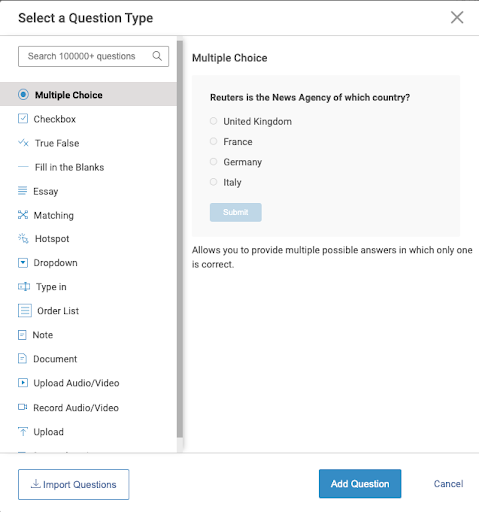
Explore Different Question Types
For instance, multiple-choice questions are suitable for longer or more complicated LinkedIn skill quizzes where the quiz takers might need additional support to pinpoint the answer.
With that said, you don’t have to limit yourself to just one question type. Make your LinkedIn assessment quizzes dynamic and valuable by adding rich questions that vary in nature.
This will provide a great learning experience for the quiz takers and ensure maximum participation from them at the same time.
ProProfs Quiz Maker is one such tool that offers over 10+ question types that will help you educate and engage the quiz takers with the right mix of questions.
Watch: 10 Types of Quiz Questions for Online Learning
2. Keep It Short and Simple
Unless you want to bore your audience, always try to keep your LinkedIn quiz short and questions crisp.
A professional networking platform like LinkedIn does not provide a huge scope for time-consuming quizzes that are too wordy.
Always aim to offer a meaningful quiz experience that doesn’t cost too much time to complete.
Here are some pointers for crafting great questions:
- Keep your questions concise and simple
- Eliminate qualifiers that give hints about the answers
- Omit imprecise descriptors
- Try not to lead, mislead or influence your learners
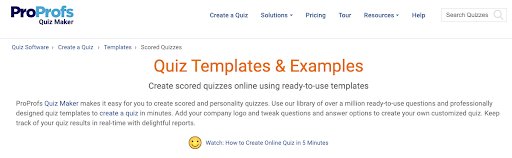
If you are worried about asking the right kind of questions, be sure to take advantage of built–in templates and question banks within your LinkedIn quiz maker tool.
3. Set up Branching Scenarios
Branching scenarios can prove to be extremely useful as they take your quiz takers on different paths based on their LinkedIn quiz answers to specific questions.
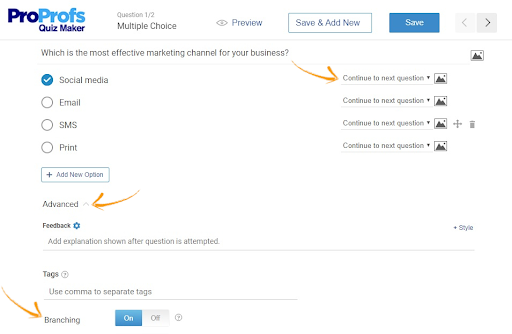
For instance, for a product recommendation quiz, if a quiz taker answers an exact question a certain way, you can use branching logic by displaying a specific product for each answer.
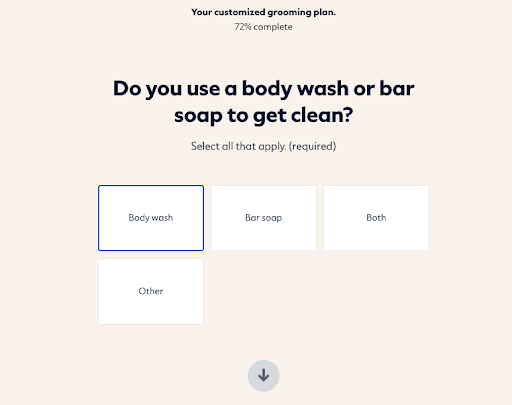
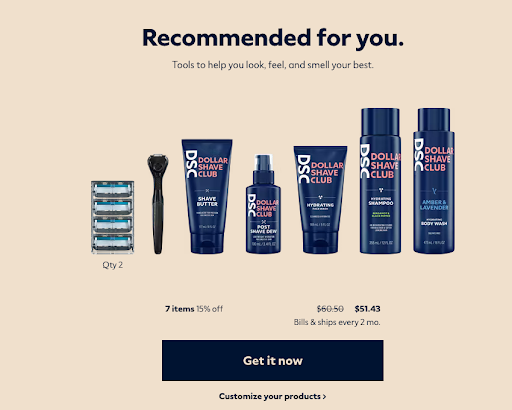
Branching logic helps you create personalized paths for every user, which in turn generates more engagement and makes your quizzes much more impactful.
4. Implement Gamification
Game elements inside a quiz can make quizzes more attractive and fun for the quiz takers. Gamification can help you create simple quiz elements into challenges that your quiz takers will be tempted to overcome.
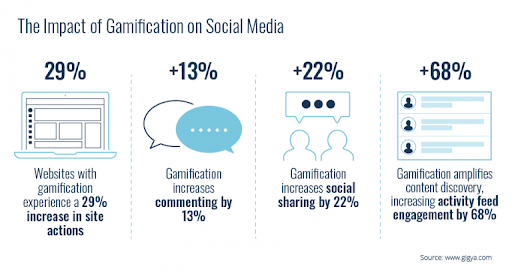
When it comes to quizzes on social media, gamification is considered a powerful psychological tool to draw people in to take the quiz..
Creating a gamified quiz is easy: you just need an interesting topic to create a slightly challenging question that will tempt your audience to take the quiz. Here’s an example:
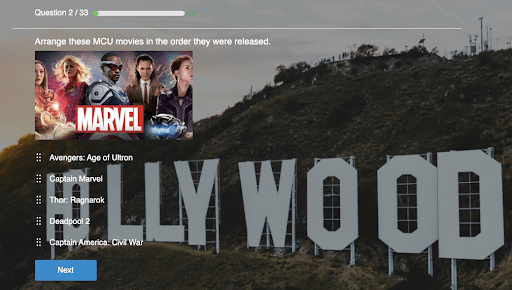
This order list question type is perfect for quiz takers to put in some thought and try to complete this challenge. You can also create a series of such questions to make your games longer, and your audience will be more than happy to participate.
Because who doesn’t want bragging rights?
They might even collaborate with their peers to play these games, which means a lot more people will see your quizzes.
In fact, a challenging game will also influence quiz takers to try it repeatedly if they fail, which will improve engagement and the long-term recall of your brand.
5. Provide Accurate Feedback
Feedback is the crux of every LinkedIn assessment quiz.
This is because quiz takers are always looking for feedback to reflect on their answer selection.
By doing this, you can provide a lot more value out of your ‘scored‘ quizzes because the feedback will prove to be helpful to quiz takers in understanding where they went wrong.
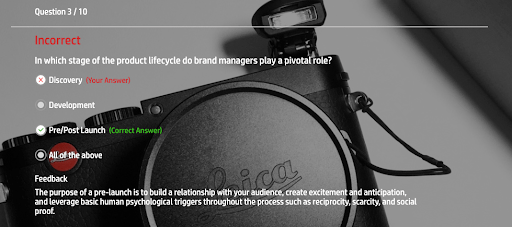
Feedback at the end of ‘personality‘ quizzes is also extremely crucial because it gives quiz takers the opportunity for self-discovery and also the closure they have been looking for.
You can provide accurate feedback at the end of every question by simply adding feedback to the LinkedIn quiz answers using your quiz maker tool.
Related Read– If you would like to explore everything about creating quizzes, then have a look at How to Create a Quiz: The Ultimate Guide
Create Game-Changing Quizzes on LinkedIn
LinkedIn has grown tremendously in the area of content generation and engagement.
It’s the go-to platform for organizations to interact with an audience and build connections through quizzes.
Using a poorly designed LinkedIn quiz maker will not only waste your time and effort, it will be a huge waste of untapped potential. With the tips and process we have discussed here, you’ll overcome the challenges of interacting with your audience on LinkedIn by creating amazing quizzes and sharing them on your LinkedIn page.
ProProfs Quiz Maker is one of the most highly regarded quiz-making platforms out there.
With ProProfs, you can also convert documents into quizzes to repurpose your existing LinkedIn content effortlessly.
It offers over 100,000+ professionally built quizzes to instantly create quizzes for audience engagement, lead generation, traffic increase, and much more.
Now that you have been given the power to create the best quizzes on LinkedIn, go out there and make the best of every situation.
Frequently Asked Questions

Can LinkedIn quizzes be used for pre-employment screening before interviews?
Yes, they work well for early screening. Share a scored quiz with a defined pass score and limited attempts. Candidates who meet the threshold move forward. This reduces interview volume and gives you a consistent, objective way to shortlist applicants before investing time in interviews.
What quiz format works best for compliance training or policy awareness checks?
A scored quiz with a clear pass score and attempt limits works best. It creates an audit trail with timestamps, scores, and pass status. Tagging questions by topic also helps identify knowledge gaps across teams, making it easier to improve training beyond just tracking completion.
How many questions should a LinkedIn quiz have to keep completion rates high?
For public LinkedIn posts, keep quizzes under 10 questions to maintain completion rates. For targeted or shared links, you can extend to 15 to 20 questions if the audience is motivated. Most users start dropping off after question 7 or 8, so prioritize key questions early.
What information should I collect in a quiz lead form without hurting conversions?
Keep the form short and relevant. For B2C, name and email usually work best. For B2B, add two or three qualifying fields like job title, company size, or role. Every extra field lowers completion rates, so only collect information you will actually use.
How do I make a LinkedIn quiz secure enough for skills testing or certification?
Use features like pass scores, attempt limits, and question randomization to maintain integrity. For higher-stakes quizzes, add controls like browser lockdown and IP tracking. Tools like ProProfs Quiz Maker allow you to adjust these settings so you can balance security with user experience.
What metrics should I track to know whether a LinkedIn quiz is actually working?
Focus on completion rate, opt-in rate, and average score to measure engagement and effectiveness. Also track where users drop off. For hiring or training use cases, include pass rates and performance by topic to understand both participation and knowledge gaps clearly.
Should I use a personality quiz or a scored quiz for B2B lead generation and hiring?
Personality quizzes work better for engagement and attracting clicks on public posts. Scored quizzes are better for qualification, hiring, and compliance use cases. The format sets expectations, personality quizzes invite participation, while scored quizzes help you assess knowledge and identify high-quality leads.

Let ProProfs AI Build a Quiz

 We'd love your feedback!
What did you like & how can we make it even better?
 Thanks for your feedback!
 Ask Your Question
Have a question? Get expert help to make your decision easier.