

Running math tests online is very different from putting any quiz on a screen. With online math assessment tools, you’re not just marking answers right or wrong. You’re trying to see how students move through fractions, algebra, graphs, and word problems without every test turning into a technical hassle.
I’ve worked on many math assessment setups. I’ve also spent a lot of time with teachers and educational institutions, helping refine their e-learning systems. Over time, I’ve started to treat these tools like an investment. Do they cut prep time? Do they handle notation cleanly? Can they keep results honest when students are on different devices or testing from home?
This guide walks you through the tools that, in my experience, can answer “yes” to those questions and reliably support math assessment.
What to Look for in Online Math Assessment Tools
Before you pick a tool, it helps to be clear about what “good” looks like for math, not just for any quiz.
When I look at digital math testing platforms, I start with a few simple filters.
1. Math Input That Actually Works
The equation editor should feel natural. You should be able to build fractions, algebra, graphs, and multi-step problems without fighting the interface. If adding one formula feels slow, it will not scale to a full test.
2. Stable on Real Devices
Students will join from school laptops, older phones, and shared tablets. The tool needs to load fast, stay stable, and keep student work safe, even on mixed networks.
3. Honest Results and Exam Integrity
Look for options like question shuffling, time limits, browser controls, and some form of proctoring or monitoring. In math, one shared answer can spread very quickly.
4. Real-Time Savings for Teachers
Good tools let you reuse questions, import existing quizzes, and, ideally, use AI to draft or refine items. Prep time should go down, not up.
5. Insight, Not Just Scores
Assessment reports should show more than who passed. You want to see which skills are weak, which questions caused trouble, and which students need support.
If a tool clears these checks for math, it is worth your attention.
A real teacher’s math assessment workflow, explained:
In the next sections, we will look at platforms that do this well in practice.
Top 10 Online Math Assessment Tools in 2026
Now, let’s put this into practice and look at specific tools that line up well with those checks.
The list below is a mix of quiz makers, standards-based platforms, gamified apps, and self-assessment tools. I have focused on how they behave in real math use: formula handling, reporting depth, security options, and how much time they actually save you.
| Tool | Best For | Pricing |
|---|---|---|
| ProProfs Quiz Maker | AI quiz maker with a strong math editor | Free plan; paid plans start at $4/teacher/month for K-12 |
| Pear Assessment (Formerly Edulastic) | Standards-based assessment and reporting | Free plan; Teacher Premium from $125/year |
| Formative | Real-time instruction and feedback | Free plan; teacher plans from $13/month |
| Quizizz | Gamified math quizzes and homework | Free plan; individual plans from $10/month |
| Mathster | Online math worksheets and self-marking tests | £6.99/teacher/month (approx. $9/month) |
| Khan Academy | Free mastery-based math practice | Free for teachers and students |
| IXL | Adaptive skills practice and diagnostics | Single-subject family plans from $79/year; additional child plans from $40/year |
| Quizlet | Flashcards and targeted math review | Free plan; Plus plan from $35.99/year |
| Microsoft Forms | Simple AI-assisted math quizzes | Included with Microsoft 365; business access from $6/month/user |
| Mathway | Self-check and step-by-step math help | Free plan; Premium from $9.99/month |
1. ProProfs Quiz Maker – Best for Easily Creating Quizzes & Assessments for Business, Training, and Education
ProProfs Quiz Maker is built for teachers who want to move fast without losing control over how math is tested. The math editor is based on MathML, so you can write proper fractions, algebraic expressions, trigonometry, and calculus in a way that still looks clean on every device.
You click, type, and build questions instead of fighting the formatting.
When I set up math quizzes in ProProfs, two things stand out: the AI math quiz generator and the way it handles security. You can generate full quizzes from a topic or chapter outline, then refine them with your own questions, images, and hints.
You also get access to a library of thousands of ready-to-use math quizzes organized by topic, subtopic, and grade. You can share them with your students as they are or customize them to fit your lesson plan.
During the test, you can shuffle questions, randomize options, pool items, and use proctoring and browser controls to keep results honest, even in remote settings. For take-home math assignments especially, it also flags any answer that shows signs of being generated by an AI solver, which matters given how easy it’s become for students to run a problem through one instead of working it out.
Reporting is simple to read and useful. You see who struggled with which questions, how scores move across attempts, and where you may need to reteach. You can ask the AI directly which topic or student needs the most attention, and it pulls the answer straight from the data instead of you scanning through every report by hand. That turns each quiz into a small feedback loop instead of a one-off event.
Pros
- The math editor supports clean formatting for fractions, algebra, graphs, and multi-step problems.
- The test maker for teachers uses AI-assisted quiz creation to speed up building math assessments across different topics and levels.
- Auto-grading, including AI-scored feedback on multi-step and open-ended problems, reduces manual checking time and helps streamline routine quizzes and tests.
- Reports highlight question-level performance and make weak skill areas easy to identify.
- Built-in security features help maintain test integrity during both in-class and remote assessments.
Cons
- Requires a stable internet connection since it is fully cloud-based.
- A dark mode option would improve comfort for teachers and students during longer quiz creation or review sessions.
Pricing: Free plan for short quizzes. Paid plans start at $4/teacher/month for K–12, $0.25/student/month for schools & districts, and $19.99/month for others.
User Rating: 4.6/5 (Capterra)
2. Pear Assessment (Formerly Edulastic) – Best for Standards-Based Assessment and Reporting
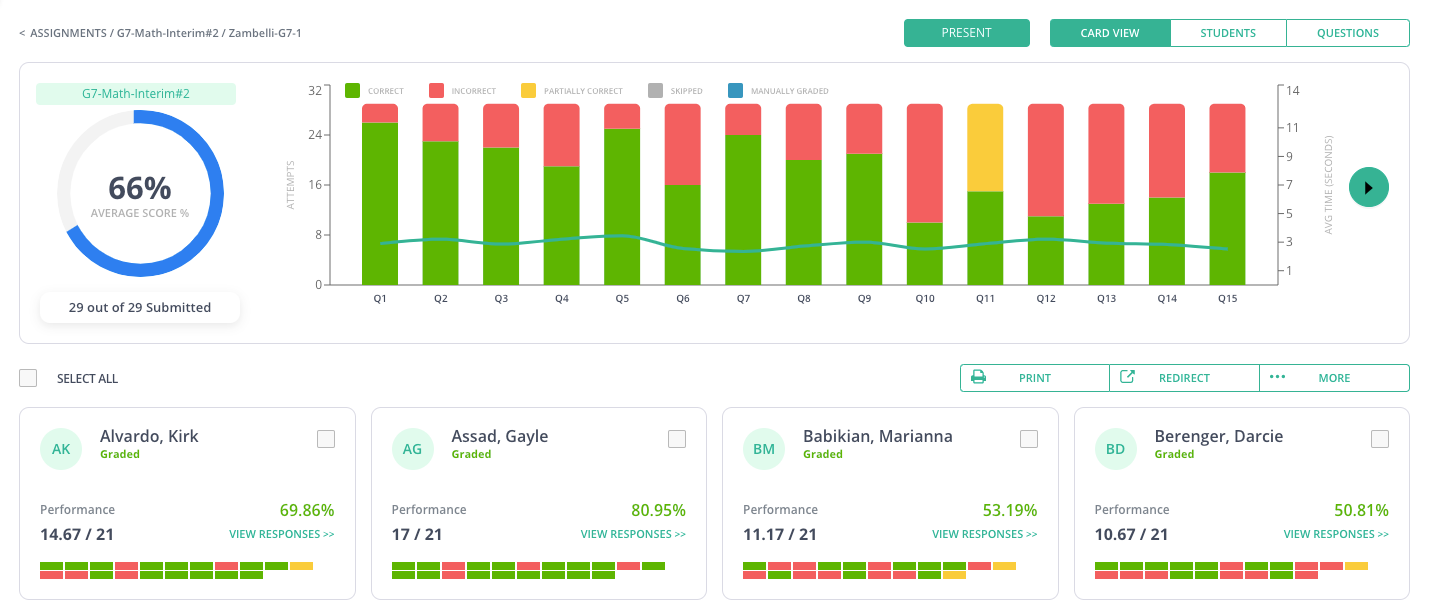
Image source: Pear Assessment
Pear Assessment (formerly Edulastic) is built for schools that want math tests tied closely to standards and backed by strong reporting.
As one of the best math assessment software for teachers, it lets you create or choose math assessments aligned with Common Core and state standards, then track how each student performs against those targets.
In real math use, three things stand out. First, the question types. You get traditional items plus tech-enhanced questions like graphing, drag and drop, number lines, and equation response, which feel closer to how students actually work through math problems.
Second, the content library has a large bank of standards-aligned questions and ready assessments, so you are not starting from zero every time. Third, dashboards break results down by standard and skill, so it is easier to see where to reteach and which students need support.
Pros
- A wide selection of tech-enhanced math items, including graphing and equation response.
- Standards-aligned question banks help teachers create assessments tied directly to curriculum requirements.
- Reporting tools show performance by standard and class, supporting data-driven instruction.
- Dashboards make it easy to compare progress across students, classes, and assessment periods.
- The system works well for structured testing environments that require consistent benchmarking.
Cons
- The roster and standards setup process can feel heavy for teachers who only run occasional assessments.
- The interface contains many controls and menus, which may require time for new users to learn effectively.
Pricing: A free plan is available. Teacher Premium starts at $125 per year. School and district pricing varies.
User Rating: 4.4/5 (Capterra)
3. Formative – Best for Real-Time Instruction & Feedback
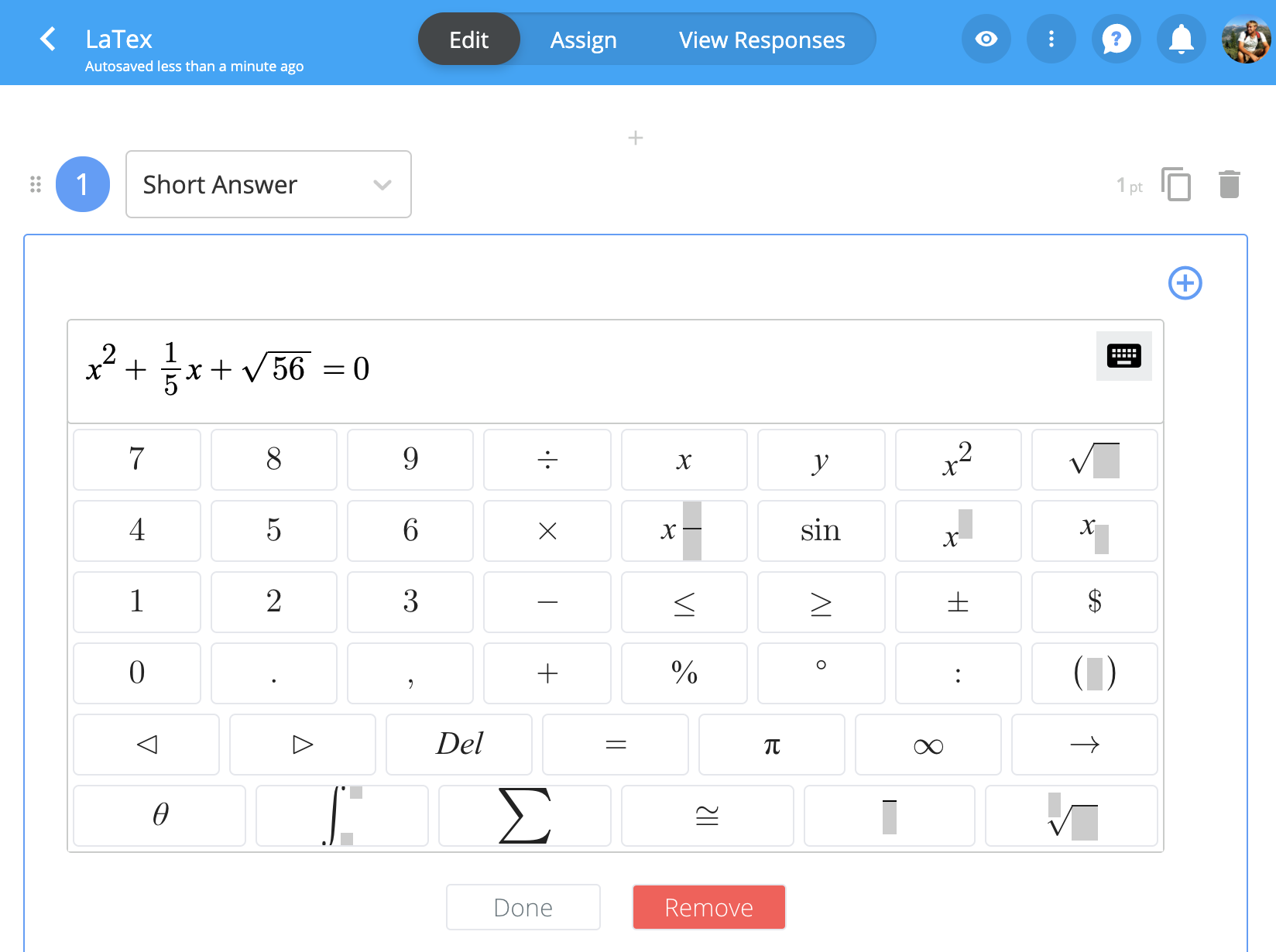
Image Source: Formative
Formative is built around live instruction, which makes it a strong fit when you want to see how students are working through math, not just whether they got the final answer right. You can combine slides, questions, and media into one live lesson and watch responses update in real time on your dashboard.
For math, I like that you can mix auto-graded items (numeric, multiple choice, graphing, categorizing) with “show your work” responses, so students can draw, annotate, or write steps as they would on paper. That makes it much easier to spot where their reasoning breaks down in fractions, algebra, or geometry.
It also plays nicely with existing workflows: you can upload PDFs/worksheets, layer questions on top, and sync with platforms like Google Classroom, Clever, and Canvas so rosters and assignments stay in one ecosystem.
Pros
- Real-time response tracking helps teachers monitor student thinking as math problems are solved.
- A flexible mix of question types supports numeric input, graphing, and “show your work” reasoning.
- Uploaded worksheets can be converted into interactive math tasks with minimal effort.
- Device-friendly design allows students to respond from laptops, tablets, and Chromebooks without friction.
- Collaborative tools help instructional teams review data and share assessments more efficiently.
Cons
- Creating multi-part math questions with partial credit can feel time-consuming when building more advanced assessments.
- Full analytics and collaboration tools are limited to higher-tier plans, reducing data depth for individual teachers.
Pricing: A free plan is available. Teacher plans start at $13/month. School and district pricing varies.
4. Wayground (Formerly Quizizz)– Best for Gamified Math Quizzes & Homework

Image source: Wayground
In my experience, Wayground works well when teachers want math practice to feel more like an activity than a formal test. You can turn problem sets into live games or homework, and students join with a simple code on any device.
Timers, leaderboards, and instant feedback keep them involved even when they are practicing the same type of question multiple times, making it one of the best formative math assessment tools.
For math, the built-in equation editor is a real plus. It lets you add fractions, exponents, roots, and other symbols without clumsy workarounds. You can also start from existing public Quizizz sets, then adjust questions, difficulty, and pacing to match your group.
The reports show accuracy by question and student, which is handy for quick formative checks.
Pros
- Gamified quiz modes keep students engaged during routine math practice and quick checks.
- The built-in math editor supports clean formatting for fractions, exponents, and symbols.
- Live and homework modes make it easy to run both in-class and remote assignments.
- Simple join codes allow students to participate quickly across a range of devices.
- Post-quiz reports highlight tricky items and show which students may need extra support.
Cons
- The game-style interface and visual effects can distract students who need a calmer testing environment.
- Managing and organizing a growing library of your own and public quizzes can feel cluttered over time.
Pricing: A free plan is available. Individual plans start at $10 per month. School and district pricing varies.
User Rating: 4.8/5 (Capterra)
5. Mathster – Best for Online Math Worksheets & Self-Marking Tests
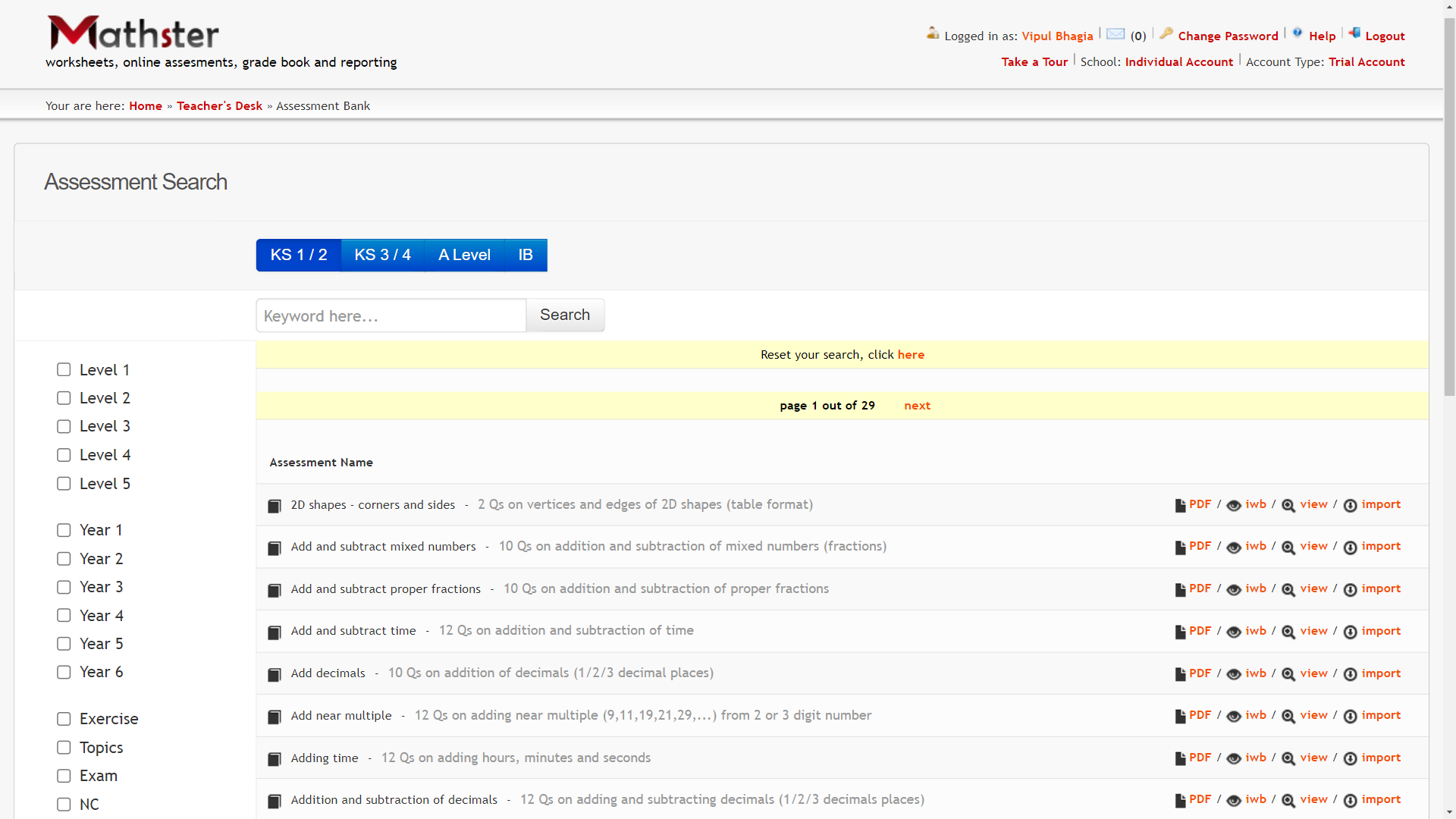
Image source: Mathster
Mathster leans heavily into what many math departments care about most: a deep question bank and fast worksheet or test creation.
From what I’ve seen in schools that use it, the strength is the volume and structure of maths content, from KS1 up to A level, with thousands of randomized questions you can use for worksheets, online homework, and video-based assessments.
This online math assessment tool lets you generate printable worksheets, set self-marking online assessments, and track results in an integrated gradebook.
There are also extra tools like graphing and geometry utilities, and a classroom response system so students can answer live questions from their devices, and you see results instantly.
Pros
- A large library of randomized math questions supports worksheets, homework, and online assessments.
- Self-marking assessments help reduce grading time and automatically record student results.
- Browser-based access ensures students can complete math tasks on laptops, tablets, and mobile devices.
- Built-in graphing and geometry tools support a wide range of math topics and activities.
- Classroom response features allow teachers to check understanding during live lessons.
Cons
- Content is closely aligned with UK Key Stages, requiring adaptation for educators following other national or state standards.
- School-wide licenses may feel oversized for small teams needing only single-teacher access for math assessment.
Pricing: Starts at £6.99/teacher/month (approx. $9 per month).
6. Khan Academy – Best for Free Mastery-Based Math Practice
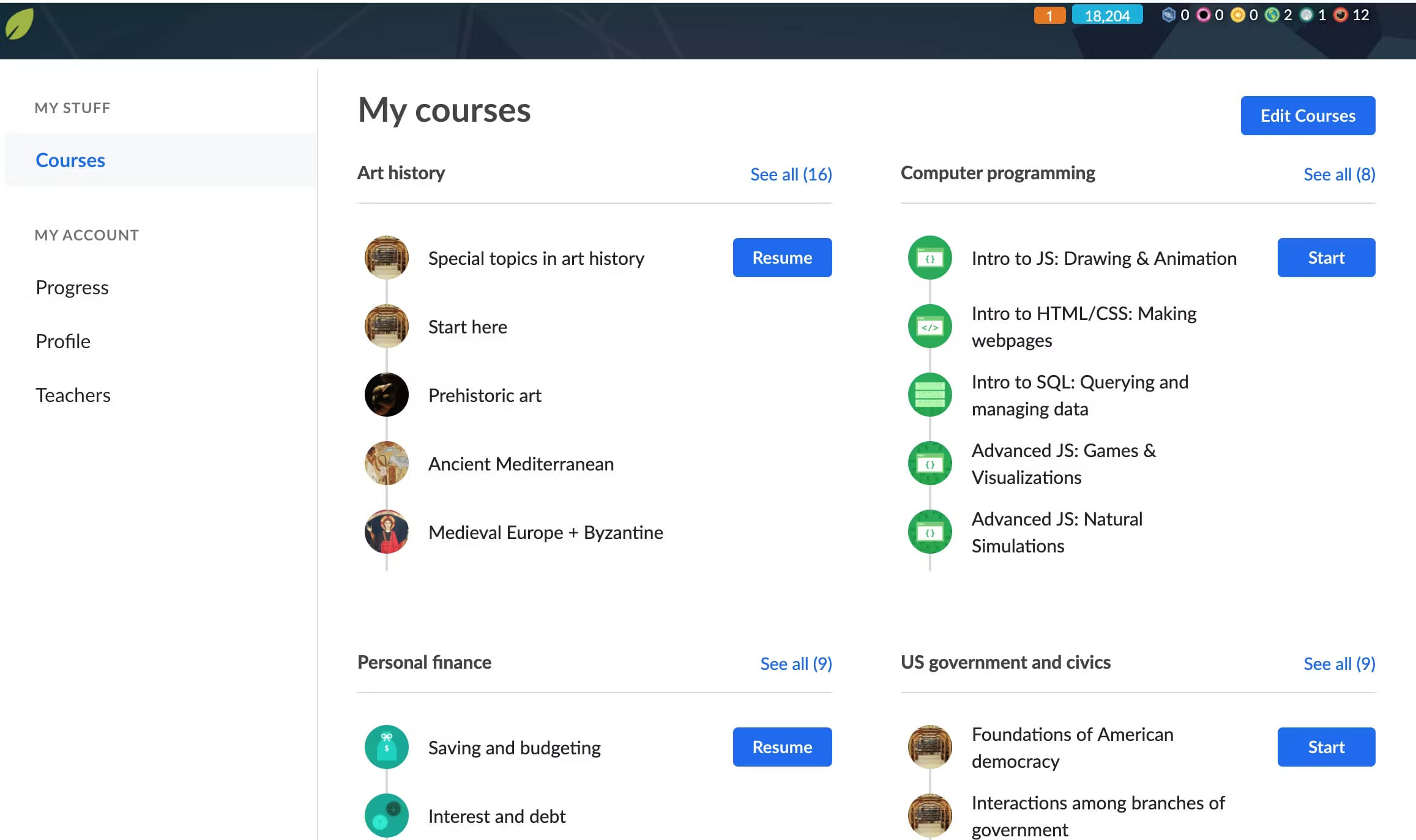
Image source: Software Advice
What stands out to me about Khan Academy for math assessment is how much ground it covers for zero cost. You get full grade-level math courses with practice exercises, quizzes, unit tests, and course challenges, all tied into a mastery system that shows how securely students understand each skill.
Teachers can assign specific skills, units, or courses, then track progress through assignment reports and mastery reports. You see how far each student has moved toward their course or unit mastery goals and which topics need more time.
For many classes, this online math assessment tool works well as a diagnostic and ongoing formative layer. Students work at their own pace, and the system adjusts based on how they perform in quizzes, unit tests, and mastery challenges.
Pros
- Free math courses and practice sets cover K–12 skills with a strong progression structure.
- Mastery-based practice helps students build deeper understanding through quizzes and unit tests.
- Teacher dashboards display assignment results and skill progress clearly at the class and student levels.
- Self-paced learning supports differentiated instruction and individual learning paths.
- Skill recommendations adjust automatically based on performance to reinforce weak areas.
Cons
- The interface can feel crowded at first, and students may need guidance to navigate assignments correctly.
- Some explanations or practice sets may be either too basic or too advanced for mixed-ability classrooms.
Pricing: Khan Academy is free for teachers, students, and schools.
User Rating: 4.7/5 (Capterra)
7. IXL – Best for Adaptive Skills Practice & Diagnostics
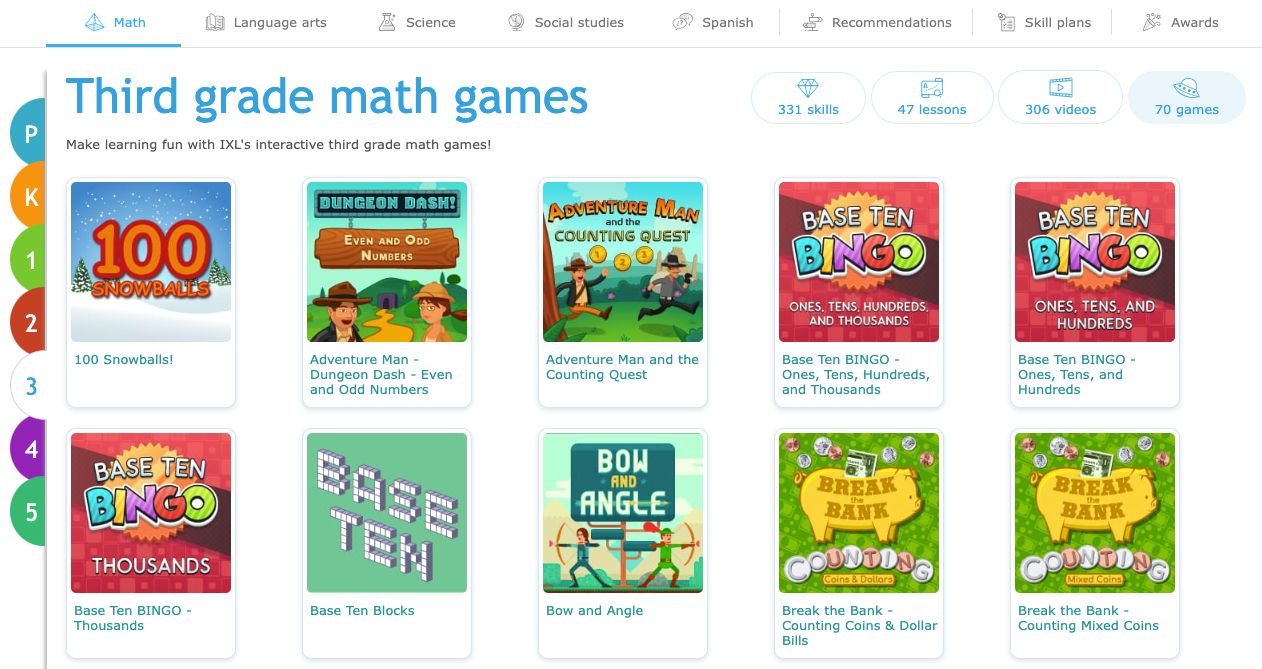
Image source: IXL
IXL often comes up when schools want something that sits between daily practice and formal testing. It is a K–12 personalized learning platform with thousands of math skills from counting to calculus, and questions that adapt in difficulty as students answer.
From my experience reviewing math platforms, IXL is strongest when you use both sides of it together. The practice side gives students endless skill-by-skill questions with instant feedback and step-by-step explanations.
The Real-Time Diagnostic side gives teachers an up-to-date picture of each student’s math level and recommends specific skills to close gaps.
You can also work from built-in skill plans aligned with state standards and popular textbooks, which helps keep online practice in sync with what you are teaching in class.
Pros
- The platform offers adaptive practice across thousands of math skills from early grades to calculus.
- Real-Time Diagnostic identifies proficiency levels and recommends skills for targeted improvement.
- Immediate feedback and explanations help students correct mistakes and strengthen understanding.
- Detailed analytics show skill mastery, growth trends, and areas needing intervention.
- Skill plans align practice with state standards and commonly used math curricula.
Cons
- The SmartScore system can feel discouraging for students because scores drop significantly after individual mistakes.
- Navigation and class setup may feel less intuitive for teachers managing multiple groups or large workloads.
Pricing: Single-subject family plans start at $79/year. Additional child plans start at $40/year. School pricing varies.
User Rating: 4.8/5 (Capterra)
8. Quizlet – Best for Flashcards & Targeted Math Review
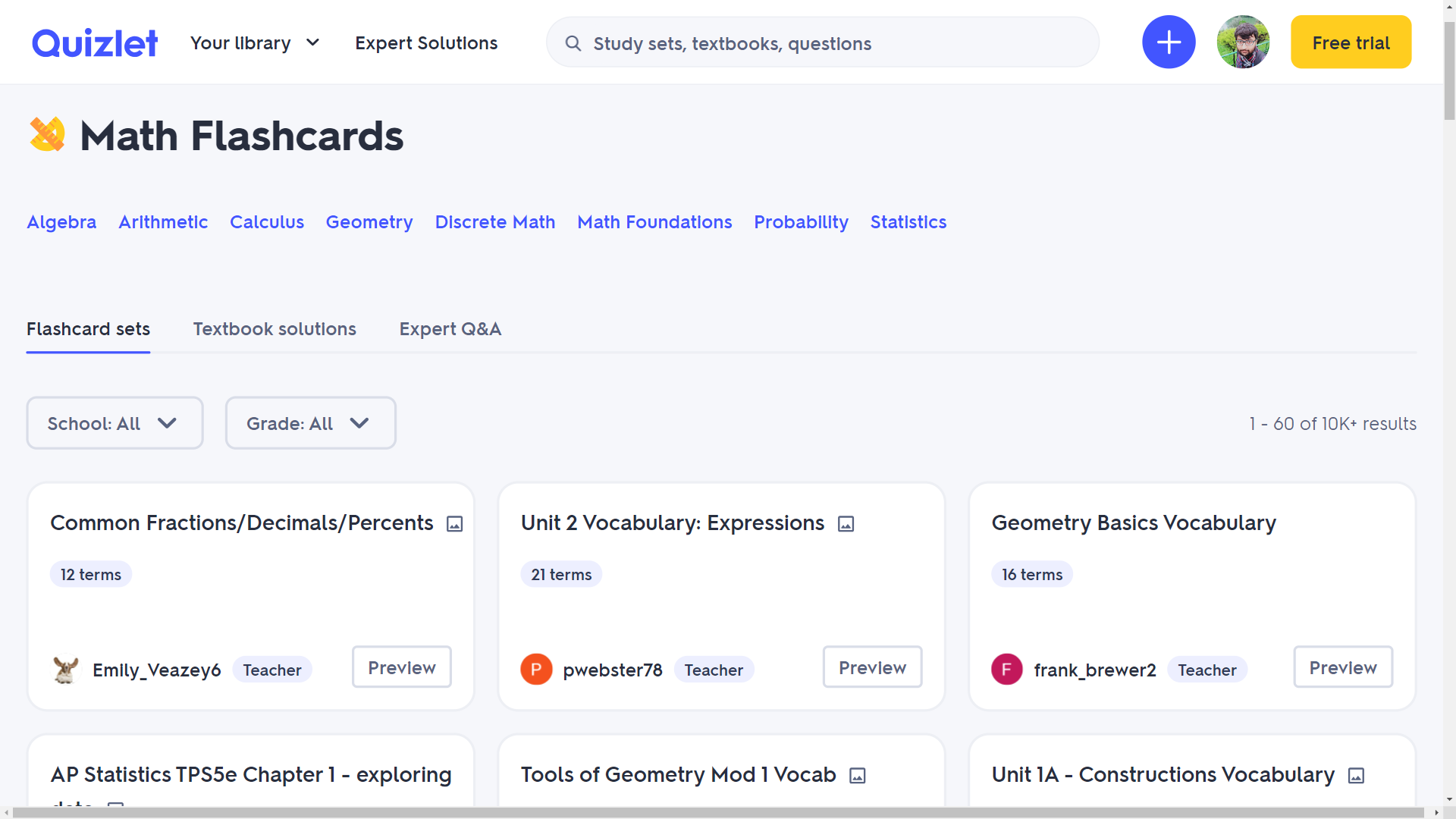
Image source: Quizlet
Whenever I hear teachers talk about out-of-class math practice, Quizlet almost always comes up. It is built around flashcards, but over time, it has grown into a full study toolkit with modes like Learn, Test, Match, and Gravity that work well for memorizing formulas, properties, and vocabulary.
For math assessment, this online math assessment tool is most useful as a support layer rather than a formal testing tool. You can build sets around key formulas, theorems, definitions, or problem types, then let students drill them in different modes.
Many teachers also lean on the huge public library and adapt existing math sets instead of starting from scratch. The result is quicker prep for low-stakes checks and ongoing spaced review.
Pros
- Flashcard-based study helps reinforce math formulas, vocabulary, and patterns efficiently.
- Multiple practice modes offer varied ways for students to review and retain key concepts.
- A large library of public sets allows teachers to adapt existing math materials quickly.
- Compatible across devices, enabling short, frequent review sessions anytime students need them.
- Study data highlights progress and helps students understand what they still need to review.
Cons
- Not designed for full, structured math exams with detailed reporting, so it works best alongside a more formal assessment tool.
- The quality of public sets varies, and you need to review the content carefully before assigning it to students.
Pricing: A free plan is available. Quizlet Plus starts at $35.99/year for extra features like offline access and enhanced study tools.
User Rating: 4.6/5 (Capterra)
9. Microsoft Forms – Best for Simple AI-Assisted Math Quizzes
One platform that often gets missed in math assessment discussions is Microsoft Forms, even though it sits inside many schools’ existing Microsoft 365 setups at no extra cost. When I look at math assessment workflows in Microsoft-heavy schools, Forms usually ends up as the quickest way to spin up a basic quiz and push it through Teams or email.
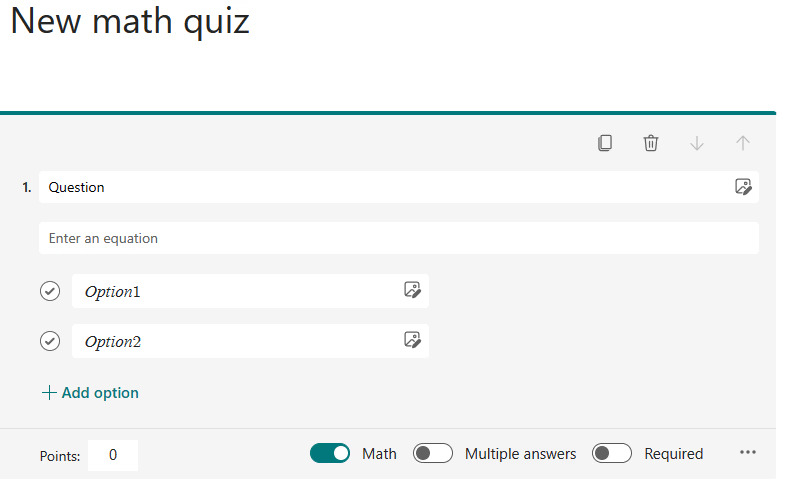
For math, the key is the built-in Math mode. You can mark a question as math, type an equation using the on-screen calculator-style keyboard, and let Forms auto-format it. The tool can even suggest correct and incorrect answer options for multiple-choice questions based on the equation you enter, which speeds up question building.
On newer setups with Copilot, Forms can go further and help draft quiz questions and generate step-by-step answer explanations, which is useful for worked solutions in higher-grade math.
Pros
- Math mode supports clean equation formatting using an intuitive on-screen math keyboard.
- Auto-generated answer suggestions help teachers build multiple-choice questions more quickly.
- Auto-grading provides immediate results and reduces manual scoring in basic math quizzes.
- Real-time summaries make it easy to review class performance immediately after submission.
- Seamless integration with Teams and Excel supports existing school workflows.
Cons
- Limited branching options make it difficult to build complex, multi-path math assessments.
- Reporting capabilities are basic and often require exporting to Excel for deeper analysis.
Pricing: Included with many Microsoft 365 plans. Business access starts at $6/month/user.
User Rating: 4.6/5 (Capterra)
10. Mathway – Best for Self-Check & Step-by-Step Math Help
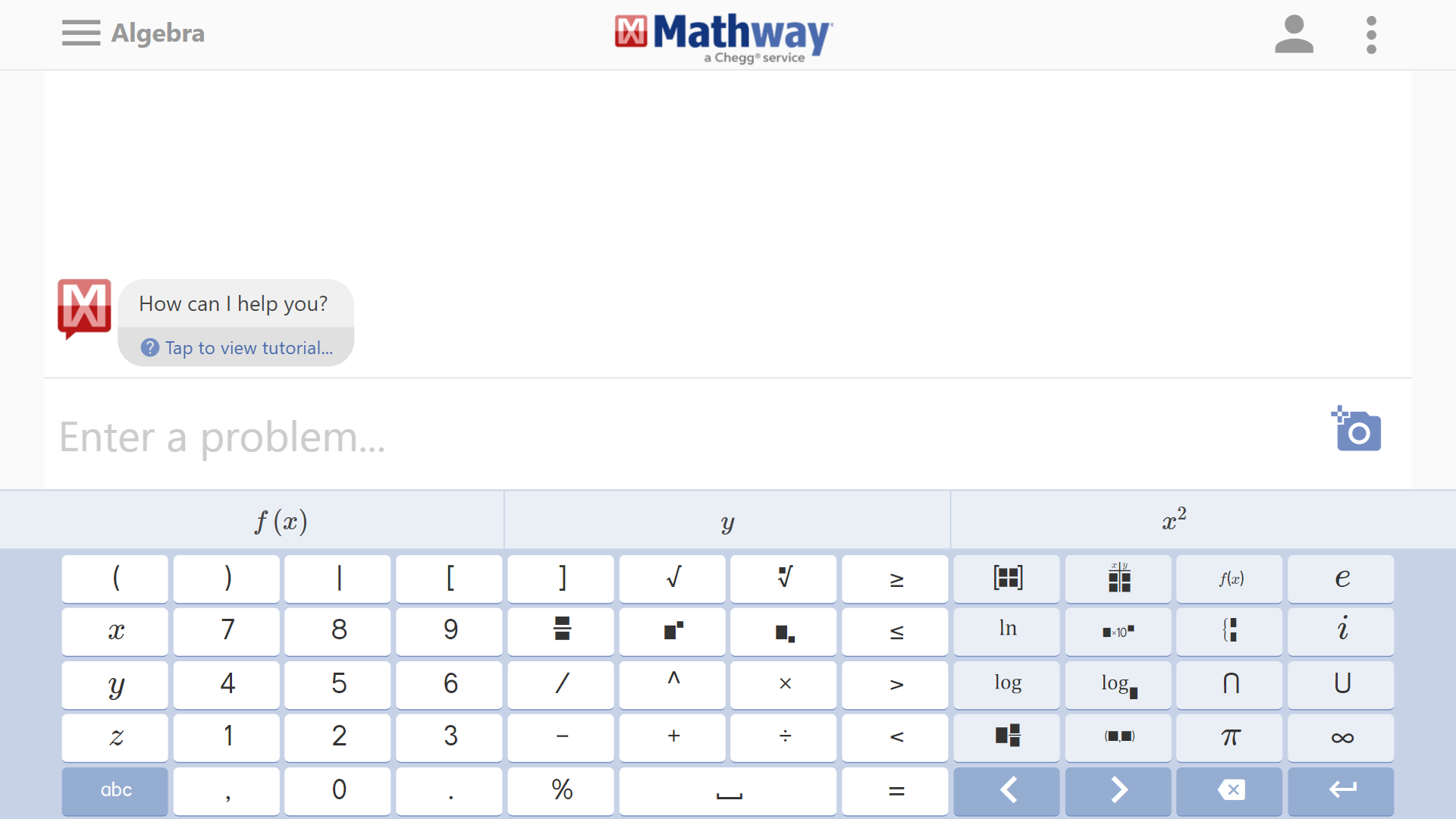
Image source: Mathway
When students need a quick way to check their work, Mathway often sits in the background as the “calculator plus.” It covers a wide span of math topics, from basic arithmetic to algebra, calculus, statistics, and more.
Students can type problems using a math keyboard or upload a photo of a handwritten or printed question, then get an instant answer.
From an assessment point of view, the real value is in the step-by-step solutions in the paid version. Those worked solutions can help students see the path from problem to answer, which is useful for homework support, exam prep, and independent practice.
It is not a full assessment platform, but it pairs well with formal quizzes by giving learners a way to review and debug their own work.
Pros
- Supports a broad range of math topics from basic arithmetic to advanced calculus.
- Multiple input options make it easy to enter problems accurately in different formats.
- Instant answers allow quick verification of homework steps or practice problems.
- Step-by-step solutions offer students insight into problem-solving methods and reasoning.
- Works well as a supplemental support tool alongside structured assessment platforms.
Cons
- Easy access to step-by-step solutions can lead to misuse during unsupervised or take-home assessments without clear rules.
- Lacks assignment or class management tools, so it serves best as a supplemental support resource.
Pricing: A free plan is available. Premium access starts at $9.99/month.
How to Choose the Best Online Math Assessment Tool
Choosing an online math assessment tool is less about features on a page and more about how it fits your reality. Here is a simple way to evaluate any platform before you commit time or budget to it.
1. Start With Your Use Cases
List how you actually plan to use the tool: weekly quizzes, unit tests, homework, benchmarks, or quick exit tickets. A platform built for benchmarks will feel heavy if you only want short formative checks, and the opposite is also true.
2. Test the Math Input First
Before anything else, try building three or four real questions. Include fractions, algebra, and at least one multi-step problem. If the equation editor feels slow or awkward, it will not get better at scale.
3. Check the Student Experience on Real Devices
Open a sample quiz on the same devices your students will use: school laptops, older phones, mixed Wi-Fi. Watch how long it takes to join, answer, and submit. Any friction here will show up on test day.
4. Look at Security for Serious Tests
If you plan to use the tool for graded tests, explore the security settings. Look for question shuffling, time limits, browser controls, and any proctoring options. Decide what level of control is realistic for your school, not just what looks impressive.
5. Measure Time Saved for You
Try a full cycle: create a short quiz, assign it, collect results, and review the data. Ask yourself two questions. Did this save time compared to what you do now? Would you still want to do this every week?
6. Inspect the Reports, Not Just the Score Sheet
Open a sample report and see what it tells you. Can you quickly spot weak skills, tricky questions, and students who need help? Or do you just see a long list of percentages?
7. Check Fit With Your Existing Systems
See how well the tool connects with what you already use: Google Classroom, Microsoft Teams, your learning management system, or your gradebook. Smooth integration usually matters more than one extra feature.
8. Match the Price to the Value
Once you know how you will use it, compare the free tier and the paid plan honestly. If the free version already covers your use cases, you can start there. If not, be clear on what the paid plan unlocks for math and whether that will be used often enough.
If an online math assessment tool passes these checks for your own classes and context, it is a strong candidate. The tools in this list are the ones I have seen clear most of these tests for math in real use.
My Top 3 Picks for Online Math Assessment Tools
If I had to narrow everything down to just three tools to start with for math, these are the ones I’d pick.
1. ProProfs Quiz Maker
ProProfs is the tool I’d use as the main assessment engine. The math editor handles real equations and expressions cleanly, AI cuts quiz creation time, and the reports make gaps easy to spot. With built-in anti-cheating options and flexible question types, it works well for both routine quizzes and serious tests.
2. Pear Assessment (Formerly Edulastic)
Pear stands out when you want a more structured assessment setup. It combines standards-aligned question banks with rich tech-enhanced items like graphing and number lines. The dashboards show performance by standard, class, and student, which makes it much easier to plan benchmarks, adjust instruction, and track progress across the year.
3. IXL
IXL earns a place in the top three for its blend of adaptive practice and diagnostics. The Real-Time Diagnostic helps you see each student’s level across key math strands, while targeted skill practice fills gaps with immediate feedback. Used alongside a quiz tool, it turns assessment data into a concrete practice plan.
How AI Is Changing Online Math Assessment
AI is now built into the core of many online math assessment tools, not just added as a bonus feature. Used well, it removes busywork and gives you clearer data for real students and real classes.
1. Faster Quiz Creation
An AI quiz maker can generate full math quizzes from a topic, chapter outline, or learning objective. You can ask for “10 mixed algebra questions at a medium difficulty level,” get a draft set, then keep the good ones and edit the rest.
2. Adaptive Practice and Diagnostics
Platforms such as IXL and Khan Academy use AI-style logic to adjust difficulty based on each response. If a student struggles with fractions, they see more targeted fraction questions. If they breeze through, the system moves them up. This turns every practice session into a low-stress diagnostic.
3. Smarter Grading and Insights
AI-backed systems can do more than mark answers as right or wrong. The best math quiz maker tools highlight common wrong choices, tricky questions, and skills where many students are dropping marks. In some tools, you can filter by “students who missed this step” instead of scanning long score sheets by hand.
4. Cleaner Math Input and Feedback
In tools like Microsoft Forms, AI helps format equations, suggest answer options, and keep the math layout readable. Combined with step-by-step explanations in tools like Mathway, students can see a clear path from problem to solution, not just a final answer.
Used with care, AI does not replace your judgment. It speeds up question creation, practice planning, and analysis so you can spend more time on what only a teacher can do: deciding what to teach next and how to support each learner.
Build a Math Assessment Setup That Actually Works
Online math assessment tools should give you clear signals, not extra admin. Decide what you need it to do right now: weekly quizzes, unit tests, or exam prep. Then test each tool with real questions, real devices, and a real class flow instead of just skimming a feature list.
Be strict about the four basics: clean math input, stable performance, honest results, and reports you actually read. If a platform fails on any of these, it will not survive your school year.
From there, keep one platform at the center for graded quizzes and tests, and let everything else support it. In my experience, using ProProfs Quiz Maker as that hub works well because it combines question creation, security, and reporting in one place, so your assessment process stays simple and repeatable.

Let ProProfs AI Build a Quiz

 We'd love your feedback!
What did you like & how can we make it even better?
 Thanks for your feedback!
 Ask Your Question
Have a question? Get expert help to make your decision easier.