You’ve probably been on both sides of this. A quiz with no time limit turns into a Google session. A timed quiz with a punishing limit turns into an anxiety spiral. Neither tells you what you actually need to know.
So the real question isn’t whether you should use a timed quiz. It’s how to set one that actually does the job. You want it to filter prepared candidates from unprepared ones, separate true mastery from guessing, or give you proof that learners actually engaged with the material.
In this guide, I’ll walk you through the full process of creating an effective timed quiz, from setting clear objectives and calibrating time limits to using response-time data to make better decisions.
Continue reading if you are:
- HR and L&D teams running onboarding or compliance assessments
- Certification bodies and training managers building high-stakes exams
- Educators and instructors designing fair, cheating-resistant quizzes
- EdTech founders or coaches delivering assessments at scale
- Hiring teams replacing unstructured interviews with scored pre-hire screens
What Is a Timed Quiz?
A timed quiz is exactly what it sounds like: a quiz with a predetermined time limit. Participants must complete the quiz within this allotted time, adding an element of urgency and encouraging them to work efficiently.
The time limit can be set for the entire quiz or for individual questions, depending on the desired assessment style and the complexity of the material. You can administer timed quizzes in various formats, from traditional paper-based tests to online assessments using an online test maker.
How to Create a Timed Quiz
Creating an effective timed quiz involves careful planning and execution. Here’s a practical guide:
Step 1: Define Objectives
Clearly define what you want to achieve. This is the foundation of your quiz and impacts everything from question design to time limits. Consider:
- Specific Knowledge/Skills: What precise knowledge or skills are you evaluating?
- Cognitive Level: What level of thinking are you assessing? This influences question type and pacing.
- Learning Outcomes: What should learners be able to do after the quiz? Define measurable outcomes.
- Use of Results: How will the quiz inform instruction (formative/summative)? This impacts the quiz’s weight and acceptable time pressure.
Step 2: Choose a Platform
Select a platform that supports timed quizzes and offers the features you need. Look for granular timing controls (for both the quiz and individual questions), a variety of question types, robust anti-cheating features (like proctoring, question/answer shuffling, and tab switching prevention), and detailed reporting on time spent on quizzes and questions.
If you’re running timed quizzes across onboarding cohorts, recurring compliance cycles, or high-volume hiring screens, also check that the platform can handle concurrent test-takers at scale without degrading timer accuracy or session stability.
Step 3: Design Effective Questions
Use a variety of question types aligned with your objectives. Since time is limited, the questions should be clear, concise, and appropriately difficult. Avoid ambiguity and ensure each question directly relates to a specific learning outcome.
Watch: Question Types for Online Learning & Assessment
Step 4: Set the Right Time Limit
Setting an appropriate time limit is crucial! Too short, and you’ll frustrate participants. Too long, and you defeat the purpose of timing. Consider these factors:
- Question Difficulty: More complex questions require more time.
- Number of Questions: A larger number of questions naturally requires a longer time limit.
- Average Completion Time: If possible, pilot test the quiz to gauge how long it takes participants to complete it without a time limit. Then, adjust accordingly. A good starting point is to add 20-25% to the average untimed completion time.
- Subject Matter: Some subjects naturally lend themselves to faster-paced quizzes than others.
- Question type: True or false questions can be answered quickly, while scenario-based ones may require more time.
The right limit also depends on what you’re actually trying to measure. Here’s a starting framework for common use cases:
| Quiz Type | Recommended Time per Question | Why |
| Pre-hire screening (MCQ) | 45 to 60 seconds | Rewards preparation; penalizes real-time lookup |
| Compliance certification | 60 to 90 seconds | Allows recall without enabling tab-switching |
| Practice or training quiz | 90 seconds or untimed | Lower stakes; focus on learning, not speed |
| High-stakes final exam | 60 to 75 seconds | Balances thoroughness with anti-cheating pressure |
For compliance and certification specifically: pair your time limit with attempt caps. A single allowed attempt with a mandatory 24-hour cooldown before retake changes how seriously participants engage the first time through.
Step 5: Test & Refine
After creating your timed quiz, it’s important to thoroughly test it. Ensure that the timing is accurate, the questions are clear, and the platform is functioning properly and is accessible to everyone.
Once the quiz is complete, analyze the results by focusing on the time spent on each question. Identify any particularly challenging questions, evaluate whether adjustments to the time limits are needed, and make any necessary improvements to enhance the quiz for future use.
This process of testing, analyzing, and refining helps ensure that your quiz remains effective and user-friendly.
Watch: How to Create a Timed Quiz
How to Use a Quiz Maker to Create an Online Quiz With a Timer
An online quiz maker simplifies quiz creation. Let’s look at how to create an online quiz with a time limit using ProProfs Quiz Maker:
Step 1: Sign up & Get Started
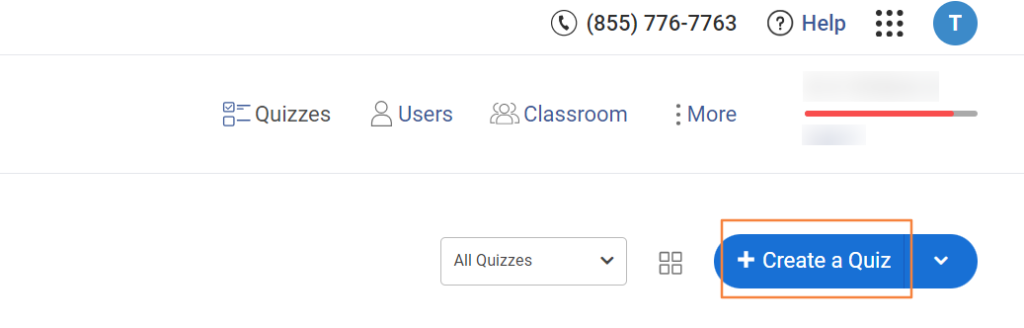
Set up your account and then click “Create a Quiz” on your dashboard. Next, give your quiz a title and add a cover image and description. Use the description to communicate the time limit (quiz or question level), question format, grading criteria, technical issue protocols, and any other relevant information.
Step 2: Add Questions
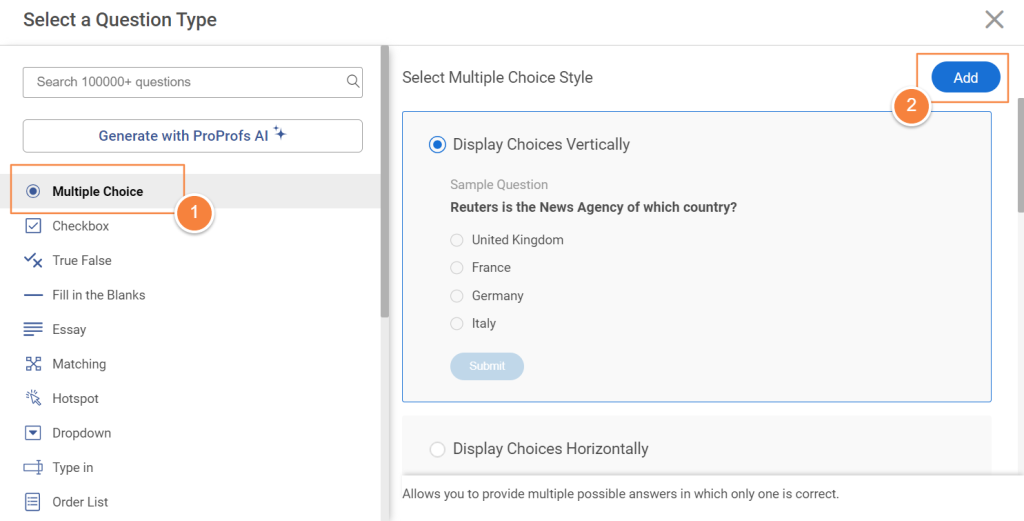
Add your questions using the various question types available. You can draft and add your own questions or generate quizzes in seconds with ProProfs AI. You can also import questions from a library of over a million questions on various topics.
Watch: How to Find & Use Ready-Made Questions
Step 3: Configure Settings
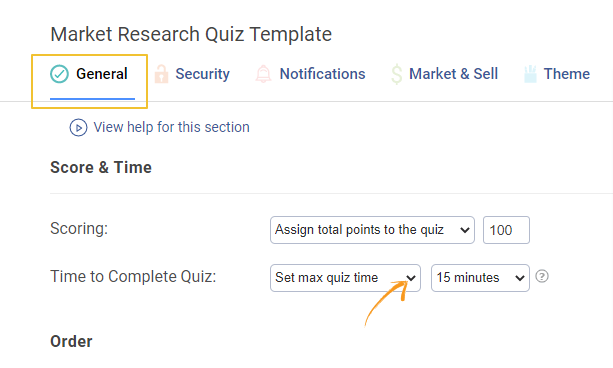
Go to the quiz settings and look for the timing options under “General.” ProProfs allows you to set a time limit for the entire quiz and also for individual questions. Enter the desired time limits.
One setting that often gets overlooked here is attempt limits. For certification and compliance exams, capping attempts to 1 or 2 (with a cooldown between retakes) raises the stakes just enough to ensure participants prepare properly. For practice quizzes or training checkpoints, unlimited attempts are fine and actually encourage repeated engagement.
ProProfs Quiz Maker lets you set this per quiz, so you’re not locked into one configuration across all your assessments.
ProProfs Quiz Maker offers 100+ settings so that you can deliver your quizzes just the way you want. You can configure settings such as proctoring, shuffling, tab switching prevention, and notifications.
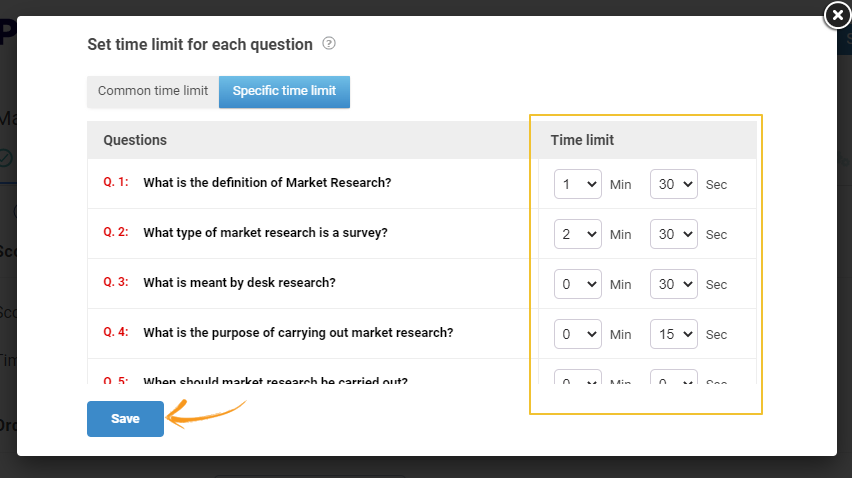
Watch: How to Customize & Configure Your Quiz Settings
Step 4: Customize the Theme
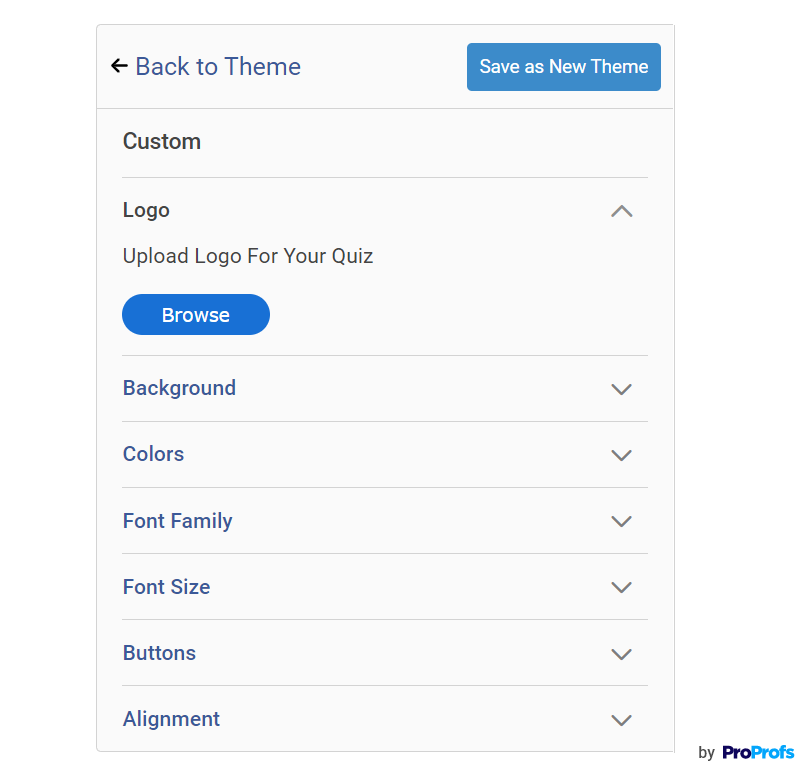
Personalize your quiz’s appearance by applying a custom theme or choosing from pre-built ones. You can change the logo, fonts, colors, background image, and even the button text to give your quiz the right look and feel.
Step 5: Preview & Share
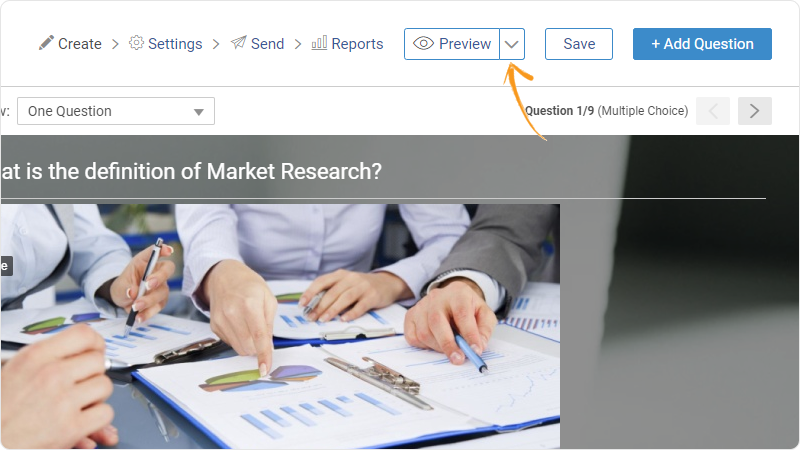
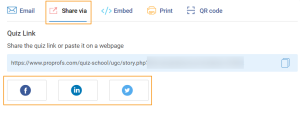
Before publishing, preview your quiz to check if everything is to your liking. Take the quiz yourself to get a feel for the pacing. Once you’re satisfied, share it with your learners via a link, embed code, or virtual classroom.
Step 6: Review Reports
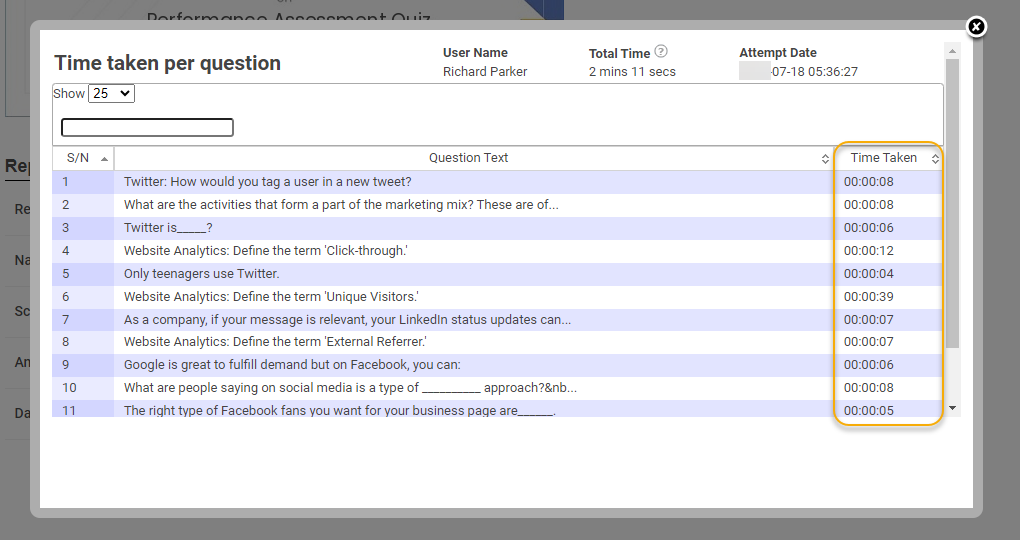
After learners have taken the quiz, access the reports to review their performance, including the time spent on each question and the quiz overall. Use this information to refine your quizzes and instruction.
For example, with ProProfs Quiz Maker, you can check the following:
- How long each learner spent on a quiz
- How long each learner spent on individual questions: This granular data is invaluable for identifying difficult questions or areas where students are struggling. If many students spend excessive time on a particular question, it might indicate that the question is poorly worded or covers a concept that needs further explanation.
- Individual time tracking across quizzes: The ability to compare an individual’s time spent across multiple quizzes can reveal patterns in their performance and identify areas where they might be improving or struggling.
- The average time taken by all learners (or a specific cohort) to complete the quiz or a particular question: This helps you gauge the overall difficulty and pacing of the quiz. If the average time taken is significantly shorter than your allocated time limit, it might suggest that the quiz is too easy or that the time limit is too generous.
Executive Cheat Sheet: The 5 KPIs of Assessment Health
Use this table during your monthly review to determine if your time limits are helping or hurting your results.
| KPI | What It Tells You | Red Flag (Action Needed) |
| Completion Rate | Overall fairness and accessibility. | < 80%: Your time limit is likely too punishing for honest test-takers. |
| Avg. Time per Question | Question clarity and difficulty level. | Extreme Highs: The question is poorly worded. Extreme Lows: The question is too easy/guessable. |
| Timeout Rate | The percentage of users who never finished. | > 10%: Indicates high anxiety or technical friction (e.g., slow page loads). |
| Pass/Fail Ratio | Calibration of your “hiring filter” or training. | 100% Pass Rate: The quiz isn’t actually filtering for mastery. |
| Retake Frequency | Engagement vs. Preparation level. | High Retakes: Learners are using the quiz as a “trial and error” tool rather than studying. |
Watch: How to Review Quiz Reports & Statistics
What Are the Benefits of Timed Quizzes?
Timed quizzes offer a range of benefits that make them a valuable tool for educators and trainers:
- Precise Assessment
Timed quizzes can help distinguish between learners who have a surface-level understanding of the material and those who have truly mastered it. The ability to perform well under time pressure often indicates a deeper level of comprehension and knowledge retention.
- Reduced Cheating
Timed quizzes can make it difficult for learners to cheat, as they have limited time to consult external resources or collaborate with others. This can help ensure that the assessment accurately reflects individual knowledge and understanding.
- Preparation for Real-World Scenarios
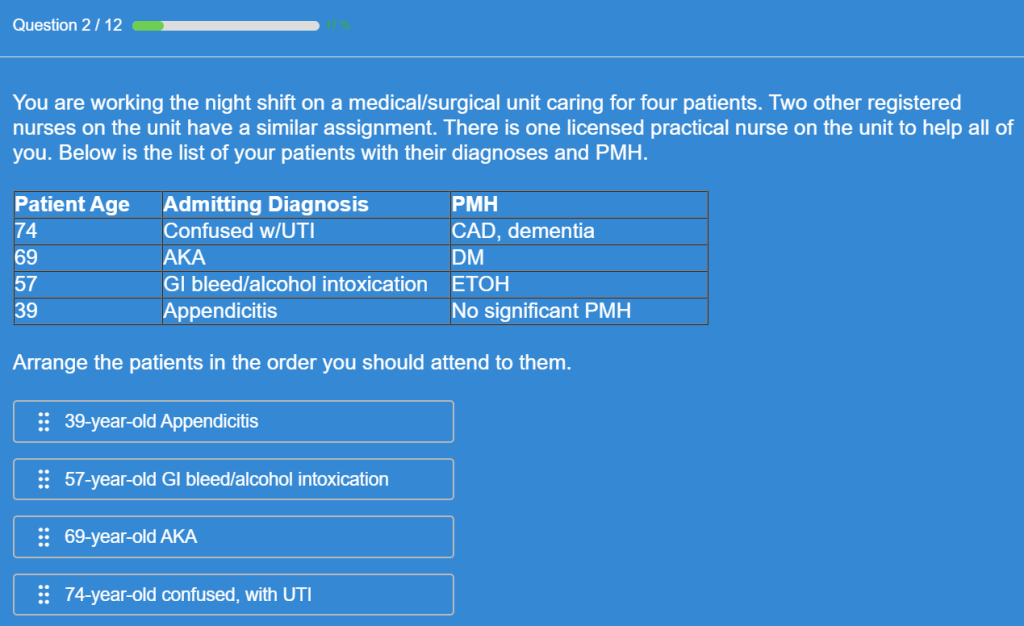
In many professional and academic settings, individuals are required to perform under time constraints. Timed quizzes can help learners develop the ability to work efficiently and make decisions under pressure, preparing them for the demands of real-world situations.
- Stronger Recall Ability
Timed conditions require learners to quickly recall and retrieve information from memory, which can strengthen memory pathways and improve their ability to access information quickly.
- Increased Engagement
The element of time can inject excitement and a sense of challenge, making the quiz more engaging for learners. This can be particularly effective for learners who might otherwise find traditional assessments monotonous.
What Does Response Time Actually Tell You?
Response time is more than a limit. It tells you how well someone truly understands the material.
- Fast + correct → Strong mastery. The answer comes naturally.
- Slow + correct → Effortful recall. They know it but need more practice.
- Fast + incorrect → Confident misunderstanding. This is harder to fix than not knowing at all.
- Slow + incorrect → Likely guessing under pressure.
Most quiz reports only show right or wrong. Response-time data shows why someone performed that way.
For hiring managers and compliance teams, this insight helps you see whether knowledge is solid, shaky, or misunderstood.
Does a Timer Actually Prevent Cheating, or Just Add Pressure?
A timer can help reduce cheating, but it doesn’t stop it on its own.
If someone is determined, they can still look up answers quickly. A timer mainly limits how much time they have, not what they can do within that time.
What actually works is combining multiple controls:
- Time limits to reduce lookup time
- Question shuffling so everyone sees a different order
- Randomized answer options
- Tab-switch detection
- Limits on attempts
Research shows that using only a timer can backfire. It often puts pressure on honest learners while doing little to stop someone who’s prepared to cheat.
The better approach is balance. Use a time limit that’s tight enough to discourage searching but fair enough for someone who knows the answers. Pair it with features like proctoring and randomization for stronger protection.
For high-stakes use cases like hiring or compliance, this layered setup is essential. Tools like ProProfs Quiz Maker let you manage all of this in one place, so you don’t have to rely on separate solutions.
For training quizzes, the goal is different. You want learning, not strict control. In these cases, a relaxed timer or no timer at all often leads to better outcomes.
What Makes a Timed Quiz Actually Work?
The timer isn’t the point. It’s a signal about what you value in an assessment: speed of recall, preparation, performance under real conditions. Get the objective right first, calibrate the limit to that objective, and the timer becomes a diagnostic tool rather than just a pressure mechanism.
If you’re building assessments for hiring, compliance, or certification, the platform matters as much as the configuration. You need timing controls that go down to the individual question, analytics that show you where people struggled and why, and anti-cheating layers that don’t require a separate integration to activate.
ProProfs Quiz Maker includes all of that on a free plan, so you can build, test, and run your first timed quiz without a procurement process standing in the way.
Frequently Asked Questions

What happens to the countdown timer if the quiz unexpectedly closes?
This depends on the quiz platform. Some platforms may pause the timer, while others may continue it in the background. It's essential to familiarize yourself with the specific features of your chosen platform and communicate any potential issues to your learners beforehand.
Can a participant pause the time limit?
Generally, no. The purpose of a timed quiz is to assess performance under pressure and time constraints. Allowing participants to pause the timer would defeat this purpose. However, if you’re creating a practice quiz, you can provide this option by enabling the “save & resume” setting in your quiz software.
How does scoring work if the quiz is automatically submitted when the time limit has expired?
Scoring typically works the same way as for a manually submitted quiz, but only the answers completed within the time limit are considered. Any unanswered questions are usually marked as incorrect. It's crucial to clearly communicate this scoring policy to learners before they begin the quiz.
How do timed quizzes improve the accuracy of pre-employment assessments?
A timed pre-hire quiz rewards candidates who prepared and penalizes those who planned to look up answers in real time. When you set a per-question limit of 45 to 60 seconds on role-specific knowledge questions, the results distinguish candidates who have genuine command of the material from those who are familiar with it but haven't internalized it. That narrows your interview pool to people worth spending time on.
What is the ideal time limit per question for different types of quizzes?
For multiple-choice knowledge questions, 45 to 75 seconds is a common benchmark. Scenario-based or multi-step questions may warrant 90 seconds to two minutes. True/false and simple recall questions can often be answered in 30 seconds by a prepared participant. The most reliable method is to pilot the quiz with a small group, measure average completion time, and add 20 to 25 percent as a buffer.
Can timed quizzes be used for compliance and certification exams?
Yes, and in many regulated industries they're standard practice. A time limit signals to participants that the exam requires actual preparation, not real-time research. For certification exams, pair the timer with attempt limits and automated certificate issuance so that passing has clear, immediate consequences. Most compliance quiz platforms, including ProProfs Quiz Maker, support per-question timing alongside proctoring and audit trail reporting.
How do I prevent cheating in a timed online quiz?
Timers alone aren't enough. Effective cheating prevention layers a calibrated time limit with question shuffling, randomized answer order, tab-switch detection, webcam proctoring for high-stakes sessions, and attempt limits with cooldown periods. Any one of these alone is circumventable. Combined, they raise the cost of cheating high enough that preparation becomes the faster path.
Should training quizzes be timed or untimed for better learning outcomes?
For low-stakes training checkpoints where the goal is learning rather than gatekeeping, untimed or generously timed quizzes tend to produce better outcomes. Participants engage more carefully, revisit content when they're unsure, and retain more. Reserve tight timers for assessments where speed of recall is itself a performance criterion, such as customer-facing roles, compliance certifications, or pre-hire screens where job performance requires fast, accurate recall under pressure.
What happens if someone runs out of time during a quiz?
Most platforms, including ProProfs Quiz Maker, automatically submit whatever the participant has completed when the timer expires. Unanswered questions are typically scored as incorrect. It's good practice to communicate this in the quiz description before participants begin, so the timeout isn't a surprise. For high-stakes exams, also configure whether partial credit applies to incomplete answers and test the auto-submit behavior before your first live cohort.

Let ProProfs AI Build a Quiz

 We'd love your feedback!
What did you like & how can we make it even better?
 Thanks for your feedback!
 Ask Your Question
Have a question? Get expert help to make your decision easier.