
I’ve spent years testing classroom assessment tools, and here’s what I keep hearing from teachers: Socrative works until it doesn’t.
The moment you need better question types, deeper reporting, AI-powered quiz creation, or real proctoring, you hit a wall. If you’re reading this, you’ve probably already hit that wall.
This guide cuts through the noise and shows you exactly which are the best Socrative alternatives, what each one does better, and which one fits your specific teaching situation. No fluff, just clear answers.
Why Are Teachers Switching From Socrative?
I’ve gone through community threads on Reddit, Quora, and teacher forums to understand what’s actually pushing educators away. Here’s what I found:
- Only 3 question types: MCQ, true/false, and short answer. No drag-and-drop, no image-based, no ordering questions.
- Weak analytics: You get basic score summaries, not question-level insight or skill-gap diagnosis.
- No AI quiz generation: Every question requires manual entry, which is time-intensive for busy teachers.
- Limited gamification: No leaderboards, badges, or team competition modes that keep students motivated.
- No built-in proctoring: Remote assessments are wide open to cheating.
- No certification or compliance workflows: Useless for formal assessments that need documented outcomes.
- Participant cap frustrations: Free tiers across many tools restrict concurrent users in large classes.
- No integration depth: Google Classroom works, but the ecosystem stops there for most users.
10 Best Socrative Alternatives for K-12 Teachers
I’ve explored quite a few assessment tools over the years, and I’ve found that the best Socrative alternative depends on what you’re trying to achieve in the classroom.
Some tools focus on engagement and gamification, while others offer stronger assessment, reporting, and learning support features.
To make your search easier, I’ve compared the best Socrative alternatives for K-12 teachers based on ease of use, classroom engagement, assessment capabilities, reporting, and overall value.
If you’re comparing Socrative with other popular classroom response tools, this quick video offers a helpful overview of how Socrative stacks up against Kahoot! in real classroom use.
| Tool | Best For | User Rating (Capterra) | Price |
| ProProfs Quiz Maker | AI-powered quizzes, security, and certification | 4.5/5 | Free plan available; Paid plans start from $4/teacher/month |
| Kahoot | Gamified live classroom engagement | 4.7/5 | Starts at $3/month |
| Quizlet | Curriculum review and student-paced learning | 4.6/5 | Starts at $7.99/month |
| Typeform | Conversational and reflection-based assessments | 4.7/5 | Starts at $28/month |
| Formative | Real-time remote proctoring and live monitoring | N/A | Starts at $20.75/month |
| Mentimeter | No-login mobile participation and live polls | 4.4/5 | Starts at €14/presenter/month |
| Classtime | Real-time formative data during instruction | 4.7/5 | Starts at $60/educator/year |
| SpeedExam | Secure, high-stakes exams | 4.8/5 | Starts at $20/year |
| ExamJet | Automated grading and assessment scheduling | 4.8/5 | Starts at $59/month |
| Respondus | LMS-integrated exam security and proctoring | 4.6/5 | Starts at $1,695/year |
1. ProProfs Quiz Maker – Best for AI-Powered Quizzes, Security, and Certification
After testing the best Socrative alternatives, ProProfs Quiz Maker is the one that felt like the most complete upgrade. While Socrative works well for quick classroom quizzes, I found ProProfs much better for creating assessments, running secure exams, and tracking student performance without needing additional tools.
What impressed me most was how quickly I could go from a lesson topic to a fully functional quiz with grading, reports, question randomization, and security settings already built in.
One feature that immediately stood out was the AI. The AI quiz can generate quizzes by entering a topic, uploading a document, pasting a webpage, or even using a YouTube video, and it creates quizzes with answers and explanations in seconds. That alone saves me a huge amount of preparation time. You can try it yourself here:

Let ProProfs AI Build a Quiz
In a ProProfs vs Socrative comparison, ProProfs gives me much more flexibility with 15+ question types, timed assessments, question banks, and detailed reporting that helps identify learning gaps. I can also run secure online exams using browser lockdown, proctoring, question shuffling, and auto-grading features that are already built into the platform.
Pros:
- AI quiz generator that builds full assessments from topics, documents, videos, and webpages in seconds
- 20+ question types including hotspot, drag-and-drop, video/audio response, and scenario-based formats
- Automated scoring with regular, partial, and custom grading options, plus instant feedback and AI-powered evaluation for faster and more accurate assessments
- Advanced anti-cheating controls: automated webcam and screen proctoring, browser lockdown, IP tracking, and question randomization
- Question pooling from shared banks, so each quiz taker or re-attempt receives a different set of questions
- Time limits for the entire quiz or per question to control pacing and reduce answer-searching
- Instant feedback with explanations that turn every attempt into a learning opportunity
- Flexible grading with configurable scoring rules, passing criteria, and partial credit
- Automated certificate generation and recertification with custom branding
- 100,000+ customizable templates and a library of over 1,000,000 ready-made questions
- Mobile-friendly quizzes accessible on most devices
- 70+ language support for global learner populations
- Detailed analytics tracking scores, question-level insights, and skill gaps across groups
Cons:
- No dark mode, which matters during extended sessions in low-light classrooms
- Cloud-only; no on-premise version if your district requires local hosting
How ProProfs Quiz Maker Compares With Socrative: In a ProProfs vs Socrative comparison, the differences become clear quickly.
ProProfs Quiz Maker vs Socrative: Direct Comparison
| Feature | ProProfs Quiz Maker | Socrative |
| Question Types | 20+ question types including hotspot, drag-and-drop, video/audio response, matching, and scenario-based questions | Multiple choice, true/false, and short answer |
| AI Quiz Generation | Generate quizzes from topics, PDFs, documents, webpages, YouTube videos, and text using AI | No AI quiz generation |
| Exam Security & Proctoring | Browser lockdown, webcam proctoring, screen monitoring, IP tracking, question randomization, and time limits | Basic quiz controls with no built-in proctoring or browser lockdown |
| Analytics & Reporting | Question-level reports, skill-gap analysis, learner progress tracking, and detailed performance insights | Basic score reports and response summaries |
| Pricing | Free plan available. Paid plans start at $4/teacher/month | Free plan available. Paid plans start at $9.99/month |
| Google Classroom Integration | Supports Google Classroom and LMS integrations alongside SCORM and LTI compatibility | Google Classroom integration available for assignment sharing and roster management |
User Rating: 4.5/5 (Capterra)
Price: Free for short quizzes and essential features. Paid plans start at $4/teacher/month, Business at $39.99/month, and Enterprise at $199.99/month. K-12 pricing starts at $4/teacher/month or $0.25/student/month.
2. Kahoot – Best for Gamified Live Classroom Engagement
A high school teacher I know uses Kahoot every Friday as a review ritual, and her students start asking for it by Wednesday. I’ve watched Kahoot sessions in classrooms where students who barely participate during lectures are the first to answer. The competitive format does something traditional quizzes simply can’t: it makes getting the answer right feel urgent, social, and genuinely fun.
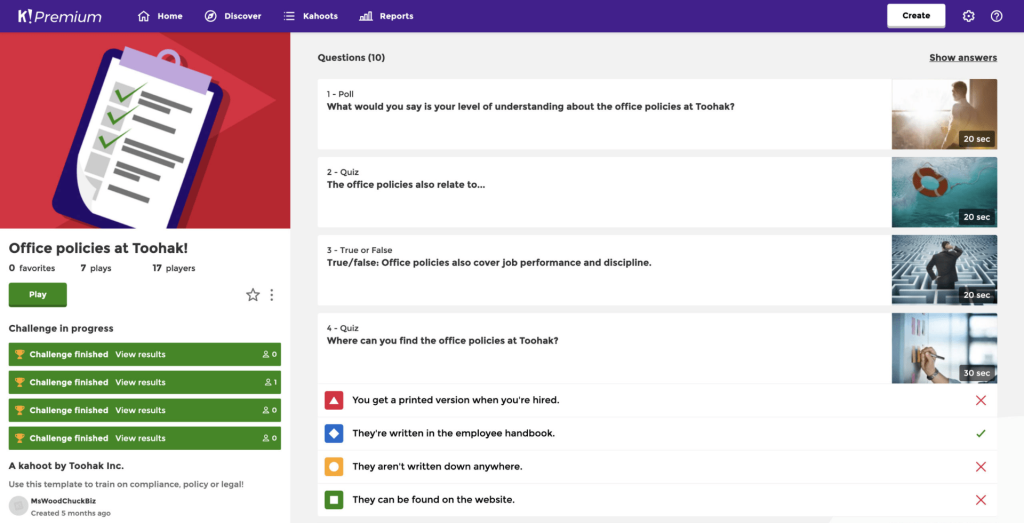
What Socrative never solved is the engagement gap, and Kahoot fills it directly. With the leaderboard, the music, and the countdown timer, it’s a full classroom event, not just a quiz. I’ve also used the homework mode for asynchronous review, and student completion rates are noticeably higher than with standard assignments.
The tradeoff is that speed-focused formats can reward fast guessers over deep thinkers, so I use them for review and warm-ups, not formal assessment. Rotate it every few weeks to avoid fatigue.
Pros:
- Live game-mode quizzes: Real-time competition with music, timers, and a live leaderboard locks students in.
- Collaborative team challenges: Students can work in groups, which Socrative doesn’t support.
- Homework and self-paced modes: Assign Kahoots asynchronously when live isn’t possible.
- 70+ language support: Broader than Socrative’s 14 languages.
- Pre-built quiz library: Search by subject and grade level across a massive public library.
Cons:
- Speed-focused format rewards fast guessers over deep thinkers; comprehension can take a back seat
- “Kahoot fatigue” is real if you run it too frequently; rotate it with other tools
How Kahoot Compares With Socrative: Socrative can run a live quiz, but the experience is flat. Kahoot turns the same activity into something students talk about after class. The tradeoff is depth: Kahoot doesn’t give you the reporting or question flexibility that Socrative even offers. Use it for engagement, not for formal assessment.
User Rating: 4.7/5 (Capterra)
Price: Starts at $3/month, billed annually.
3. Quizlet – Best for Curriculum Review and Student-Paced Learning
I keep recommending Quizlet to teachers who ask how to get students to actually review before a test without forcing them to. The answer is Quizlet, because students use it voluntarily outside of class. That kind of self-directed engagement is rare in ed-tech, and it’s what makes Quizlet genuinely different from every other tool on this list.
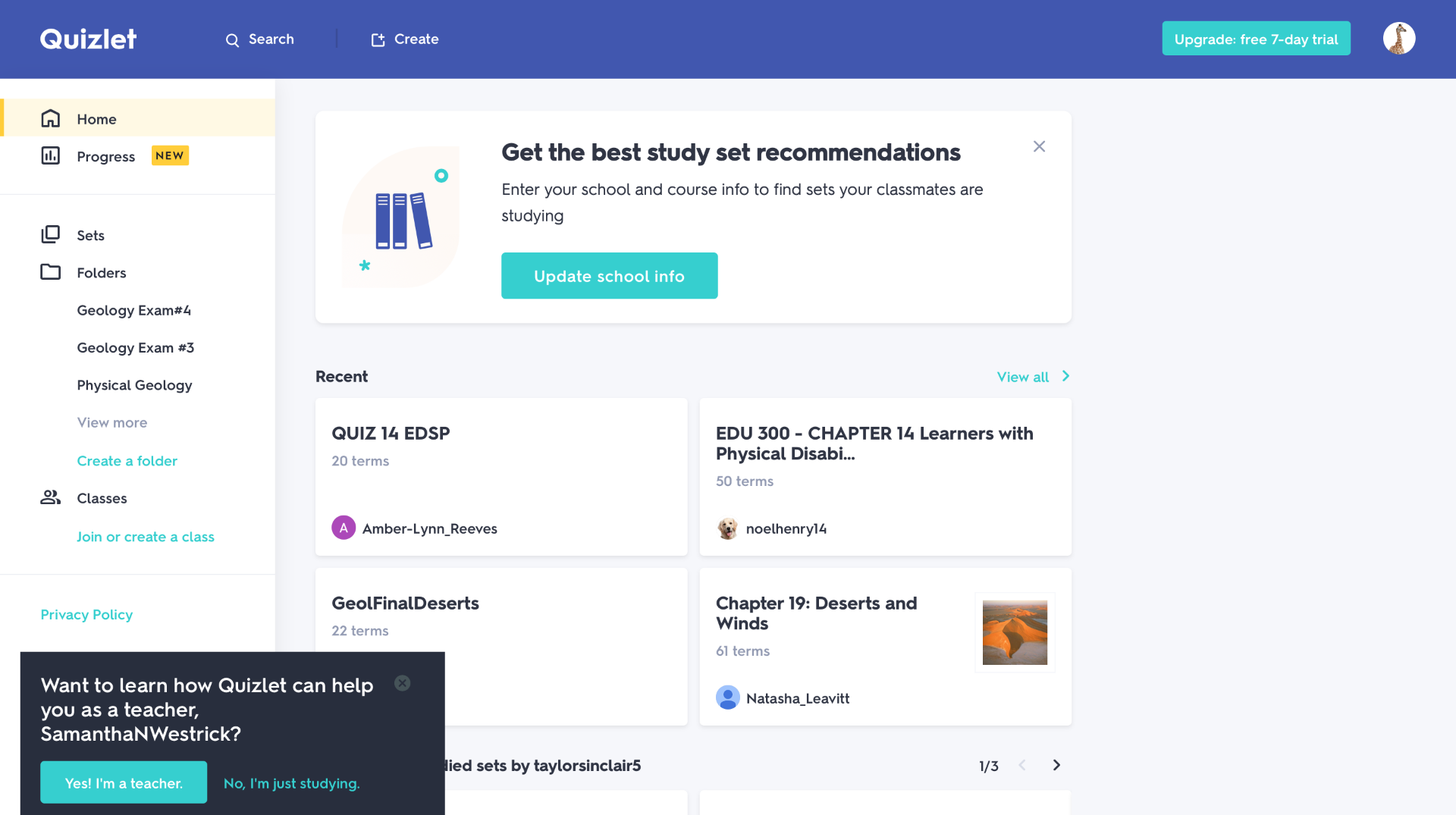
What surprised me when I went deeper was the adaptive logic. Quizlet doesn’t just shuffle flashcards; it tracks which ones a student keeps getting wrong and surfaces those more frequently, which is closer to how real studying should work. The 500M+ study sets mean there’s almost always something ready for your subject and grade level.
I’ve used it particularly for vocabulary-heavy units, and the retention results are measurable. The honest caveat is that the open library has inaccurate user-generated content, so always verify sets before assigning.
Pros:
- 500M+ flashcards and study sets: The largest student-generated content library in ed-tech.
- Adaptive difficulty: Adjusts question frequency based on individual student performance and mastery.
- Multiple study modes: Learn, write, spell, test, match, gravity. Students self-direct their review.
- Interactive diagrams: Strong for science, geography, and visual subjects.
- Progress tracking: More detailed breakdowns than Socrative’s basic summaries.
Cons:
- Open library includes inaccurate user-generated content; always verify sets before assigning
- Built for studying, not formal assessment; no proctoring, grading, or certification
How Quizlet Compares With Socrative: Socrative is a teacher-controlled quiz runner. Quizlet is a student-directed study platform. They solve different problems. Where Quizlet wins is retention and student motivation; where it falls short is formal assessment control. If you need both, use Quizlet for review and another tool for the actual assessment.
User Rating: 4.6/5 (Capterra)
Price: Starts at $7.99/month
4. Typeform – Best for Conversational and Reflection-Based Assessments
The first time I used Typeform for a student reflection activity, three students told me it was the first survey they’d ever actually finished. That reaction tells you exactly what Typeform is good at: it removes the friction and anxiety of traditional quiz formats by delivering one question at a time in a clean, conversational interface that feels nothing like a test.
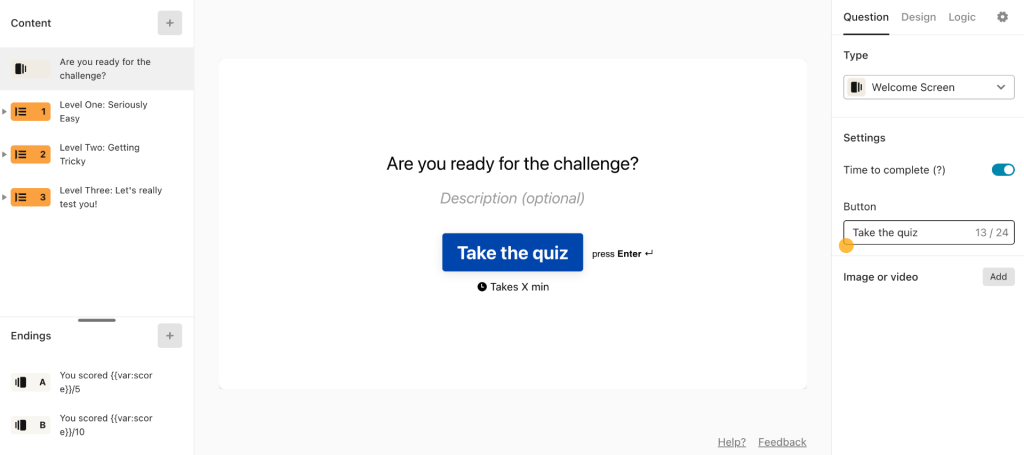
For exit tickets, pre-lesson entrance checks, and metacognitive reflection tasks, Typeform’s conditional logic is genuinely useful. I can branch the quiz based on how a student answers, so a student who got a concept wrong sees a follow-up probe while a student who got it right moves on.
That kind of personalization usually requires a complex setup in other tools, but Typeform handles it intuitively. The tradeoff is that it’s not built for formal grading. No question bank, no proctoring, no certification. Use it for insight, not for summative assessment.
Pros:
- Conditional logic: Quiz paths branch based on previous answers for personalized review experiences.
- Open-ended, rating, and opinion-scale questions: Better for reflection and metacognitive assessment than Socrative.
- Image and video embedding: Add visual context directly to questions.
- Conversational one-question-at-a-time format: Reduces test anxiety for reluctant responders.
Cons:
- Not built for formal grading; no question bank, no proctoring, no certification
- No free plan; pricing starts at $25/month, which is steep for a single-use case
How Typeform Compares With Socrative: Socrative is a quiz tool; Typeform is a conversation tool. Don’t use Typeform for graded assessments. Use it when you want honest student responses, reflection data, or entrance tickets that actually tell you something before a lesson starts.
User Rating: 4.7/5 (Capterra)
Price: Starts at $28/month
5. Formative – Best for Real-Time Remote Proctoring and Live Monitoring
I came across Formative when a teacher in a hybrid classroom told me she had no way to know if her remote students were actually doing the work or just submitting answers after a quick Google search. Formative solves that specific problem better than anything else I’ve tested at this price point, and for hybrid and remote classrooms, that problem is the one that matters most.
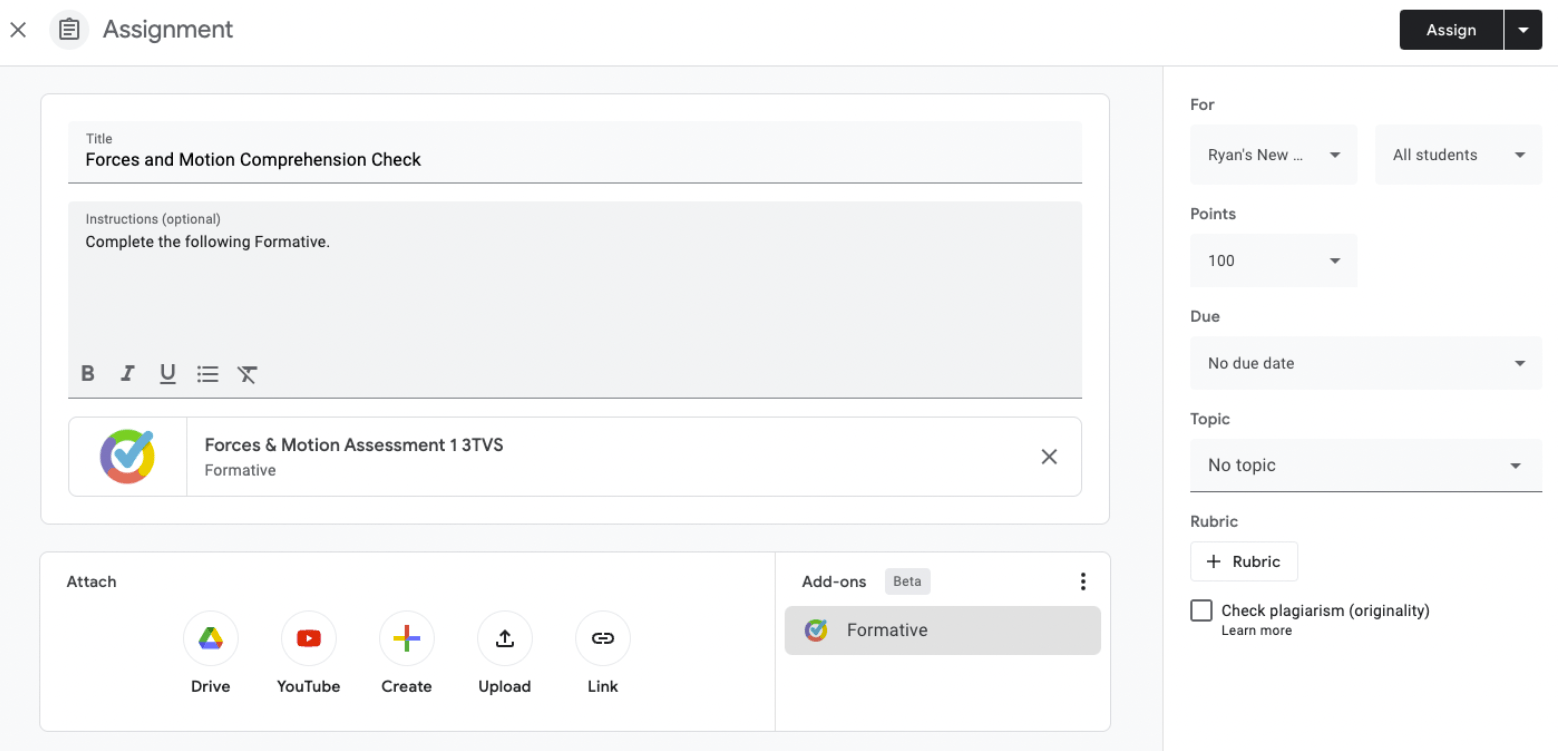
The live monitoring dashboard shows me every student’s progress question by question as they work, in real time. I can see who’s stuck on question three, who’s flying through without reading, and who hasn’t even started yet. The AI-flagged suspicious behavior adds another layer that Socrative doesn’t come close to offering.
I’ve used it in lessons where I’ve been able to pause the class mid-assessment because the live data showed that most students had missed the same concept. That kind of instructional responsiveness is something Socrative simply doesn’t enable.
Pros:
- Live assessment monitoring: Watch student progress question by question in real time while the quiz runs.
- Audio and video questions: Add media directly to assessments; Socrative has no equivalent.
- Browser restriction and copy-paste disable: Students can’t open other tabs or copy content during the assessment.
- AI-flagged suspicious behavior: Detects patterns suggesting off-task activity.
- Google Classroom, Canvas, Schoology, and Clever integrations: Far broader than Socrative’s Google Classroom-only support.
Cons:
- A second device isn’t detected; determined cheaters can still use a phone alongside a locked browser
- Best for monitored sessions, not fully unattended high-stakes exams
How Formative Compares With Socrative: Socrative has no proctoring and no live student view beyond aggregate progress. Formative gives you real-time, student-by-student visibility during the assessment. For hybrid and remote classrooms, that gap is the whole ballgame.
Price: Starts at $20.75/month, billed annually.
6. Mentimeter – Best for No-Login Mobile Participation and Live Polls
Mentimeter is the tool I reach for when the real problem isn’t what students know, it’s that students aren’t participating at all. No login, no app download, no IT approval for student accounts. Students join with a code on whatever device they have, and that removal of friction changes participation rates in a way I didn’t fully appreciate until I saw it in a class where the teacher had been struggling to get responses for weeks.
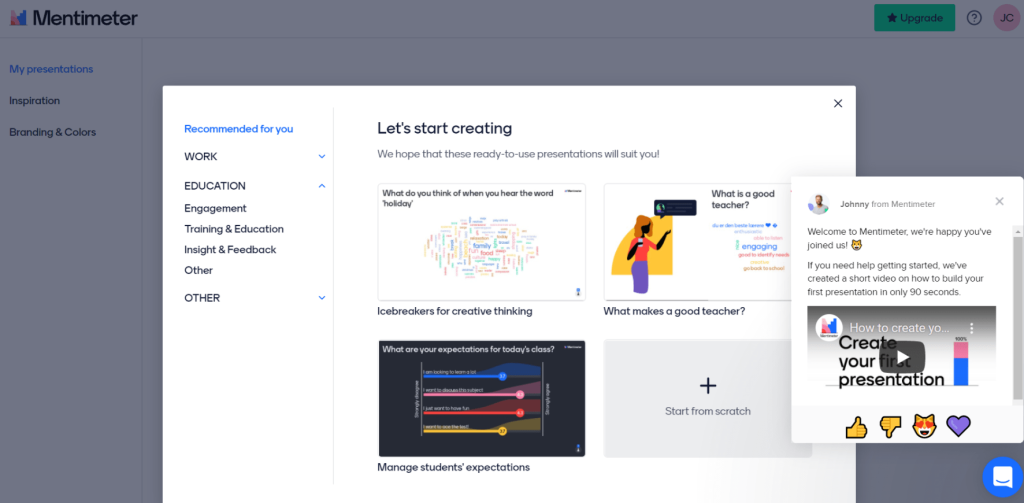
The word cloud, live Q&A, and polling formats go well beyond anything Socrative offers, and the gamified quiz mode adds a competitive layer without requiring the full production of a Kahoot session.
I use it most at the opening and closing of lessons, where I want honest, ungraded responses that tell me where students actually are. The limitation is clear: there’s no gradebook, no question bank, and no formal reporting. It’s an engagement and pulse-check tool, and it’s excellent at exactly that.
Pros:
- No student login required: Students join with a code; zero setup friction on their end.
- Live polls, word clouds, and open Q&A: Formats Socrative doesn’t offer at all.
- Gamified quiz mode: Music, animations, and a leaderboard built into a presentation flow.
- Mobile-first design: Works cleanly on phones without a projector or classroom computer.
- Broader template library: More design options for visually engaging activities.
Cons:
- Not a formal assessment tool; no grading, no question bank, no gradebook reporting
- Per-presenter pricing adds up if multiple teachers in a department want to use it
How Mentimeter Compares With Socrative: Socrative requires student accounts and runs a structured quiz. Mentimeter requires nothing from students and runs anything from a poll to a quiz to a brainstorm. Use Mentimeter for the opening and closing of lessons; use a grading-capable tool for the middle.
User Rating: 4.4/5 (Capterra)
Price: Starts at €14/presenter/month.
7. Classtime – Best for Real-Time Formative Data During Instruction
Classtime is the closest thing I’ve found to what Socrative was supposed to be, done properly. I discovered it after a teacher told me she needed something that showed her what was happening during a lesson, not just a score report after it ended. That real-time diagnostic view during instruction is exactly what Classtime delivers, and it’s the feature that separates it from most tools in this category.
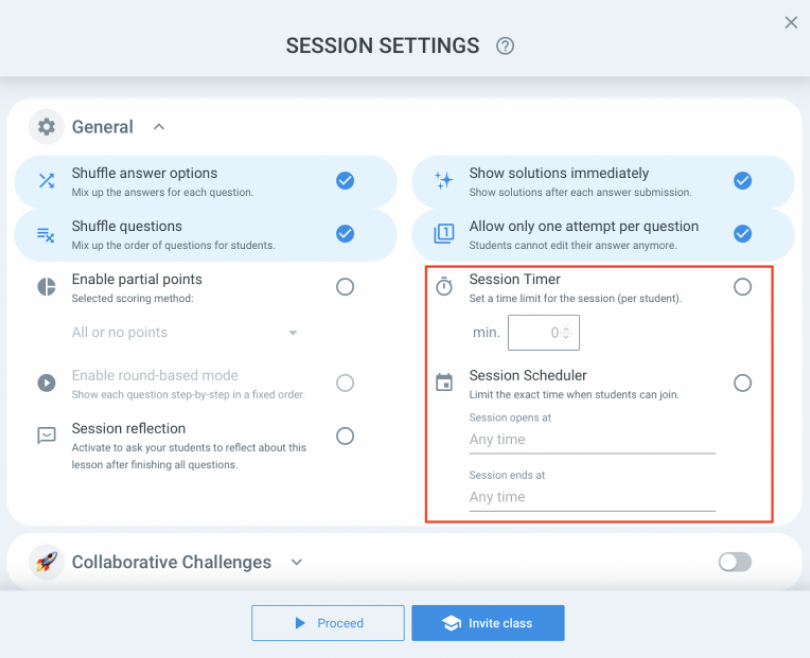
What I find most useful is the automatic concept-gap identification. After an activity, Classtime doesn’t just show me how many students got each question right. It surfaces which specific students are struggling and flags the exact concepts where understanding broke down.
That’s the information that actually changes what I plan for tomorrow’s lesson, and it takes seconds to read rather than minutes to calculate manually. For formative-focused teachers who want data that informs instruction rather than just records it, Classtime is the most direct answer I’ve found.
Pros:
- Live class overview: See the entire class’s response patterns on one screen while the activity runs.
- Diagnostic analytics: Automatically identifies struggling students and pinpoints the specific concept gaps.
- Multiple question types: Open-ended, multiple-choice, ordering, and categorization beyond Socrative’s basic formats.
- Student-paced and teacher-paced modes: Works for both live instruction and asynchronous assignments.
- Google Classroom integration: Seamless roster sync.
Cons:
- Less feature depth than larger all-in-one platforms
- Paid pricing isn’t publicly listed; requires a quote, which adds friction when evaluating
How Classtime Compares With Socrative: Socrative shows you who got what right after the quiz. Classtime shows you what’s happening while the quiz is running and diagnoses why students are struggling. For formative-focused teachers, that real-time diagnostic layer is the difference that matters.
User Rating: 4.7/5 (Capterra)
Price: Paid plans start at $60/educator annually
8. SpeedExam – Best for Secure, High-Stakes Exams
SpeedExam came up repeatedly when I talked to teachers who administer formal end-of-term assessments and had given up on consumer quiz tools because the security simply wasn’t there. I tested it specifically for scenarios where results need to be defensible: final exams, mastery assessments, and evaluations where a student challenging their score would be a real possibility.
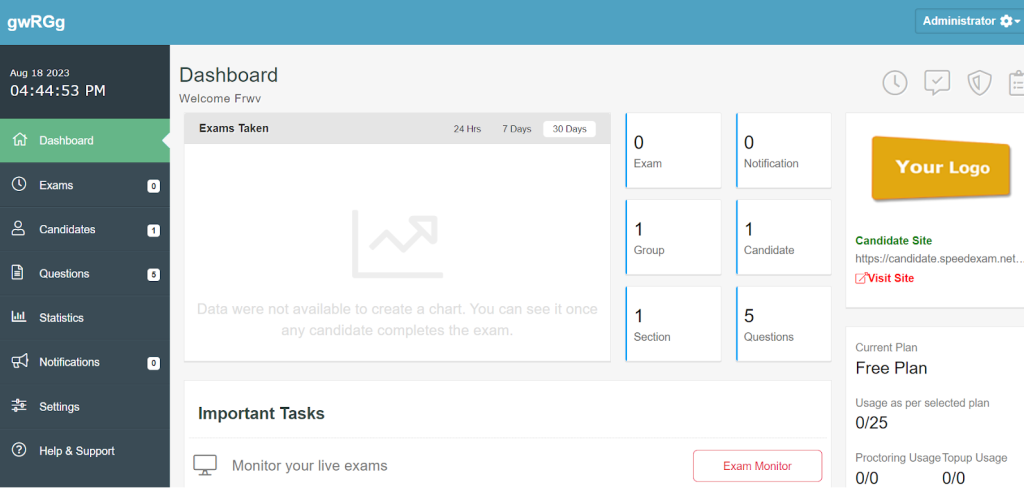
It holds up in all of those situations in a way that Socrative and most classroom tools don’t. The question randomization is more sophisticated than what most platforms offer: different question sets per student drawn from categorized banks, with time limits configurable at the question level rather than just the exam level.
I’ve also found the exportable reporting useful when I need to document assessment outcomes for compliance or program review purposes. The honest limitation is that SpeedExam is built for formal controlled exams, not daily classroom interaction. Don’t use it for a Friday review quiz; use it when the integrity of results actually matters.
Pros:
- Advanced proctoring controls: Browser lockdown, per-question time limits, attempt restrictions, and IP-based access control.
- Question randomization at scale: Different question sets per student from large categorized banks.
- Detailed result reporting: Exportable data with question-level performance and time-on-question tracking.
- Supports large concurrent batches: Designed for institutional scale, not just small classroom groups.
- Custom exam branding: White-label the experience for your institution.
Cons:
- Not a classroom engagement tool; no gamification, no live interaction during lessons
- Requires institutional setup; not a quick option for a single teacher experimenting with one exam
How SpeedExam Compares With Socrative: Socrative is designed for classroom quizzes and quick knowledge checks. SpeedExam is designed for secure, high-stakes assessments where accuracy, security, and auditability matter. If you’re conducting exams that impact course grades, certifications, compliance requirements, or professional qualifications, SpeedExam offers the controls and security needed for those scenarios, while Socrative is better suited for everyday classroom assessment.
User Rating: 4.8/5 (Capterra)
Price: Paid plans start at $20/year
9. ExamJet – Best for Automated Grading and Assessment Scheduling
ExamJet landed on my list after a teacher told me she was spending Sunday evenings grading the same multiple-choice exam she’d given every quarter for three years. That kind of recurring manual work is exactly the problem ExamJet eliminates.
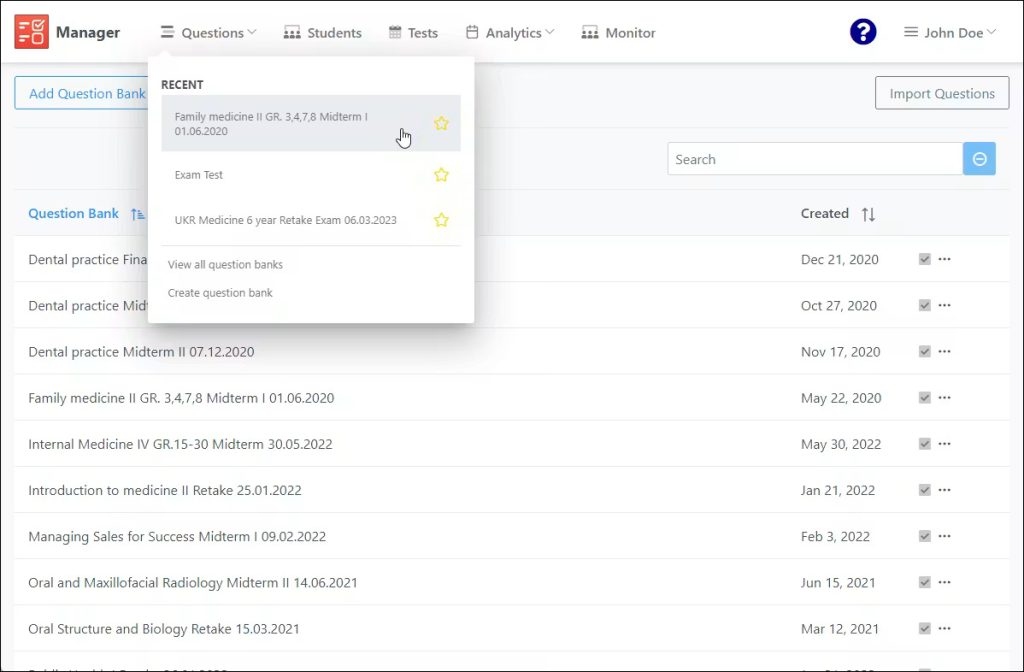
I tested it specifically for teachers who run the same assessments repeatedly across multiple class sections and need the grading and reporting handled automatically every single time.
The bulk scheduling feature is the standout for me. I can assign the same exam across multiple sections simultaneously, set different attempt windows for each group, and have consolidated results ready by the time the last class submits.
The question bank management is also more organized than most tools, with subject, topic, and difficulty tagging that makes pulling together a balanced assessment faster than building from scratch.
Pros:
- Automated grading engine: Handles MCQ, true/false, and structured response types without manual intervention.
- Question bank management: Build and organize questions by subject, topic, and difficulty.
- Bulk exam scheduling: Run the same exam across multiple classes or groups without rebuilding it.
- Immediate results and performance reports: Class-level and individual breakdowns available right after submission.
- Retake and attempt management: Control how many times a student can attempt an assessment.
Cons:
- Not a classroom engagement tool; no live game modes or real-time interaction during lessons
- Better suited for formal assessment administration than daily formative use
How ExamJet Compares With Socrative: Socrative requires manual grading oversight and doesn’t scale well for large batches. ExamJet automates the full assessment cycle: scheduling, delivery, grading, and reporting. For teachers running the same assessments repeatedly across multiple sections, the time savings are significant.
User Rating: 4.8/5 (Capterra)
Price: Paid plans start at $59.00/month
10. Respondus – Best for LMS-Integrated Exam Security and Proctoring
Respondus is the name that comes up every time I talk to teachers who already use Canvas, Blackboard, or Moodle and need a security layer on top of their existing exam setup without rebuilding anything.
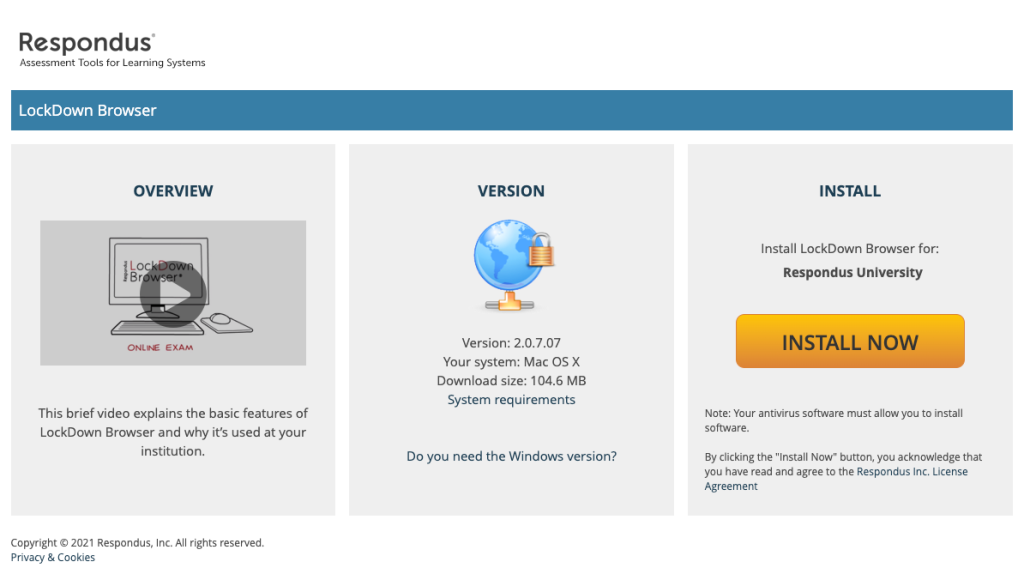
I’ve recommended it specifically in institutional contexts where the LMS is already established, and the gap isn’t in quiz creation; it’s ensuring the exams that already exist can’t be compromised during remote delivery. The LockDown Browser handles the obvious vectors: no other applications, no internet access, and no printing during an exam session.
Respondus Monitor adds webcam recording, with an AI review system that flags only the moments worth a closer look, which matters when you’re responsible for 30 students and can’t watch 30 recordings in full. The honest limitation is that Respondus is purely a security layer. It doesn’t build quizzes or run classroom activities.
Pros:
- LockDown Browser: Blocks other applications, internet access, and printing during an exam session.
- Respondus Monitor: Webcam-based automated proctoring with AI flagging of suspicious moments.
- Native LMS integration: Works directly with Canvas, Blackboard, D2L, Moodle, and other major platforms.
- Question import from LMS banks: No need to rebuild existing question sets.
- Efficient review dashboard: Shows only flagged moments, not full recordings.
Cons:
- Not a quiz creation or classroom engagement tool; it’s a security and proctoring layer only
- Requires institutional licensing; individual teacher adoption isn’t the intended use case
How Respondus Compares With Socrative: Socrative has no exam security. Respondus has no quiz creation. They don’t compete; they solve different problems for different assessment contexts. If you’re already in an LMS and need to make your exams secure, Respondus is the standard answer. If you need a quiz tool with some built-in security, ProProfs Quiz Maker is the better fit.
User Rating: 4.6/5 (Capterra)
Price: Paid plans start at $1695/year
My Top 3 Socrative Alternatives
After testing all ten tools and putting them through real classroom scenarios, three kept rising to the top for different reasons. The right one depends on what Socrative is actually failing to do for you.
1. ProProfs Quiz Maker
ProProfs Quiz Maker is my top overall pick because it solves the broadest set of problems K-12 teachers face when they outgrow Socrative. The AI generator kills manual question-entry work, 15+ question types remove format limitations, and built-in proctoring handles both daily quizzes and formal exams without a second tool. The analytics show question-level gaps, not just total scores. The free plan is genuinely usable from day one.
2. Kahoot
Kahoot earns its spot because it solves the one problem no analytics dashboard can fix: students who don’t want to participate. The live game format, leaderboard, and real-time competition create classroom energy that Socrative never could. Team challenges add a collaborative layer that works especially well for review sessions. It’s not a formal assessment tool, but for engagement, nothing on this list comes close.
3. Quizlet
Quizlet makes my top three because students use it voluntarily, which is the hardest thing to manufacture in ed-tech. The adaptive logic surfaces cards students keep getting wrong more frequently, making review genuinely effective rather than just busy work. The 500M+ study sets mean content is ready for almost any subject. For vocabulary-heavy units and pre-test review, the retention results are measurable and consistent.
Evaluation Criteria
Picking tools for a list like this is not something I take lightly. I followed a systematic approach to make sure every recommendation is fair, grounded, and actually useful for a teacher making a real decision about their classroom.
- User Reviews and Ratings: I started with verified feedback on Capterra, looking for patterns across reviews rather than isolated opinions. If multiple teachers flagged the same limitation or praised the same feature consistently, that shaped the assessment.
- Essential Features and Functionality: I focused on what actually drives assessment quality: question type depth, reporting granularity, AI capabilities, mobile support, and whether the tool delivers on the use case it claims to handle. A tool that lists “analytics” as a feature but only shows a total score did not rank as high, regardless of how polished the interface looks.
- Ease of Use: If building your first quiz takes more than 20 minutes, that friction compounds every time you create a new assessment. Tools with clear creation flows and minimal technical requirements ranked higher. A teacher with no IT background should be able to launch a quiz independently on day one.
- Customer Support: Integration failures, Google Classroom sync issues, and student access problems are common across assessment tools. I looked at support availability, response times cited in reviews, and how well teams assist during setup, not just after something breaks mid-class.
- Value for Money: I evaluated value based on what you realistically get at the tier most teachers would actually use, not just the cheapest entry plan. Free plans were assessed on how useful they are before upgrade pressure kicks in, because most teachers are spending their own money or working within a tight school budget.
- Personal Experience and Expert Opinions: I factored in firsthand observations and patterns from educators running real assessments across grade levels and subjects. If a tool consistently created friction or consistently impressed experienced teachers, that showed up in the final ranking.
The Right Socrative Alternative Makes Teaching Less Manual
Socrative is a useful classroom response tool, but as your assessment needs grow, its limitations become harder to ignore. Whether you’re looking for stronger analytics, AI-powered quiz creation, better engagement, secure testing, or more question types, there are plenty of best Socrative alternatives available. From Kahoot’s gamified learning experience to Quizlet’s self-paced study tools, each platform brings something different to the table.
Among all the options I evaluated, ProProfs Quiz Maker stood out for offering the most complete assessment experience. It combines AI-generated quizzes, advanced reporting, certification, question banks, and built-in proctoring in a single platform, making it suitable for both everyday quizzes and formal assessments.
Before making a decision, create a sample assessment in your top two or three choices and see which one best fits your classroom goals, workflow, and budget.
Frequently Asked Questions
What is the best free Socrative alternative for K-12 teachers?
ProProfs Quiz Maker, Formative, and Classtime all offer usable free plans for K-12 teachers. ProProfs is the strongest overall because the free tier supports AI quiz generation, 15+ question types, and basic reporting, not just a feature preview that forces an upgrade after two quizzes.
Which best Socrative competitor works best with Google Classroom?
ProProfs Quiz Maker, Formative, Classtime, and Kahoot all integrate with Google Classroom for roster sync and assignment delivery. Formative has the deepest Google Classroom integration if live monitoring during class is your priority.
Can I switch from Socrative without rebuilding all my quizzes?
ProProfs Quiz Maker supports bulk question import from Excel and document uploads, which cuts migration time significantly. For most other tools, you'll need to rebuild manually, so it's worth deciding which platform you plan to stick with before investing heavily in a question bank.
Which best Socrative competitor is best for preventing cheating on remote exams?
Respondus is the institutional standard if you're already in an LMS like Canvas. For standalone use, SpeedExam and ProProfs Quiz Maker both offer browser lockdown, webcam proctoring, question randomization, and IP tracking. Formative covers live monitoring during class but is less suited for fully unattended exams.
Do any of these tools generate quiz questions automatically?
Yes. ProProfs Quiz Maker's AI generator creates complete quizzes from a topic prompt or from uploaded documents, PDFs, and videos. Most other tools on this list require manual question entry, which is one of the clearest workflow advantages ProProfs has over Socrative’s best Socrative competitors.
What Socrative alternative is best for student engagement and classroom energy?
Kahoot is the benchmark for high-energy live quizzes. Mentimeter is better when you want real interaction without the speed-focused competition format. Both address the engagement gap that Socrative's flat interface never solved.
Is there a Socrative alternative that handles both teaching content and testing?
ProProfs Quiz Maker lets you embed videos and documents alongside questions and supports course-style delivery, making it useful for mini-lessons paired with assessments. It's the closest option on this list to a combined teaching and testing platform without the full complexity of an LMS.
Let ProProfs AI Build a Quiz

 We'd love your feedback!
What did you like & how can we make it even better?
 Thanks for your feedback!
 Ask Your Question
Have a question? Get expert help to make your decision easier.