
I’ve written enough quizzes by hand to know exactly how long a good one takes: an hour, easily, if you want questions you’d actually feel fine handing to a room full of learners. So when someone tells me they can create a quiz with AI in five minutes, my first reaction is a raised eyebrow.
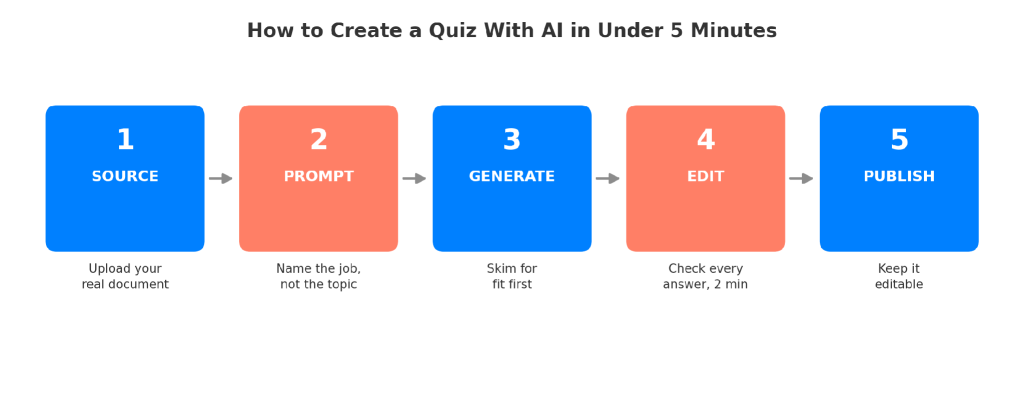
My second reaction, after doing it enough times to trust the process, is that they’re mostly right. Learning how to create a quiz with AI isn’t about typing a topic into a box and hoping for the best. It’s a specific sequence: source, prompt, generate, edit, ship.
Skip the editing step and you’ll publish something wrong with total confidence. Do it in order and you really can go from blank page to a usable quiz before your coffee gets cold.
This is for:
- Trainers building a compliance or onboarding quiz on a deadline
- Teachers turning lesson material into a practice test
- HR teams running a knowledge check after a policy rollout
- Marketers building a lead-gen quiz for a campaign
- Anyone with a stack of source material and thirty minutes, not three hours
All of these people are trying to create quizzes using AI without babysitting every single question that comes out the other end. That’s a reasonable thing to want. It’s also not automatic.
What “Creating a Quiz With AI” Actually Means
That distinction matters more than most product pages let on. The AI is doing pattern completion against your source material, guessing at what a reasonable question looks like based on everything similar it’s seen before.
Sometimes the guess is genuinely sharp. Sometimes it’s a confident, well-formatted question about a detail your document never actually said. You’re not outsourcing the quiz. You’re outsourcing the first draft, which, if you’ve ever stared at an empty quiz builder at 4:45 on a Friday, is still a real gift. That’s the basic mechanics of how to create a quiz with AI. Knowing the mechanics isn’t the same as doing it well, which is the actual point of everything below.
What Do You Actually Need Before You Open an AI Quiz Maker?
Before you get into how to create a quiz with AI that’s actually worth assigning to real people, get three things sorted. Not much, honestly, but the few things you do need matter more than people assume.
- Source material, if you have it. A PDF, a slide deck, a policy doc, a training manual, even a YouTube recording of a session you ran last quarter. The more specific the input, the less the AI has to invent.
- A plain-English sense of the job. What should someone be able to do or recall after taking this? “Test them on the material” is not a job. “Confirm they know the three steps for reporting a safety incident” is.
- A tool that reads what you give it. A lot of people default to a general chatbot and paste in a paragraph. That works for a five-question warm-up. It falls apart the moment your source material is thirty pages long.
If you’re working from a topic alone, with no document to upload, that’s fine too. You’ll just lean harder on the prompt itself, which is the part most people rush.
The tools that let you create quizzes using AI all share one trait: they actually read what you upload instead of guessing from a topic name alone. That’s a bigger deal than it sounds.
How Do You Actually Create a Quiz With AI in Under 5 Minutes?
This is the actual sequence for how to create a quiz with AI in under five minutes, and I’m not describing it in the abstract. This is exactly how I ran it in ProProfs Quiz Maker, screen by screen, the last time I needed a real quiz by the end of a meeting.
Step 1: Source: Open a New Quiz and Hand It the Real Document
From the dashboard, I click “+ Create a Quiz,” pick Scored (compliance and training quizzes almost always are), and land on a screen with a text box and an upload option sitting right underneath it, built to take a PDF, DOCX, or TXT file directly. I upload the actual policy doc, not a paragraph summarizing what’s in it. A summary strips out the specific numbers and edge cases that make a question worth asking in the first place.
Step 2: Prompt: Type the Job Into That Same Box Before You Touch Generate
This is the single biggest lever in how to create a quiz with AI that doesn’t need a full rewrite, and it happens in the same field where I just uploaded the file. “Quiz on onboarding” gets generic filler. “Ten multiple-choice questions testing whether a new hire can identify the four steps in our expense approval process, medium difficulty, one trick answer per question” gets something usable. Then, and only then, I click Generate Quiz. You can try below:

Let ProProfs AI Build a Quiz
Step 3: Generate: Skim What Comes Back Before You Read Closely
The questions land with answer options already laid out and the correct answer already flagged. My first pass is a triage pass: are these even about the right material, is the difficulty roughly right, is anything obviously off-topic? I’m not proofreading yet. I’m deciding whether this batch is worth proofreading at all.
Step 4: Edit: Fix It Inside the Same Panel, Don’t Rebuild by Hand
If a question is weak, I don’t delete it and start over. I prompt the AI panel directly, “make the distractors less obvious” or “rewrite question four, it’s too easy,” and it revises that one question without touching the rest. What it can’t do for me is the actual fact-check. I still read every correct answer against my source manually. Asking the AI to polish a question is not the same as confirming the question is true.
Step 5: Publish: Share It, Then Let the Reporting Do the Rest
I share the finished quiz as a link (QR code and embed work the same way), and once real people start taking it, the built-in reporting shows me which specific questions people miss constantly or misread as a group. That tells me more about a weak question than my own read-through ever did.
No separate tool for grading, no exporting scores into a spreadsheet to figure out who missed what, no copy-pasting a chatbot’s output into a document just to have something to hand someone. That’s most of what separates “create quizzes using AI” as an actual workflow from “create quizzes using AI” as a party trick.
What Actually Eats the Five Minutes If You’re Not Careful?
This is the part of how to create a quiz with AI that most five-minute promises quietly leave out.
The promise assumes your first AI-generated quiz is nearly finished. It usually isn’t, and pretending otherwise is how incorrect questions end up in front of real learners.
AI Can Be Confident and Wrong
AI models can produce factually incorrect information with the exact same confident tone they use for accurate answers. There’s no visual cue, disclaimer, or warning.
For example, a quiz about your refund policy might include a plausible-sounding but completely fabricated dollar threshold. It will look no different from the surrounding questions that are actually correct.
What to do: Verify every question and answer against your original source. Skimming isn’t enough.
AI Often Creates Shallow Questions
By default, most AI quiz generators lean toward simple recall questions, such as:
- Define this term.
- Name this date.
- Identify this concept.
That works for a quick knowledge check but falls short when you need to measure real understanding.
What to do: Explicitly ask the AI to generate application-based, scenario-based, or higher-order thinking questions. It won’t do this automatically.
Long Documents Lead to Coverage Gaps
Coverage gaps are common when generating quiz questions from lengthy documents.
For example, upload a 16-page policy manual and ask the AI to create a quiz. You’ll often receive several questions from the opening pages while much of the later content is barely represented.
This isn’t an edge case. It’s one of the most common reasons an AI-generated quiz appears complete while quietly missing large sections of the source material.
What to do: Review the quiz against the document outline to confirm every important section is covered.
The Real Five Minutes
None of this means AI quiz generation is a waste of time.
It simply means the five minutes should include reviewing, verifying, and refining the output, not just clicking Generate.
How Do You Write a Prompt That Actually Gets You Usable Questions?
Most disappointing AI quiz output traces back to a lazy prompt, not a bad tool. If you want to create quizzes using AI that don’t need a full rewrite, and you want to generate quiz questions with AI that actually match your objective, be specific about five things:
- Audience. New hires versus five-year veterans need genuinely different questions, not the same question with harder vocabulary.
- Difficulty. Say “requires applying the concept to a new scenario” if that’s what you actually want. “Medium difficulty” alone means nothing consistent to a model.
- Question types. Ask for a mix (multiple-choice, scenario-based, short answer) instead of accepting whatever the default happens to be, or start from a ready-made quiz template if you’d rather the structure was already decided for you.
- Learning objective, stated plainly. Not “the topic” but the specific thing someone should be able to do afterward.
- What to explicitly avoid. Tell it not to test information your document doesn’t actually cover. This single instruction eliminates a surprising share of the fabricated-detail problem.
A prompt like this works better than most people expect: “Using the attached document only, write eight scenario-based questions for new warehouse hires testing whether they can correctly apply our lockout-tagout procedure. Medium difficulty. Include one obviously-wrong distractor and one plausible-but-wrong distractor per question. Do not introduce any detail not present in the document.” That’s specific enough that the output needs editing, not rewriting. Try it yourself here:
Let ProProfs AI Build a Quiz
What Should You Actually Check Before You Publish?
This is the last mile of how to create a quiz with AI that actually holds up once real people start taking it. Not everything deserves equal attention. Some fixes matter enormously. Some can wait. And one common instinct is a trap.
What matters most: factual accuracy of every correct answer, checked line by line against your source. This is non-negotiable, and it’s the one step people skip when they’re in a hurry, which is exactly backward.
What can wait: phrasing polish, tone consistency, whether question three sounds slightly more formal than question four. Nobody fails a quiz because of awkward phrasing.
The trap: assuming that because the AI generated the right number of questions, it covered the right material. It’s easy to glance at “twelve questions, looks thorough” and move on. Actually check which sections of your source got tested and which got skipped entirely. This is the single most common way a rushed AI quiz ships with real gaps.
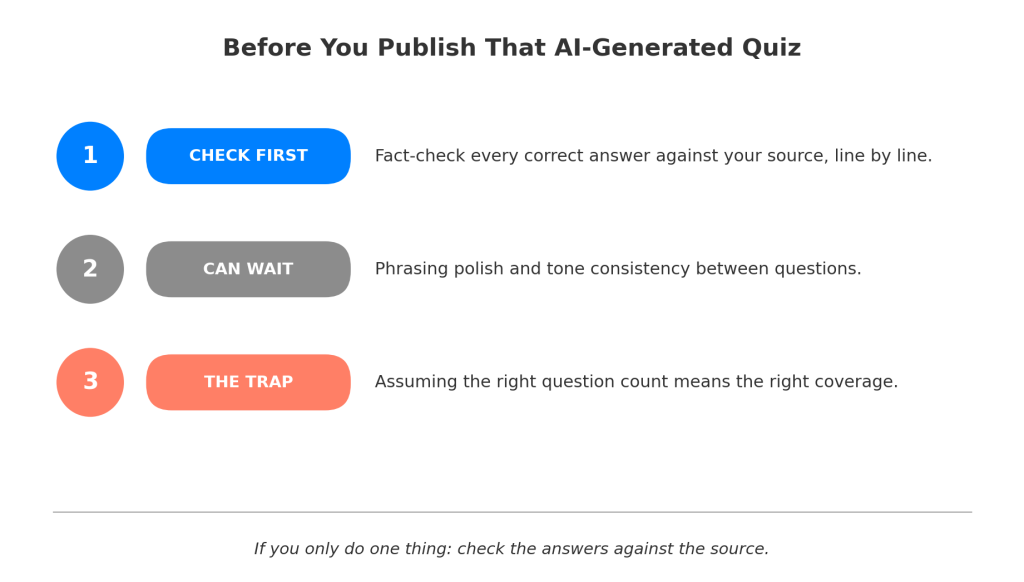
If you can only do one thing before you publish, fact-check the answers against your source document. Everything else is polish. That one step is quality control.
Do You Need a Dedicated AI-Powered Quiz Maker, or Will a General Chatbot Do?
Both routes let you create quizzes using AI, technically. Only one of them turns that draft into something gradeable. For a quick, throwaway five-question check, a general chatbot is genuinely fine. For anything you’re actually going to assign, track, or grade, the gap shows up fast.
| General AI Chatbot | Dedicated AI-Powered Quiz Maker | |
|---|---|---|
| Reads an uploaded PDF or doc directly | Inconsistent, often needs manual copy-paste | Built in |
| Turns output into a shareable, gradeable quiz | No, you’re still building that separately | Built in |
| Auto-grades responses, including open-ended ones | No | Yes, with custom rubrics on most tools |
| Tracks who took it and how they scored | No | Yes |
| Forever-free tier with no credit card | Varies, often capped | ProProfs Quiz Maker offers a free-forever plan for shorter quizzes |
This is the gap people hit right after their first “wow, that was fast” moment with a general chatbot: the questions exist, but there’s no way to actually send them to anyone, track completions, or grade the results without building an entire second system by hand. An AI-powered quiz maker built for this specifically, like ProProfs Quiz Maker, closes that gap by handling the generation and the delivery, scoring, and reporting in the same place.
The Five Minutes Are Real. The Judgment Isn’t Optional.
Here’s what I’ve landed on after doing this enough times to stop being impressed by the speed alone: the five-minute claim is true, and it’s also slightly misleading, because it describes the generation step and quietly skips the part where you actually make sure the thing is correct. Both things are true at once. AI genuinely collapses the blank-page problem that used to eat the first hour of quiz writing. It does not collapse the responsibility to check what it produced.
If you remember one thing from all of this, let it be the boring one: generate fast, check slow. That’s the real short version of how to create a quiz with AI. The tool earns you back the hour you used to spend writing from scratch. Don’t hand that hour right back by skipping the two minutes it takes to verify the thing is actually accurate.
Frequently Asked Questions
Can AI create a full quiz from a PDF?
Yes. Upload the PDF directly to a tool that reads documents (rather than pasting a summary into a chatbot), and it can generate quiz questions with AI pulled from the actual content, including specific facts, figures, and procedures in the file.
How accurate are AI-generated quiz questions?
Accuracy varies by source quality and prompt specificity. AI can state incorrect information confidently, with no visible warning sign, so every generated answer needs a manual check against your source material before publishing. Longer, messier documents tend to produce more confident-but-wrong questions than a short topic prompt.
What's the best free way to create a quiz with AI?
Look for a tool with a genuinely free forever tier, not a time-limited trial. ProProfs Quiz Maker, for example, lets you build shorter quizzes for free with no credit card, which is enough to test the workflow before committing to anything.
Can AI grade quizzes automatically?
Yes, dedicated AI-powered quiz makers can auto-grade multiple-choice, true/false, and even open-ended or essay responses using custom rubrics, which a general chatbot cannot do without a separate system built around it. This is usually the first gap people notice once they start actually running a quiz.
How many questions can AI generate in one batch?
It depends on the tool and source length, but you can generate quiz questions with AI in batches of roughly ten to twenty per pass. For longer documents, generate in smaller batches by section instead of all at once, to avoid the coverage gaps common with long single uploads.
Do I need to fact-check AI-generated quiz questions?
Always. This is the one non-negotiable step. AI can produce a fabricated but confident-sounding detail inside an otherwise accurate quiz, and the only way to catch it is checking every answer against your original source material, line by line, before anyone else sees the quiz.
Can I edit AI-generated questions after they're created?
Yes, and you should. Treat AI output as a first draft: fix weak distractors, adjust difficulty, remove anything off-topic, and reword questions that sound obviously machine-generated before you publish or assign the quiz. Most tools let you edit inline, so nothing about the process locks the questions in place.
What file types can I upload to generate a quiz with AI?
Most AI-powered quiz makers accept PDFs, Word documents, and plain text, with some supporting YouTube links or webpage URLs too. If you're figuring out how to create a quiz with AI from a specific file type, check the tool's supported formats before assuming it will work.
Let ProProfs AI Build a Quiz

 We'd love your feedback!
What did you like & how can we make it even better?
 Thanks for your feedback!
 Ask Your Question
Have a question? Get expert help to make your decision easier.