
I once watched a perfectly good compliance quiz fall apart in Poland. Not because the content was wrong. Because “sign off” got translated literally, and half the room thought they were being asked to autograph something. Small mistake. Big meeting afterward.
That’s the thing nobody tells you before you build your first multilingual quiz: the quiz part is easy. The multilingual part is where people get quietly humiliated, or quietly lose ten minutes of a training session to confusion nobody wants to admit to. If you’re building for a workforce, a classroom, or a customer base that doesn’t all speak the same language at the same level, this is for you. I’ve built these for global teams, broken a few of them along the way, and fixed enough to have opinions.
What Is a Multilingual Quiz, Actually?
Most people picture the first version, a quiz that got translated once. What they actually need, if they want it to hold up under real use, is the second: an experience that stays consistent in every language, not just in the question text. Some tools translate the label on a button and call it done. Others leave the questions in English while the buttons speak Portuguese, which is its own special kind of confusing.
A genuinely multilingual quiz maker treats every visible piece of the experience as translatable, not just the parts a developer remembered to flag. ProProfs Quiz Maker builds it this way by default, translating the interface as thoroughly as the questions themselves.
Translation Gets You Words. Localization Gets You Trust.
Here’s where most people go wrong, and I include past versions of myself in that. They treat “multilingual” as a find-and-replace job. Swap the English words for French ones, ship it, move on. That’s translation. It is not localization, and the gap between them shows up exactly when you can least afford it: in the middle of a graded assessment, where a confused learner can’t ask you what you meant.
- Idioms and workplace metaphors don’t survive the trip. “Touch base” means nothing useful in Mandarin. Neither does most humor, which tends to be the first thing writers add for warmth and the first thing that reads as bizarre once it’s moved.
- Colors and symbols carry different weight depending on where your learner is sitting. A green checkmark reads as “correct” almost everywhere. A specific hand gesture in your example image might not.
- Examples built around one culture’s assumptions travel badly. A scenario that feels universal to you can confuse or quietly offend a learner reading it somewhere else.
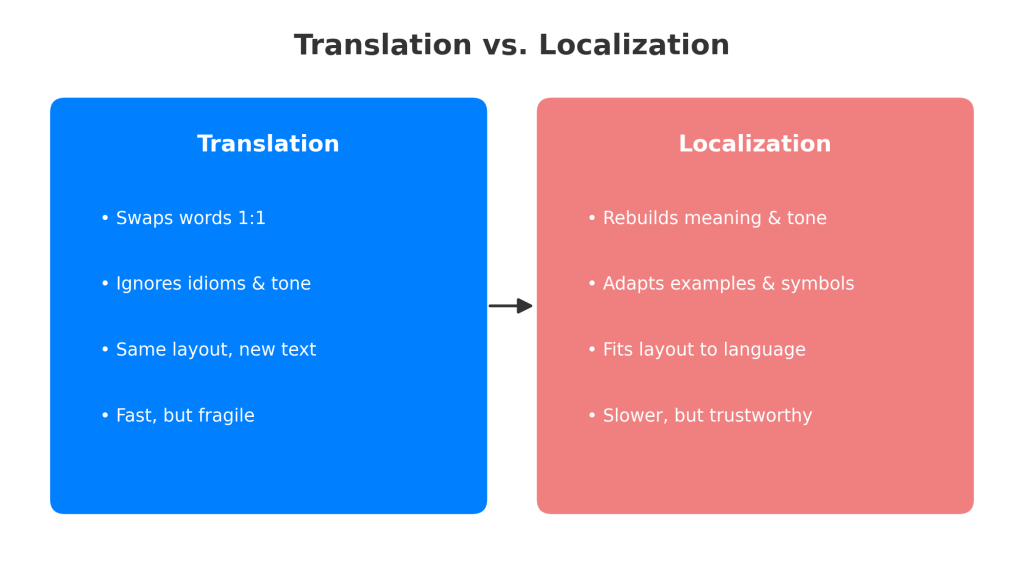
None of this means don’t bother. It means the job isn’t “translate the quiz.” The job is closer to: rebuild the quiz’s meaning in a second language, using a second set of cultural assumptions, while keeping the actual skill being tested identical. Machine translation gets you a rough draft. A native reviewer gets you something you can actually grade someone on.
Building a Multilingual Quiz, Step by Step
I’m going to walk through this the way I’d actually do it, not the idealized version.
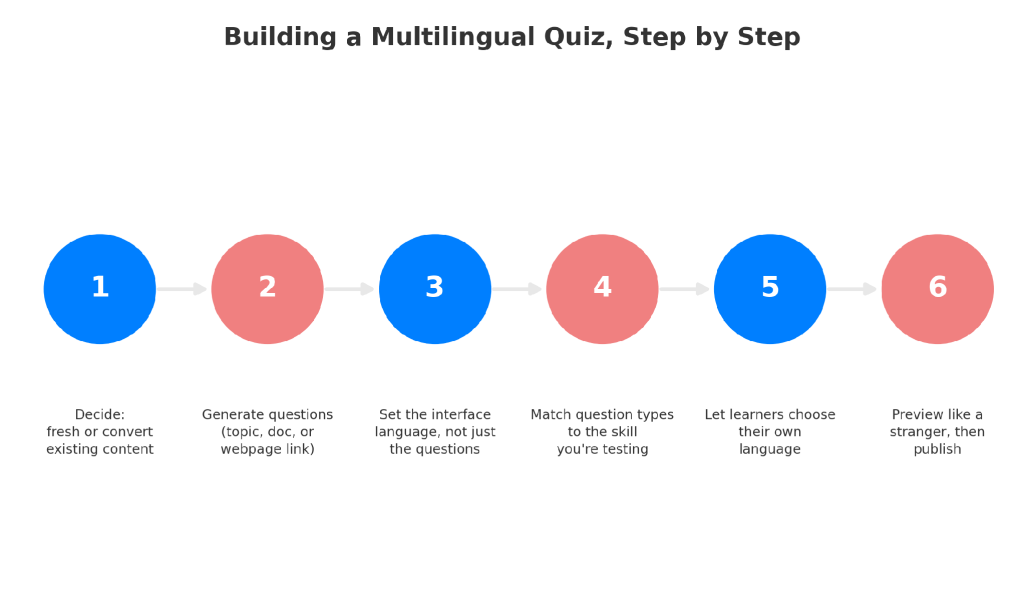
Step 1: Decide How You’ll Create the Quiz
Decide whether you’re building fresh or converting something that already exists. If you already have a training manual, a policy doc, or an existing English quiz, you don’t need to write new questions from scratch. If you’re starting from nothing, a topic and a target language are enough to get a first draft.
Step 2: Generate Questions From Your Existing Content or a Topic
Generate the questions whichever way fits your source material. Type a topic and let AI draft it from scratch, upload a document you already have, or paste in a webpage link. ProProfs’ AI quiz creator can generate the quiz directly from any of these, in the same language as the source or a different one.
Try it yourself. Type a quiz topic below in the language you want to teach, and watch ProProfs AI build the first draft in seconds.
Suggested prompts:
- Basic Spanish Vocabulary Quiz for Beginners
- French Grammar Test, Intermediate Level

Let ProProfs AI Build a Quiz
Step 3: Match the Quiz Interface to the Target Language
Set the interface language deliberately, not by accident. This is the step people skip, and it’s the one that caused my Poland problem. The welcome screen, instructions, navigation buttons, results page, certificate, and email notification all need to match the language the questions are in. A quiz that asks questions in Japanese but shows an English “Submit” button isn’t done. It’s half-finished and looks it.
Step 4: Choose Question Types That Fit Your Learning Goals
Pick question types based on what you’re actually testing, not what’s fastest to build. If you’re assessing language proficiency specifically, audio and video response questions let you test speaking and listening, not just reading comprehension. Multiple choice is fine for knowledge checks. It’s the wrong tool for a pronunciation test.
Step 5: Decide How Learners Will Select Their Language
Decide whether learners choose their own language, or you assign it. For a global workforce with mixed comfort levels, letting people toggle their preferred language themselves, rather than assuming based on location, tends to produce fewer support tickets and fewer people quietly guessing their way through a form field.
Step 6: Preview Every Language Version Before Publishing
Preview it as a stranger would see it, then publish. Not as the person who wrote it. Read every screen from top to bottom in the actual target language, ideally with someone who speaks it natively looking over your shoulder.
Four Ways AI Can Build a Multilingual Quiz, and Where I’d Slow Down
There isn’t one way to use AI to create quizzes in multiple languages, and most explanations flatten this into a single button press, as if every language quiz generator worked the same way under the hood. From where I sit, a few methods actually matter, and they’re not interchangeable.
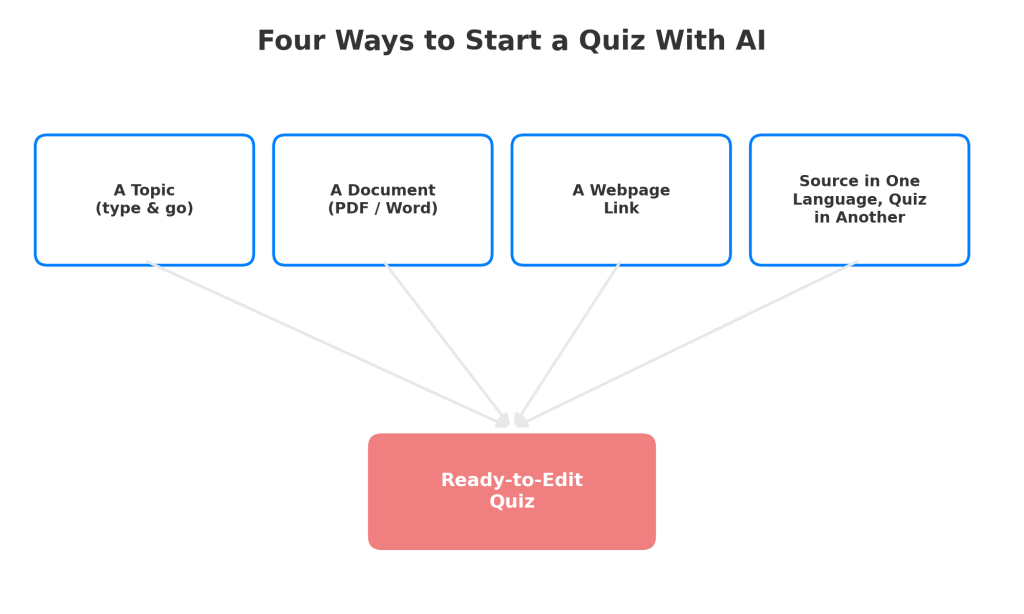
- Type a topic and let it draft the whole thing. Works well for general knowledge checks, warm-up quizzes, or anything you’re not grading against a specific source. Tell it the subject and the language, and it hands you a complete first draft, questions, answer options, and all. It’s a fast way to create quizzes in multiple languages without a source document in hand.
- Feed it existing material. A PDF, a Word doc, a policy manual, whatever you already have. This is the mode I reach for whenever I need a language quiz generator that stays grounded in a specific policy or lesson instead of the AI’s general sense of the topic. A mistranslated general fact is a lot harder to catch than a straightforwardly wrong one, which is exactly where a language quiz generator earns its keep.
- Paste in a webpage or article link. The quiet workhorse option. If your source material already lives online, in a blog post, an internal wiki page, or a public policy page, you skip the upload step entirely.
- Feed it content in one language, get the quiz in another. This is a genuinely useful trick for multilingual work specifically. An English policy document can become a Vietnamese assessment without a human translating it question by question first.
I’d still put a native speaker’s eyes on the result before it goes live. AI grounded in your document is accurate to your document. It is not automatically fluent in the nuance of the second language, and treating it as if it were is how translation errors sneak into graded material. Whichever language quiz generator you’re using, that step doesn’t get skipped. None of this replaces a native reviewer for anything high-stakes. Use AI to kill the blank-page problem, not as your only quality check on a certification exam.
The Technical Stuff Nobody Warns You About
Some of this is boring. It’s also exactly the part that breaks live in front of your learners if a multilingual quiz maker doesn’t handle it for you automatically.
- Right-to-left languages (Arabic and Hebrew especially) need the entire layout mirrored, not just the text direction. A quiz that reads correctly right to left but still has its “Next” button sitting where “Back” should be is going to confuse people who are otherwise reading it perfectly well.
- Text expansion is a real problem, not a theoretical one. German and Finnish routinely run thirty to forty percent longer than the English they’re translated from. A button that fit “Submit” comfortably will not fit its German equivalent without wrapping awkwardly or getting cut off on a smaller screen.
- Mobile screens matter more than people plan for. A lot of language learners and distributed workforce trainees are taking these on a phone, not a laptop, and a layout that only got tested on a desktop monitor hasn’t really been tested.
- Media brings its own weight. Audio narration, video prompts, and any image with embedded text all need separate handling per language. An image with an English caption baked into the picture doesn’t magically translate itself just because the quiz around it did.
Keeping It Fair Across Every Language Version
This is the part that gets skipped when people are in a hurry, and it’s the part that actually determines whether a multilingual quiz maker’s output means anything once it reaches an actual classroom or training room.
A quiz measures the same skill in every language only if the difficulty holds steady across versions. That’s not automatic. A question that’s straightforward in English can turn subtly harder, or subtly easier, once translated, depending on how directly the concept maps onto the second language. Educators worry about this for good reason: a scoring gap that’s actually a translation artifact looks, from the data, exactly like a real skill gap. It isn’t one, and treating it like one is unfair to the learner.
- Test with actual target-language speakers before you trust the results, not just before you publish.
- Ask someone fluent, ideally close to your actual learner profile, to take the quiz cold and flag anything that reads oddly. Small wording adjustments here save you from bigger credibility problems later, the kind where a whole cohort quietly stops trusting the assessment.
Measuring Whether Your Multilingual Quiz Actually Worked
Building the thing is half the job. The other half is checking whether it’s doing what you built it to do.
- Break completion rates and scores out by language, not just in aggregate. If one language version is consistently scoring ten points lower than the rest, that’s rarely a knowledge gap. It’s usually a translation or localization issue hiding in plain sight, and aggregate numbers will never show it to you.
- Watch for silent drop-off, people who start a quiz in a specific language and abandon it partway through, more than others. That pattern often points to a technical problem: a broken layout, a confusing button, a question that simply didn’t translate cleanly.
Your Learners Don’t Care How Many Languages You Support. They Care Whether Theirs Works.
That’s really the whole argument. Seventy-plus languages on a features page is a number. A single Vietnamese learner completing an assessment without once having to guess what a button meant is the actual outcome you’re building toward.
Start smaller than you think you need to. Get one additional language completely right, tested by a native speaker, checked for layout breakage, verified for scoring fairness, before you roll out the fifth or sixth. A single well-built multilingual quiz will teach you more about where things break than five rushed ones will. If you haven’t yet, go create quizzes in multiple languages yourself on ProProfs Quiz Maker and see where your first one breaks. That’s usually the fastest way to learn what actually matters.
Frequently Asked Questions
What's the difference between a translated quiz and a multilingual quiz?
A translated quiz usually means the questions got converted once, while buttons, instructions, and certificates stayed in the original language. A true multilingual quiz translates the entire experience, interface included, and lets learners move through it without switching mentally between two languages.
Can AI actually create quizzes in multiple languages accurately?
For a first draft, yes, especially when a language quiz generator is grounded in a source document instead of general knowledge. For anything graded or high-stakes, have a native speaker review the output first. AI removes the blank page. It doesn't replace judgment on nuance.
Do learners need to already know which language to pick?
No. A well-built quiz maker lets you show a language selector on the welcome screen, or auto-detect based on the learner's settings, so nobody has to guess or ask a colleague before they've even started the quiz.
What languages does ProProfs Quiz Maker support?
ProProfs Quiz Maker supports 70-plus languages, covering everything from Spanish and Mandarin to Arabic and Hebrew, with full interface translation across the welcome screen, questions, results, certificates, and even email notifications, not just the question text.
Is it expensive to create quizzes in multiple languages?
Not necessarily. A multilingual quiz maker with translation built in handles the full experience inside the same platform you already use, instead of paying separately for translation services. The real cost is usually the time spent on native-speaker review, which is worth budgeting for regardless of tool.
Let ProProfs AI Build a Quiz

 We'd love your feedback!
What did you like & how can we make it even better?
 Thanks for your feedback!
 Ask Your Question
Have a question? Get expert help to make your decision easier.