Quizzes
Take Quizzes
Animal
Nutrition
Love
Relationship
Computer
Sports
Society
Business
Geography
Language
Personality
Harry Potter
Movie
Television
Music
Online Exam
Health
Country
Art
Entertainment
Celebrity
Math
Game
Book
Fun
Science
Food
History
Education
All Topics
Create a Quiz
Quiz Maker
Training Maker
Survey Maker
Flashcards
Brain Games
See All
ProProfs.com
Search
Create A Quiz
Take Quizzes
Animal
Nutrition
Love
Relationship
Computer
Sports
Society
Business
Geography
Language
Personality
Harry Potter
Movie
Television
Music
Online Exam
Health
Country
Art
Entertainment
Celebrity
Math
Game
Book
Fun
Science
Food
History
Education
All Topics
Products
Quiz Maker
Training Maker
Survey Maker
Flashcards
Brain Games
See All
ProProfs.com
Quizzes
Quizzes
›
Science
›
Technology
›
Microsoft Office
Microsoft Word - Basic Skills
3 Questions

|
By Joyceannem | Updated: May 11, 2015
Share
Start
Share on Facebook
Share on Twitter
Share on Whatsapp
Share on Pinterest
Share on Email
Copy to Clipboard
Embed on your website
Question
1
/ 4
🏆
Rank #--
▾
0 %
0/100
Score
0/100
1.
Whick keyboard shortcut is used to make text bold?
CTRL+I
CTRL+B
CTRL+D
CTRL+U
Submit
Start Quiz
About This Quiz
Test your basic skills of Microsoft Word
2.
What first name or nickname would you like us to use?
You may optionally provide this to label your report, leaderboard, or certificate.
2.
How do you PROPERLY shut down and restart a computer?
Press the on/off (power) button on the computer unit to shut it down and press the button again to restart...
Press the on/off (power) button on the computer unit to shut it down and press the button again to restart the computer.
Click the Start button, press Shut Down, then select restart from the drop down menu to restart the computer
Use the keyboard shortcut CTRL+ALT+DELETE to enter the Task Manager and press Shut Down
All of the above
Submit
3.
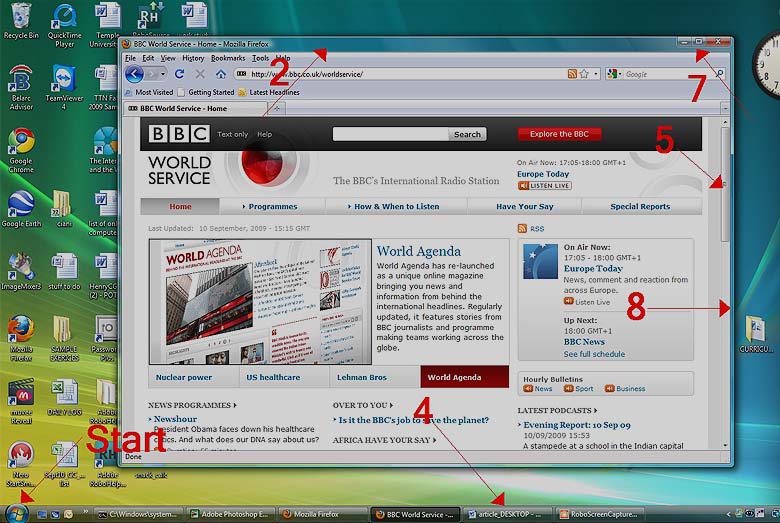
In the image below, how would you move the open window to another part of the screen?
Put the cursor on the bar indicated by #2, hold down the left mouse button and drag.
Double click anywhere on the window, a menu will pop up and give me the option to move it.
Place my cursor in the area indicated by #8, hold down the left mouse button and drag.
All of the above are acceptable methods of moving a window.
I don't know the answer. Skip this question.
Submit
×
Thank you for your feedback!
View My Results
Related Quizzes
Trivia: Microsoft Word Practice Test! Quiz
Microsoft Word: Resumes and Papers
Test Your Basic Photoshop Skills
Photoshop Basic Skills Quiz1
Introduction To Computers--EOC 2013
How Well Do You Know Microsoft?
Thank you for your feedback!
Would you like to edit this question to improve it?
No thanks
Name:
Email:
Oops! Give us more information:
Incorrect Question
Incorrect Answer
Typos
I have a feedback
Submit
Please provide name and email to proceed.
Please provide correct email to proceed.
Please provide feedback.
Please select the option.
All (3)
Unanswered (
)
Answered (
)
Whick keyboard shortcut is used to make text bold?
How do you PROPERLY shut down and restart a computer?
In the image below, how would you move the open window to another part...
X
OK
X
OK
Cancel
X
OK
Cancel
Your Rank: #-- / --
Leaderboard
✕