

I’ve built enough online quizzes at this point that I can tell you exactly where the time goes, and it’s rarely where you think. You don’t lose an hour writing questions. You lose it formatting them, making three versions so nobody copies off the kid next to them, and then re-grading the same short answer four different ways because four students phrased it four different ways. So when people ask me how to create online quizzes for students, what they actually mean is: how do I do this without it eating up my evening?
That’s what this is. Not theory. The actual mechanics, the actual traps, and where the shortcuts genuinely help.
Why Student Quiz Creation Takes Longer Than It Should
Most people looking up how to create online quizzes for students aren’t really asking about the writing. They’re asking about the two hours sitting around it. Digital quizzes for students promise to save time, and they do, just rarely in the places people expect.
Where the Extra Two Hours Actually Go
Writing the questions is the fast part. It’s everything wrapped around the questions that stretches a twenty-minute task into a two-hour one.
You write ten questions. Then you realize you need a second version because it’s an in-person exam and rows one and three can see each other’s screens. Then a student emails you at 11 p.m. because the quiz “glitched,” and you spend fifteen minutes confirming it didn’t. Then grading starts, and the multiple choice grades itself, sure, but the two short-answer questions you added for depth take longer to grade than the rest of the quiz combined.
Good student quiz creation isn’t about typing faster. It’s about setting up the right structure once, so you’re not rebuilding it every unit. Student quiz creation was never supposed to be a second job. But most of the friction isn’t in the writing. It’s in the setup decisions you make before you write a single question, and most people make those decisions on autopilot.
Fix the System, Not the Typing Speed
Here’s a blunt one: if you’re building a new quiz from a blank page every single time, you’re doing the most expensive version of this task available. A reusable question bank fixes more of your actual problem than any grading feature ever will.
Why Shuffling Questions Doesn’t Stop Cheating on Digital Quizzes for Students
This is the one that gets argued about the most, so let’s be direct about it.
Randomizing the order of your questions feels like it solves the copying problem. It doesn’t, not really. Every student is still answering the exact same ten questions, just in a different sequence. Anyone sitting near a screen or texting a friend in a different section gets the same information either way.
- Order randomization reshuffles the same fixed set of questions. It looks like security. It functions like decoration.
- Question pool randomization pulls a different subset for each student from a much bigger bank. That’s the difference between a lock and a lock that’s for show.
What actually works is pulling from a larger pool. Build thirty questions on a topic instead of ten, then have the system serve each student a random subset of, say, twelve. Now, two students sitting next to each other aren’t just seeing questions in a different order; they’re often not seeing the same questions at all.
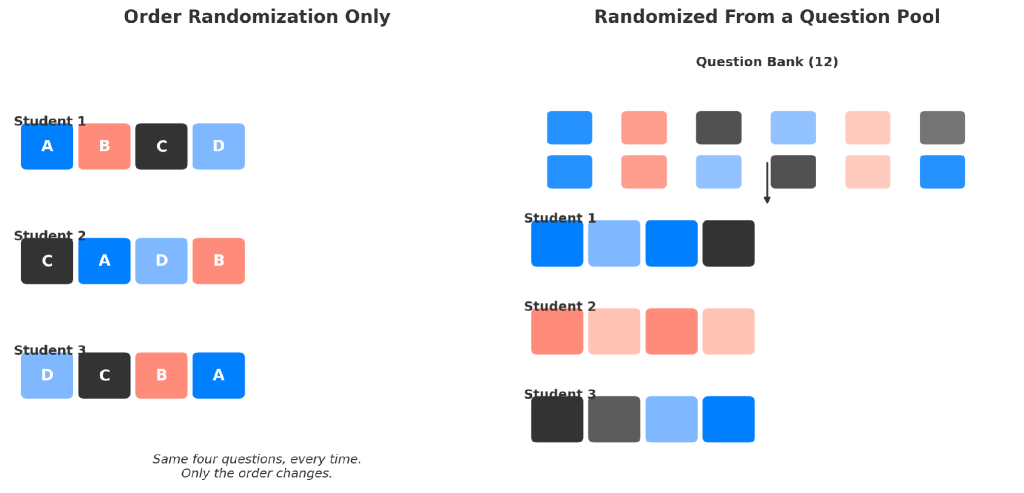
Order randomization only reshuffles the same four questions. A question pool gives each student a genuinely different subset.
I’ve seen exceptions to this, mostly with very small classes where thirty questions on one topic just isn’t realistic. In that case, pair the smaller pool with answer-choice shuffling and a hard time limit per question, so there’s no window to compare notes even if the questions do overlap. Your situation may call for a mix of both. That’s fine. The point is knowing which lever actually does something and which one just feels like it does.
How to Create Online Quizzes for Students, Step by Step
This is the part people actually came here for, so I’ll keep the fluff out of it. Here’s how to create online quizzes for students in ProProfs Quiz Maker when you want it done right the first time, not the fast-and-sloppy way.
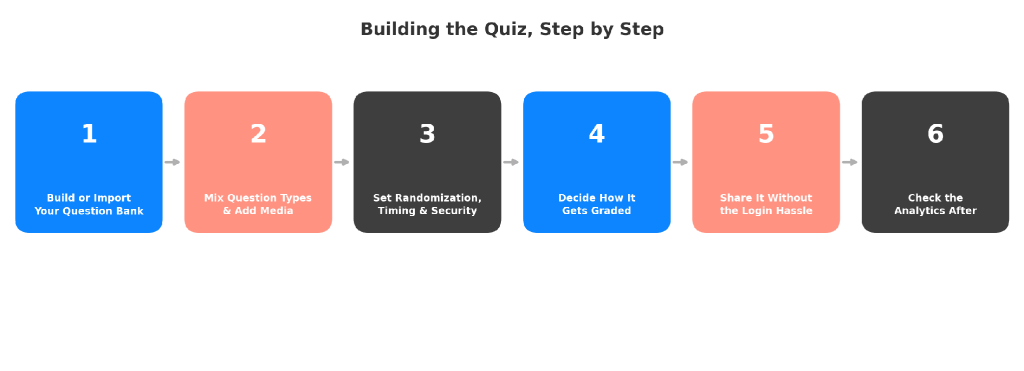
Step 1: Build or Import Your Question Bank
Don’t start from a blank quiz screen. Start from a bank. If you already have questions sitting in a Word doc or an Excel sheet from last semester, import them instead of retyping them; this reads questions straight out of Excel or Word files automatically, which alone saves most of the setup time people complain about. That’s the difference between an online quiz maker for students that respects your time and one that just digitizes the same busywork.
I’m cautious about AI claims attached to any online quiz maker for students, because half of them are a chatbot bolted onto a form builder with a new label. This is one of the few places it’s genuinely worth your time, so let me be specific about why:
- Describe the topic, get a draft. Type something like “a ten-question quiz on cellular respiration for tenth grade” into an AI quiz maker and get a working first draft in under a minute. You’re not using the output as-is; you’re using it as a starting point that’s faster to edit than to write from scratch.
- Upload what you already teach from. Feed it the actual chapter, slide deck, or PDF of notes you use in class, and it generates questions from that specific material instead of generic ones that might not match how you actually taught the topic.
- Import existing question banks. If you’ve got years of questions sitting in old Word docs or spreadsheets, AI question import reads them in directly instead of you having to retype a decade of work.

Let ProProfs AI Build a Quiz
Here’s the honest caveat with digital quizzes for students that lean on AI: none of this replaces knowing your students. AI can draft a question. It cannot tell you that your third-period class always misreads word problems with negative numbers, because it doesn’t know your third-period class.
Step 2: Mix Question Types and Add Media
This is where most basic tools quietly limit you. Google Forms, for instance, handles multiple choice fine and starts to strain the moment you need a diagram labeled or an equation typed cleanly. This is the single biggest gap between a real online quiz maker for students and a basic form builder wearing a quiz costume.
You get over twenty question types to actually use, not just list on a features page:
- Multiple choice, true/false, and matching for quick recall
- Hotspot and image-based questions for anything visual or diagram-heavy
- Video response and audio response for verbal or practical skills
- Essay and short answer for anything that needs real explanation
Add images, equations, or short audio clips where they genuinely help. Don’t add them for decoration. A diagram that clarifies a question earns its place. A stock photo of a smiling student does not.
Step 3: Set Randomization, Timing, and Security
This is where the pooling logic from earlier becomes a setting instead of a theory, and where a proper, secure exam setup actually pays off. Pull from your bank, set the subset size per student, shuffle the answer choices within each question, and decide whether students see one question at a time or the whole quiz at once. One question at a time slows down screen-sharing and side-glancing considerably.
Set a time limit that matches the actual thinking time required, not a round number that feels safe. Too generous, and you’ve left a window open for looking things up. Too tight, and your strongest students start missing questions out of rushed reading, not a lack of knowledge.
Step 4: Decide How It Gets Graded
Short answer and essay questions are where most teachers quietly give up and grade by hand, which is exactly where the time disappears.
- Grades itself instantly: multiple choice, true/false, matching
- Needs a rubric to grade well: short answer, essay, audio/video response
This is worth doing differently. Auto-grading and scoring can handle every question type, including essays and short answers, against a rubric you set, so you’re not manually reading the same handful of phrasings forty times over. It won’t replace your judgment on genuinely nuanced answers, and it shouldn’t, but it removes the repetitive first pass that eats the bulk of your grading time.
Step 5: Share It Without the Login Hassle
Distribution is where a good quiz quietly dies. If students need to create an account just to take a five-minute check-in quiz, some percentage of them won’t bother, and you’ll spend the next class period chasing down who did and didn’t finish.
Share a direct link, embed it on a class page, or set up an online classroom if you’re managing multiple sections at once. Students shouldn’t need a new login for every tool a teacher adds to their week. That friction is yours to remove, not theirs to absorb.
Step 6: Check the Analytics After
The quiz isn’t done when the last student submits. Pull the per-question difficulty report and look at which specific questions the whole class missed, not just the overall scores. A question that eighty percent of the class got wrong is not a sign your students didn’t study. It’s usually a sign the question was ambiguous, or you didn’t actually teach that specific angle of the concept as clearly as you thought you did.
That’s the honest version of how to create online quizzes for students that actually hold up under real classroom conditions, not just in a demo.
Grading Eats More Student Quiz Creation Time Than Anything Else
Let’s stay on grading for a second longer, because it deserves more than one bullet point.
Auto-grading multiple choice and true or false is a solved problem; there’s no argument to have there. The real argument is what happens with everything else. A short-answer question can be phrased four correct ways by four different students, and a rigid keyword-match grader will mark half of them wrong for no good reason. That’s worse than not automating it at all, because now you’re both grading by hand and fixing the automation’s mistakes.
A rubric-based approach handles this better because it’s judging against criteria, not against an exact string. It still won’t catch everything; a student who writes something technically correct but weirdly phrased might trip it up. Check a sample of the auto-graded results by hand the first few times you use a new question type, the same way you’d sanity-check any new grading method before trusting it fully.
The other half of this is feedback speed. Students forget what they were thinking within a day of taking a quiz. Immediate, specific feedback (not just a score, but which questions they missed and why) is what actually turns a quiz report into a learning moment instead of just a data point in your gradebook.
Practice Mode vs. Real Stakes: Getting Digital Quizzes for Students Right
There’s a real tension between two things teachers want from digital quizzes for students, and pretending it doesn’t exist just leads to a tool that’s mediocre at both.
- Live and timed works for quick recall checks. Energy goes up, engagement goes up, but the format punishes depth, since a question has to be answerable in ten seconds.
- Self-paced and pooled work for anything that counts toward a grade. It solves the depth problem but removes the built-in pressure, so the cheating conversation from earlier becomes relevant again.
My actual take: use both, deliberately, not interchangeably. Live and timed for quick formative checks where the goal is engagement and immediate recall. Self-paced, pooled, and properly timed for anything that counts toward a grade. Trying to make one format do both jobs is usually where the complaints start, from students and from you.
The Real Checklist for How to Create Online Quizzes for Students
None of this is really about the software. It’s about whether the fifteen minutes you spend setting a quiz up saves you the ninety minutes you’d otherwise spend grading, chasing down technical issues, and re-explaining a question that turned out to be ambiguous.
A well-built question bank, real randomization instead of the illusion of it, grading that handles the repetitive parts without pretending to replace you, and distribution that doesn’t make students jump through hoops: that’s the actual checklist. Everything else is decoration.
If you’re rebuilding this process from scratch every time, that’s the one thing worth fixing first. Not the questions. The system around the questions. Student quiz creation only gets faster once the system around it is right, not because you personally learned to type quicker.
Frequently Asked Questions
How to create online quizzes for students quickly?
Start from a question bank instead of a blank page, and use an AI quiz maker to draft questions from your existing notes or slides. Importing what you already have beats retyping it every time, and it's the single biggest time-saver in the whole process.
Does randomizing quiz question order actually stop cheating?
Not on its own. Order randomization only changes the sequence, not the content, so students seeing the same questions can still share answers. Pulling random subsets from a larger question pool is what actually limits how much overlap exists between students.
Can AI grade essay and short-answer questions accurately?
It can grade them against a rubric you define, which handles the bulk of repetitive grading well. It's not perfect on unusually phrased but correct answers, so spot-checking a sample of results the first few times is a smart habit, not an overreaction.
What question types work best for an online quiz maker for students?
It depends on the subject. Multiple choice and true or false cover quick recall well. Image-based, hotspot, and short-answer questions work better for anything requiring identification or explanation rather than recognition.
Should students need an account to take an online quiz?
Generally, no. Requiring a login for a short check-in quiz adds friction that some students simply won't push through, especially for low-stakes assessments. Save account requirements for graded work where identity verification actually matters.
How many questions should be in a question pool to prevent cheating?
There's no universal number, but a pool at least two to three times larger than what each student sees gives you meaningful randomization. A ten-question quiz pulled from a bank of thirty is far more secure than the same ten questions shown to everyone.
Is a timed quiz better than a self-paced one?
Neither is universally better; they serve different goals. Timed, live formats work well for quick engagement and recall checks. Self-paced formats work better for graded assessments that require actual thinking time.
Let ProProfs AI Build a Quiz

 We'd love your feedback!
What did you like & how can we make it even better?
 Thanks for your feedback!
 Ask Your Question
Have a question? Get expert help to make your decision easier.