If you’re evaluating YouTestMe GetCertified Alternatives, here’s what I found after digging through reviews, pricing pages, and product docs for eight competing platforms: the switch is rarely about YouTestMe being “bad” software. It’s about a mismatch between the platform’s scope and how quickly a team needs to move.
Some buyers want AI to build the test instead of typing every question by hand. Some want a published price instead of a quote call. Others just need a cleaner mobile exam experience for distributed candidates.
Below, I break down eight alternatives that each actually fit, what they cost, and where they beat GetCertified outright.
Why Are Teams Switching From YouTestMe GetCertified?
YouTestMe GetCertified earns its “state of the art” reputation for a reason. One Capterra reviewer, a program coordinator at a 1,000+ employee medical practice, called it a “very user-friendly platform,” and a nonprofit executive director noted her organization has stayed on YouTestMe GetCertified for five years because of consistently strong support. So this isn’t a case of a bad product. It’s a case of a platform built for maximum flexibility running into buyers who want less setup, not more.
A steep admin learning curve: One reviewer summed it up well: “As it is an extensive platform system, it is also a bit demanding to implement.” Multi-tenant hierarchies, question-pool logic, and granular role permissions are powerful once configured, but they slow down a small L&D team that just needs to launch a compliance quiz this week.
Sales-gated, opaque pricing: Neither Capterra nor GetApp lists a public starting price for YouTestMe GetCertified. Every buyer has to go through a quote conversation before they know what the software costs, which is a real friction point for HR and training teams trying to compare options quickly.
No native AI test generation: Building a question bank in YouTestMe GetCertified still leans on manual entry or traditional file imports. Tools built in the last two years let you upload a PDF, a slide deck, or a policy document and get a graded, ready-to-publish assessment back in seconds, a workflow YouTestMe GetCertified hasn’t caught up to yet.
A candidate experience that shows its age on mobile: YouTestMe GetCertified’s strength is backend configurability, not frontend polish, and some test-takers report friction navigating the exam UI on phones or slower connections a real issue when your candidate pool includes fieldworkers, remote hires, or distributed franchise staff.
None of this erases YouTestMe GetCertified’s core advantage: it’s one of the few platforms that genuinely supports government-, enterprise-, and education-grade certification with both cloud and on-premises deployment. If data residency and deep customization matter more to you than fast setup, that’s worth weighing before you switch.
Top 8 YouTestMe GetCertified Alternatives for Online Testing & Certification
I built this list around the friction points above, then checked it against what buyers in HR, L&D, compliance, and certification actually search for. “Best YouTestMe GetCertified alternative” means something different to a compliance manager running annual HIPAA re-certifications than it does to a university registrar or an engineering hiring manager.
| Software | Best For | Starting Price | User Rating |
| ProProfs Quiz Maker | Creating Quizzes & Assessments for Business, Training and Education | Free plan; paid plans from $19.99/month | 4.3/5 (G2) |
| TestGorilla | Skills-Based Hiring & Pre-Employment Testing | Free plan; paid plans from ~$75/month | 4.5/5 (G2) |
| Codejudge | Technical Screening & Developer Coding Assessments | From ~$3 per assessment invite (tiered plans) | 4.7/5 (G2) |
| Canvas Quizzes | Higher Education & Enterprise LMS Integration | Institutional Canvas license (no public per-user price) | 4.5/5 (G2) |
| iSpring QuizMaker | SCORM-Compliant Compliance Training & LMS Export | From $470/year per user | 4.7/5 (G2) |
| Quizgecko | Fast AI-Generated Quizzes | Free plan (no AI); Educator plan from $16/month | 4.5/5 (G2) |
| ClassMarker | High-Volume Certification Exams | From $19.95/month | 4.4/5 (G2) |
| Google Forms | Free, No-Frills Quizzes for Low-Stakes Checks | Free | 4.6/5 (G2) |
1. ProProfs Quiz Maker: Best for Creating Quizzes & Assessments for Business, Training and Education
ProProfs Quiz Maker is the closest match I found to YouTestMe GetCertified alternatives. Its AI quiz maker turns a policy document, PDF, or slide deck into a full graded assessment in seconds, with an AI Feedback Coach and AI Essay Grader handling the review work a human usually does by hand.
On security, it isn’t a stripped-down version of an enterprise tool. Secure exam features include webcam and screen proctoring, tab-switch blocking, IP restrictions, SSO, and randomized question pools, so no two candidates sit the exact same exam.
For certification bodies specifically, automated certificate issuance with expiry tracking and scheduled retake reminders directly answers YouTestMe GetCertified’s core use case, and compliance-specific templates cover HIPAA, OSHA, and similar recurring requirements out of the box.
Pros:
- AI quiz generator that builds a full graded assessment from a document, video, or webpage
- Automated webcam and screen proctoring, browser lockdown, and IP tracking
- 20+ question types, including scenario-based and video-response formats
- Automated certificate issuance and recertification with branded, expiring certificates
- Published, transparent pricing with a free plan to start on
Cons:
- No dark mode, which may affect comfort during extended use
- Only cloud-based; no on-premise deployment option
How ProProfs Quiz Maker Compares With YouTestMe GetCertified: The two biggest complaints about YouTestMe GetCertified are the demanding setup and the lack of published pricing. ProProfs solves both with a documented starting price and an AI-driven build process that replaces manual question entry, while matching YouTestMe GetCertified on proctoring depth and certificate automation. Check how ProProfs’ AI quiz maker creates a quiz with just a prompt:

Let ProProfs AI Build a Quiz
User Rating: 4.3/5 (G2)
Pricing: Free plan available; paid plans start at $19.99/month, billed annually.
2. TestGorilla: Best for Skills-Based Hiring & Pre-Employment Testing
If your version of a “YouTestMe GetCertified alternative” is really about pre-employment screening rather than post-hire certification, TestGorilla is built for that exact job. Instead of a general quiz builder, it offers a library of 350+ scientifically validated skills tests covering cognitive ability, personality, and role-specific technical knowledge.
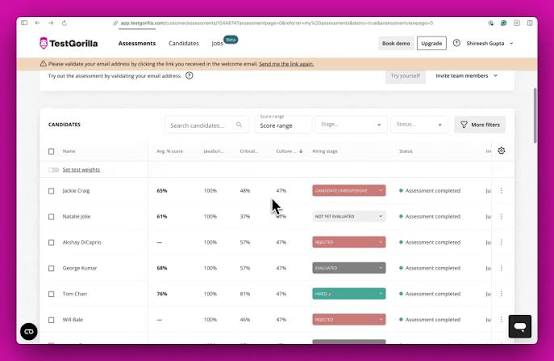
Anti-cheating tools: webcam snapshots, tab-switch detection, copy-paste monitoring, and IP tracking are built in, and results feed into a ranked, side-by-side candidate dashboard instead of a static score report.
Fifteen-plus ATS integrations, including Greenhouse and Lever, mean candidate data flows automatically into your existing hiring pipeline, and a 2M+ pre-tested candidate pool adds sourcing on top of screening.
Pros:
- Library of 350+ validated, role-specific skills tests
- Strong anti-cheating suite: webcam snapshots, tab-switch detection, IP tracking
- 15+ ATS integrations for streamlined hiring workflows
- Detailed, shareable candidate reports with side-by-side comparison
- Free plan available with no credit card required
Cons:
- Overkill for simple classroom, training, or certification quizzes
- Limited question customization compared to general-purpose quiz builders
How TestGorilla Compares With YouTestMe GetCertified: YouTestMe GetCertified has no purpose-built hiring test library or candidate ranking system. TestGorilla’s validated test library and free entry tier remove the guesswork (and the quote call) from screening at scale, though it’s overkill if your actual need is employee certification rather than hiring.
User Rating: 4.5/5 (G2)
Pricing: Free plan available; paid plans start around $75/month for small teams, scaling with candidate volume.
3. Codejudge: Best for Technical Screening & Developer Coding Assessments
Neither YouTestMe GetCertified nor most general assessment tools can meaningfully evaluate actual code, and Codejudge exists to fill exactly that gap. Candidates work in a live IDE on real-world, project-based coding tasks across 20+ languages and 50+ frameworks, rather than answering multiple-choice syntax questions.
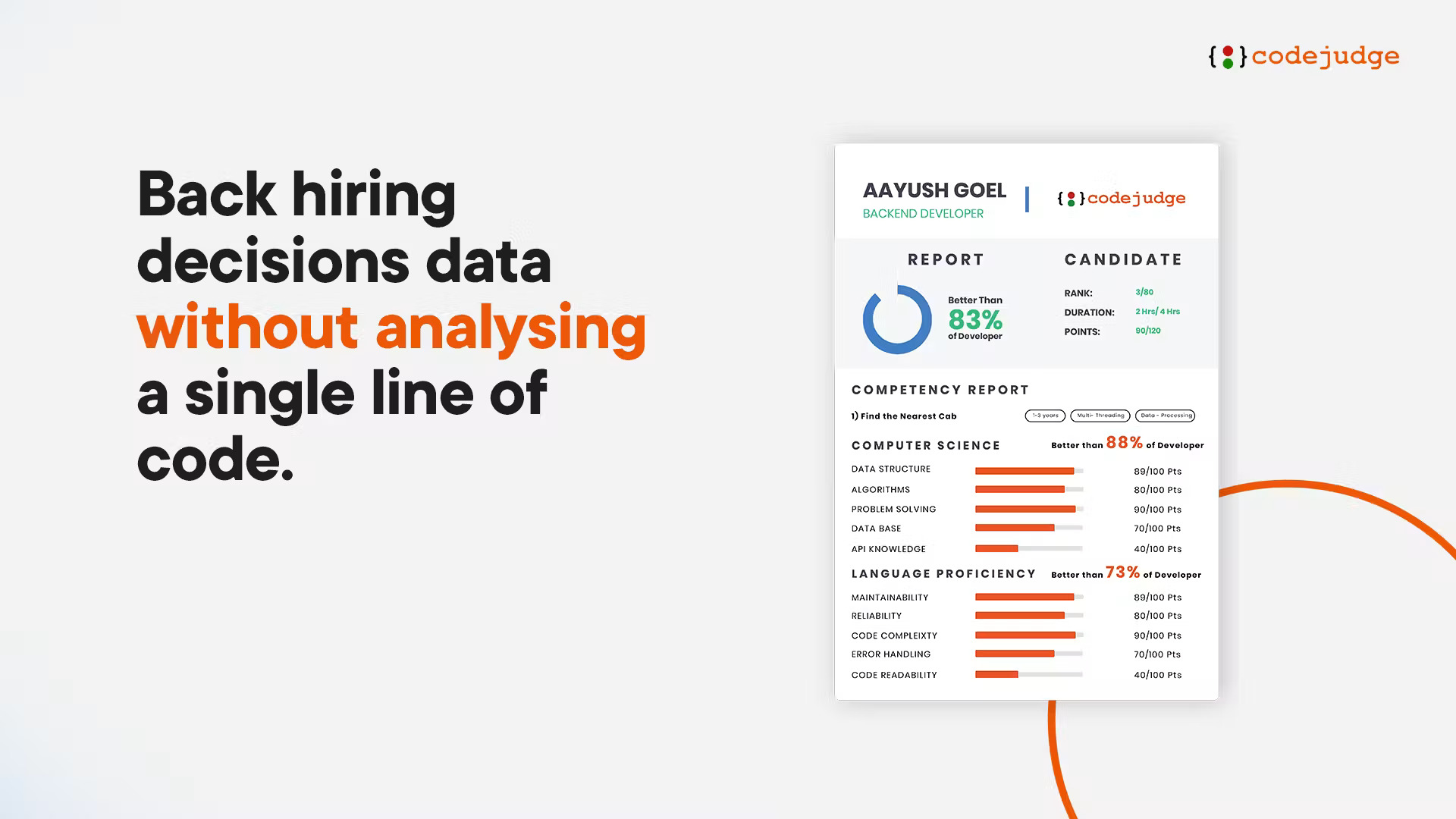
Scoring goes beyond pass/fail; the platform analyzes code quality, structure, and efficiency across more than 100 metrics, which gives hiring teams a real signal on how a candidate actually codes, not just whether their program runs.
Built-in plagiarism detection and live proctoring round out the integrity side, and everything is priced per assessment invite rather than per seat, which suits teams that hire developers in bursts rather than continuously.
Pros:
- Real project-based coding tasks in a live IDE, not multiple-choice questions
- Code-quality analysis across 100+ metrics, beyond pass/fail
- Plagiarism detection and live proctoring built for technical assessments
- Flexible per-assessment pricing that scales with hiring volume
Cons:
- Not suited to general classroom, corporate training, or certification quizzes
- Pricing details and public reviews are limited, so vetting takes extra diligence
How Codejudge Compares With YouTestMe GetCertified: YouTestMe GetCertified has no meaningful way to assess actual coding ability. Codejudge evaluates real code quality and problem-solving, a technical screening use case a general certification platform was never built to serve.
User Rating: 4.7/5 (G2)
Pricing: Tiered per-assessment pricing starting around $3 per candidate invite; exact rates vary by plan (Startup, ScaleUp, Enterprise) and region.
4. Canvas Quizzes: Best for Higher Education & Enterprise LMS Integration
For colleges, universities, and any organization already running Canvas as its LMS, building quizzes inside Canvas rather than a separate platform removes an entire layer of account management. The New Quizzes engine supports a wide range of question types and integrates directly with the gradebook.
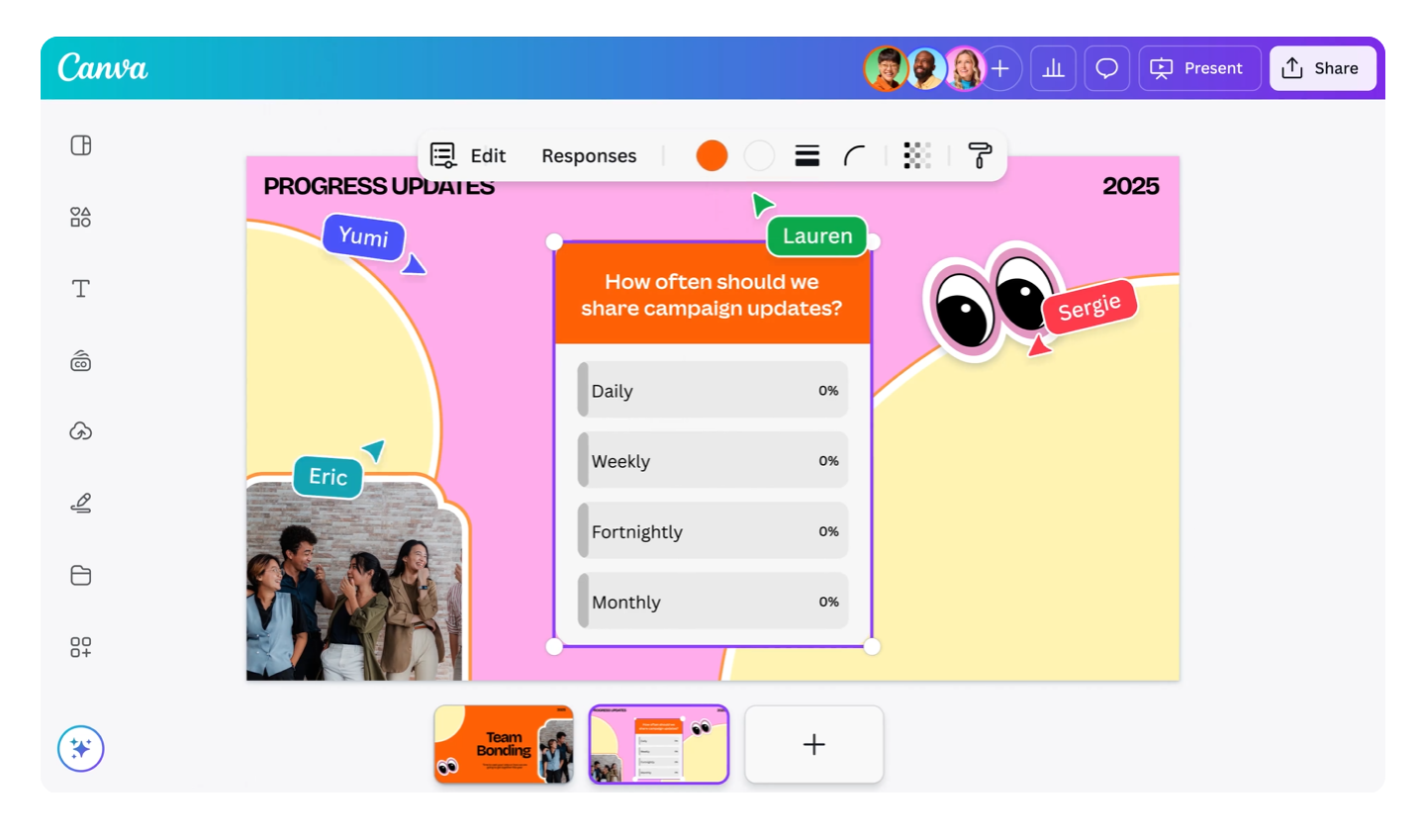
Because it lives inside the LMS students and instructors already use daily, there’s no separate login to manage and no separate roster to sync grades post automatically instead of requiring an export-import step between two systems.
SCORM and LTI support means Canvas Quizzes can also pull in outside content and tools, which matters for institutions running blended certification programs alongside standard coursework.
Pros:
- No separate login or roster; lives inside the LMS students already use
- Grades sync automatically to the existing Canvas gradebook
- SCORM and LTI support for pulling in outside content and tools
- Backed by Instructure’s established support and update cycle
Cons:
- Only a real option if your institution already runs Canvas
- No public per-user pricing; requires an institutional licensing conversation
How Canvas Quizzes Compares With YouTestMe GetCertified: YouTestMe GetCertified can serve education clients, but it’s a standalone system that has to be integrated into whatever LMS a school already runs. Canvas Quizzes skips that integration step entirely for institutions already on the platform.
User Rating: Around 4.5/5 (averaged across review platforms; not sold as a standalone product)
Pricing: Institutional Canvas license (no public per-user price)
5. iSpring QuizMaker: Best for SCORM-Compliant Compliance Training & LMS Export
For enterprises and training providers that need assessments to plug into whatever LMS they already run, iSpring QuizMaker takes a different approach than most cloud tools on this list: it’s a desktop-based authoring app that exports finished quizzes as SCORM, xAPI (Tin Can), AICC, or cmi5 packages, so the actual content lives wherever your organization hosts it.
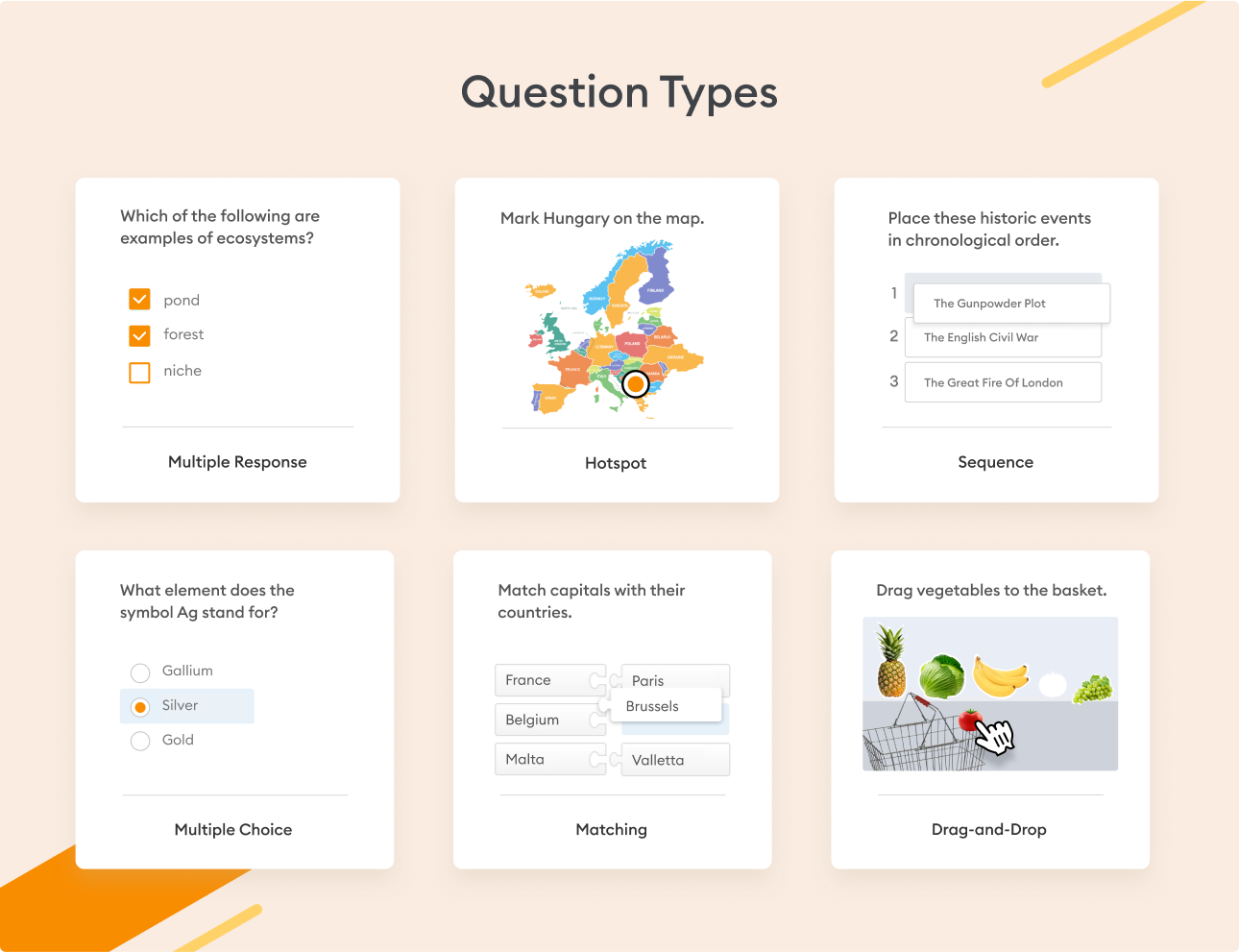
It supports branching scenarios, per-question time limits, unlimited attempts logic, and even equation-based questions, which makes it a genuine fit for both compliance training and technical or academic assessments that need more than multiple-choice.
An accessibility mode for visually impaired learners and support for up to 100,000+ learners on a single deployment make it a credible pick for large, regulated organizations running recurring certification and induction training across global teams.
Pros:
- Exports to SCORM, xAPI, AICC, and cmi5 for use in any LMS you already own
- Branching scenarios and equation-based questions, rare among quiz tools
- Accessibility mode built in for learners with visual impairments
- Scales to 100,000+ learners on a single deployment
Cons:
- Windows-only desktop app; Mac teams need Parallels or a VM
- Interface and design options feel dated next to newer cloud tools
How iSpring QuizMaker Compares With YouTestMe GetCertified: Both suit large-scale, compliance-heavy training programs, but iSpring hands you the exported files to host inside your own LMS rather than keeping everything inside one vendor’s platform closer to YouTestMe GetCertified’s own on-premise option, minus the multi-tenant admin complexity. The tradeoff is a dated, Windows-only interface with less design flexibility than newer cloud tools.
User Rating: 4.7/5 (G2)
Pricing: Per-user annual license starting around 470/year; 14-day free trial available.
6. Quizgecko: Best for Fast AI-Generated Quizzes
Quizgecko is built around a single job: turning a topic, document, or URL into a finished quiz almost instantly. It’s a strong fit for teams creating a high volume of shorter knowledge checks who want the fastest possible path from source material to a live assessment.
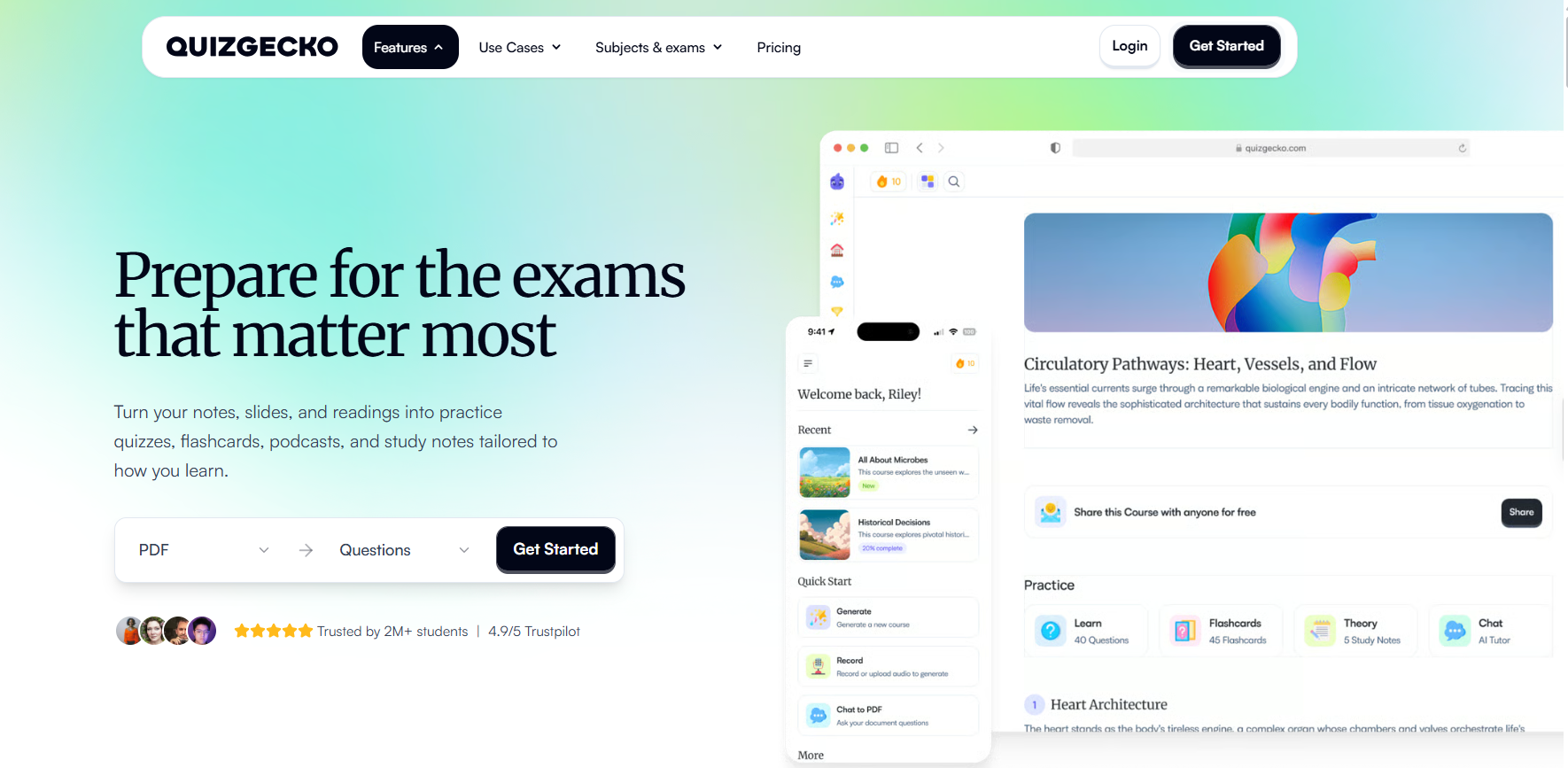
It includes enough grouping and tracking features to work as a lightweight LMS substitute for smaller programs, which reduces tool sprawl for organizations piloting AI-generated testing before a bigger platform investment.
The tradeoff shows up in the pricing structure: the free plan doesn’t include AI generation at all, so any real use requires the paid tier, and API access for larger integrations sits behind a considerably more expensive enterprise plan.
Pros:
- Generates a complete quiz from a topic, document, or URL in seconds
- Lightweight LMS-style grouping and tracking for smaller programs
- Fast, modern interface with a short learning curve
Cons:
- Free plan excludes AI generation, the tool’s core selling point
- No proctoring or advanced security features for high-stakes exams
- Enterprise API pricing is steep relative to the core plans
How Quizgecko Compares With YouTestMe GetCertified: YouTestMe GetCertified relies on manual entry or file imports to build a question bank. Quizgecko’s AI generation is faster for lightweight, high-volume quiz creation, though it doesn’t attempt to match YouTestMe GetCertified’s proctoring depth or multi-tenant architecture.
User Rating: Around 4.5/5 (averaged across review platforms)
Pricing: Free plan available (no AI generation); Educator plan from $16/month; Enterprise API around $500/month.
7. ClassMarker: Best for High-Volume Certification Exams
When a certification body needs to run an exam for hundreds or thousands of candidates at once without the system buckling, ClassMarker is one of the more commonly recommended options built specifically for that scale.
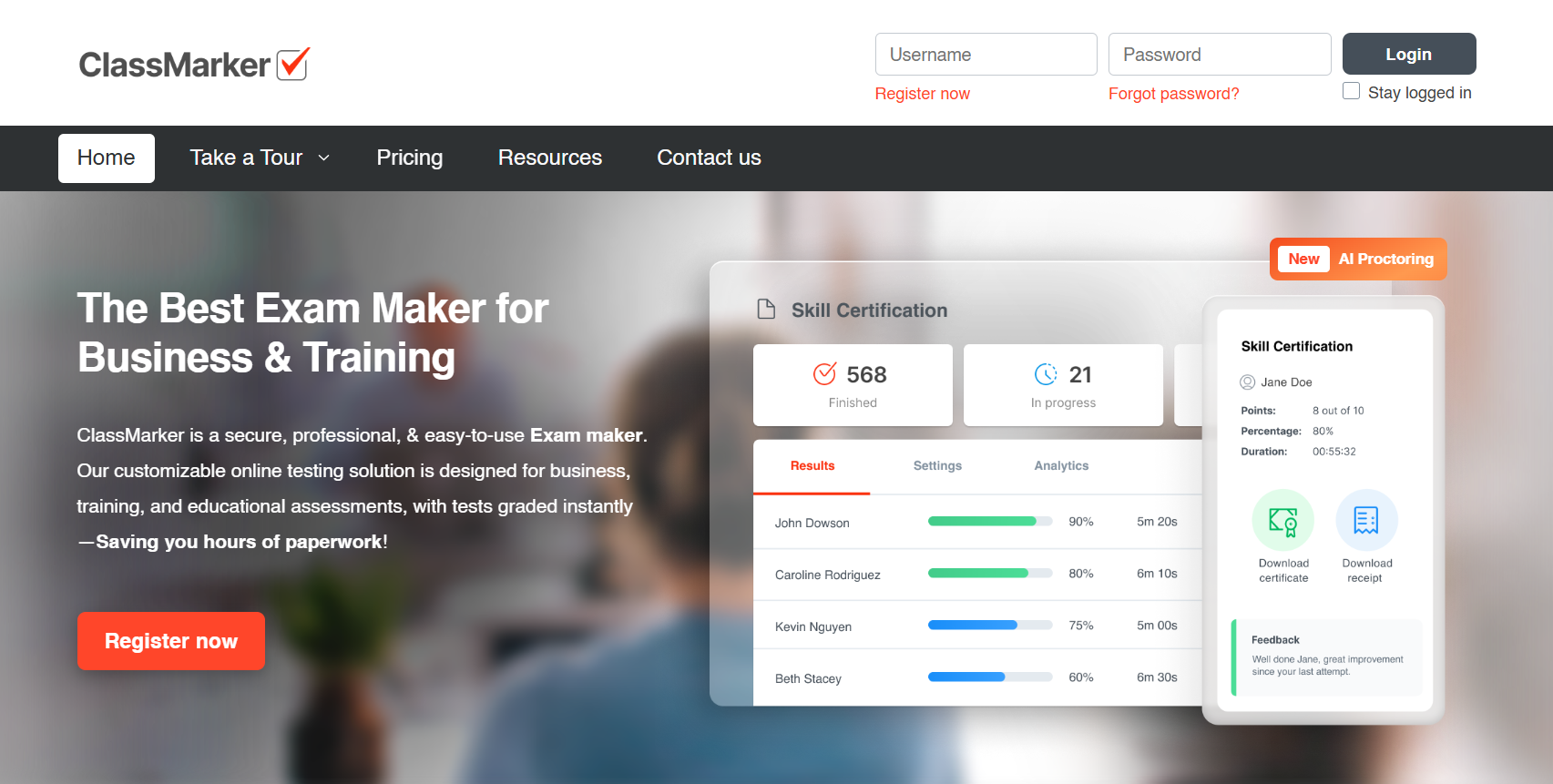
Question randomization, strict time limits, branded certificates, and group and registration management are all designed around high-stakes exam integrity rather than casual quizzing, which puts it closer to YouTestMe GetCertified’s own core use case than most tools on this list.
Reporting is built to handle large candidate pools cleanly, and setup for a straightforward certification program is noticeably faster than YouTestMe GetCertified’s more configuration-heavy dashboard.
Pros:
- Built for secure, high-volume exam delivery at scale
- Branded certificates and detailed candidate analytics
- Strong randomization and timing controls for exam integrity
- Published pricing with a free trial to test before committing
Cons:
- Interface feels more utilitarian than modern SaaS competitors
- Advanced features are gated behind higher-tier plans
How ClassMarker Compares With YouTestMe GetCertified: Both target formal, high-stakes testing, so the difference here is mostly onboarding speed. ClassMarker’s published pricing and narrower feature set get a certification program live faster, while YouTestMe GetCertified’s broader toolkit suits organizations that also need training and survey modules bundled in.
User Rating: 4.4/5 (Capterra)
Pricing: Paid plans start at $19.95/month; free trial available.
8. Google Forms: Best Free YouTestMe GetCertified Alternative
If budget is the only real constraint, Google Forms is the honest answer to youtestme alternative free. It’s free, already inside Google Workspace, and most HR and training staff have already used it for something else, so there’s effectively no onboarding curve.
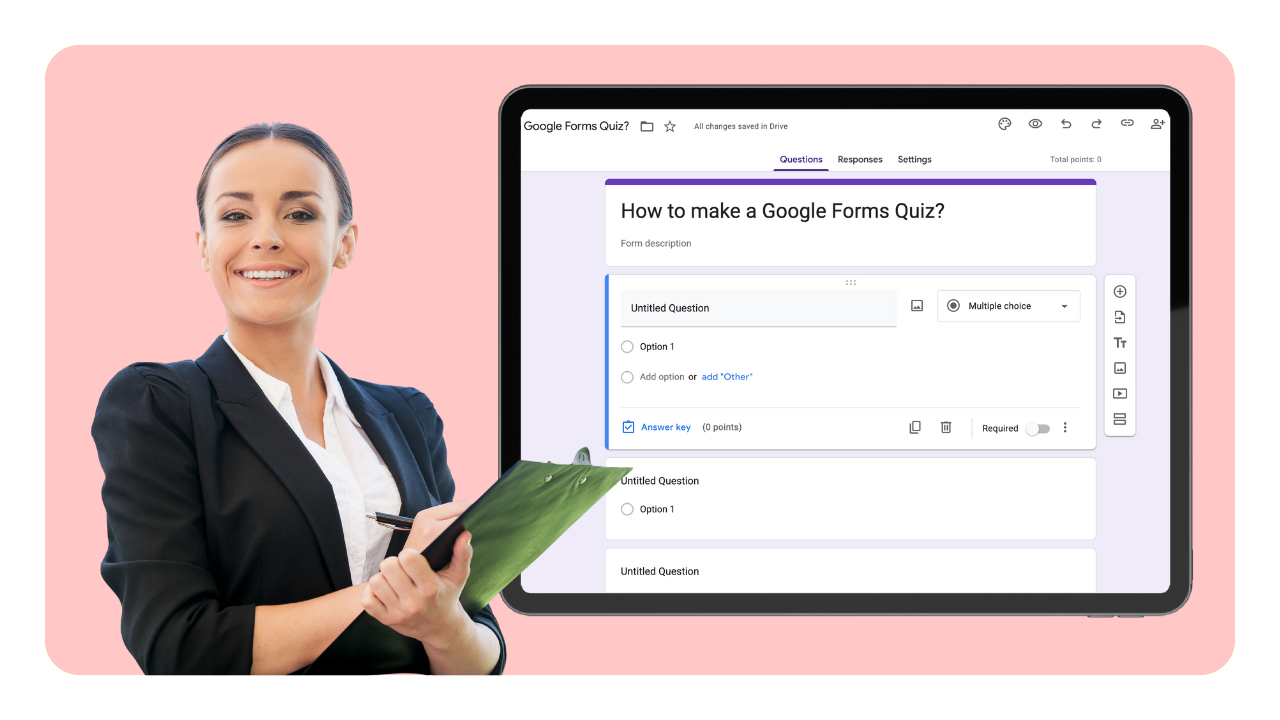
Quiz mode auto-grades responses and syncs directly with Google Sheets and Classroom, which covers basic scoring and reporting needs without any separate setup.
The tradeoff is exactly what you’d expect: no proctoring, no lockdown browser, and no certification workflow, so it fits a quick knowledge check far better than a formal exam.
Pros:
- Completely free with a standard Google account
- Deep native integration with Google Classroom and Sheets
- Instant familiarity for most staff and candidates
- Auto-grading with per-question feedback
Cons:
- No proctoring, lockdown browser, or anti-cheating tools
- No certification or automated compliance reporting features
How Google Forms Compares With YouTestMe GetCertified: YouTestMe GetCertified at least offers real exam security and a certification workflow. Google Forms trades all of that away for being free and instantly familiar, reasonable for low-stakes checks, not a like-for-like swap for certification-grade testing.
User Rating: 4.6/5 (G2)
Pricing: Free
How I Chose These YouTestMe GetCertified Alternatives
Picking these eight wasn’t a matter of skimming feature pages. Here’s exactly what I weighed before adding or leaving off a tool:
User reviews and ratings: I checked how each tool performs in real, daily use on G2 and Capterra, and I was upfront above where public review data was thin, like Codejudge.
Security and certification depth: Since YouTestMe GetCertified’s core strength is exam integrity and certificate issuance, I weighted proctoring, randomization, and automated certification heavily, rather than treating every quiz tool as an equivalent substitute.
Ease of setup: A platform an HR manager or training coordinator can’t configure without weeks of onboarding defeats the purpose of switching away from a demanding admin dashboard.
Pricing transparency: This isn’t about picking the cheapest tool, it’s about whether a published price, free plan, or documented tier actually solves YouTestMe GetCertified’s specific pain point: a sales-gated quote process buyers have to sit through before they know what anything costs.
Use case coverage: I made sure every major reason someone searches for YouTestMe GetCertified competitors corporate compliance certification, pre-employment screening, developer hiring, higher-ed LMS integration, self-hosted institutional testing, and free low-stakes checks has a genuine answer here.
Top 3 YouTestMe GetCertified Alternatives
After comparing all eight platforms, three stood out for covering the broadest range of what YouTestMe GetCertified buyers are actually looking for.
1. ProProfs Quiz Maker
For anyone whose search is really about running a secure, certifiable assessment without the sales-gated pricing, this is my top pick. It replaces manual question entry with AI generation while matching YouTestMe GetCertified on proctoring and certificate automation.
2. TestGorilla
If alternatives to YouTestMe GetCertified mean screening job candidates rather than certifying existing employees, TestGorilla’s validated skills library and free entry tier are purpose-built for that job.
3. iSpring QuizMaker
For large enterprises that need training content exported into their own LMS rather than locked inside one vendor’s cloud, iSpring’s SCORM-based export gives you a similar level of infrastructure control to YouTestMe GetCertified’s on-premises option.
Choosing the Right Fit for Your Certification Program
Switching away from YouTestMe GetCertified doesn’t mean giving up the security and certification depth that made it a serious option in the first place. It means matching the tool to the job you actually need done, instead of working around a sales-gated quote process and a dashboard that assumes you have an IT team standing by.
For most of the HR, L&D, and compliance teams I talk to, ProProfs Quiz Maker comes out ahead here: an AI quiz builder, real exam security, and automated certification in one plan, at a published price.
If your priority is hiring rather than certifying existing staff, TestGorilla’s validated skills tests are worth a closer look, and if you’re running exams at real volume, ClassMarker’s certification-scale tooling is built for exactly that.
You can browse 20+ question types or get started free and judge for yourself whether it fits your next certification rollout.
Frequently Asked Questions
Which YouTestMe GetCertified competitor offers the strongest security and anti-cheating features?
ProProfs Quiz Maker and TestGorilla both include modern anti-cheating tools proctoring, browser lockdown or tab-switch blocking, and IP tracking that go beyond a basic quiz platform.
Is there an alternative to YouTestMe GetCertified that keeps assessment data in-house?
iSpring QuizMaker exports quizzes as SCORM, xAPI, or cmi5 packages you host inside your own LMS, giving you control over where the content and results live, similar in spirit to YouTestMe GetCertified's own on-premise deployment option.
Which alternative is best for developer or technical hiring?
Codejudge is built specifically for this, scoring real coding tasks and code quality rather than multiple-choice programming questions.
What's the best YouTestMe GetCertified replacement for universities and academic institutions?
Canvas Quizzes is the strongest fit if your institution already runs Canvas as its LMS, while iSpring QuizMaker suits institutions that need SCORM packages portable across whatever LMS they use.
Which YouTestMe GetCertified alternative offers the strongest AI-generated quiz creation?
ProProfs Quiz Maker's AI quiz builder can generate a full assessment with explanations from a document, video, or webpage in seconds, a feature that directly answers YouTestMe GetCertified's manual-entry limitation.
Which competitor works best for high-volume certification exams?
ClassMarker is purpose-built for large-scale certification programs, with randomization, timing controls, and reporting designed to handle hundreds or thousands of test-takers at once.
How does pricing compare between YouTestMe GetCertified and these alternatives?
YouTestMe GetCertified requires a sales quote before you see a price. Most alternatives here publish a starting number instead ProProfs Quiz Maker at $19.99/month, ClassMarker at $19.95/month, and Google Forms and TestGorilla's entry tiers at $0 so you can budget before ever talking to sales.
Can I switch from YouTestMe GetCertified without losing existing question banks or certificates?
Most alternatives support bulk question import via Excel or Word, and platforms like ProProfs use AI to parse uploaded files automatically. Certificate designs need to be recreated in the new platform's branding tools, but historical results and question data can typically be exported from YouTestMe GetCertified's reporting module before you migrate.
Let ProProfs AI Build a Quiz

 We'd love your feedback!
What did you like & how can we make it even better?
 Thanks for your feedback!
 Ask Your Question
Have a question? Get expert help to make your decision easier.