
I spent a Sunday night once retyping forty names into a certificate template by hand, one at a time, because the exam tool I was using could record a passing score but had no idea what to do with it after that. It was almost midnight before I finished, and I remember thinking this was a genuinely dumb way to spend an evening.
If you’re here because you need online exam certificates and you’d rather not repeat my Sunday, I want to save you the trouble.
Creating certificates for online exams and tests isn’t complicated once you understand what actually has to happen behind the scenes: a trigger, a template, and a way for someone else to trust the document once it’s in their hands.
That’s most of it. Everything else is detail work.
This is for you if you’re:
- A corporate trainer issuing compliance or onboarding certifications to employees
- An independent course creator closing out a cohort with completion certificates
- A K-12 or higher-ed instructor wrapping up an online exam period
- An HR or L&D lead who needs to track certification status across a workforce
- Someone currently doing this by hand in Canva or Word, wondering if there’s a faster way
Whatever seat you’re in, the goal is the same: create certificates online without it turning into a monthly chore that eats up an afternoon every time.
What Is an Online Exam Certificate, Really?
That’s the plain version. In practice, what separates a real online exam certificate from a glorified screenshot is verification. Something on the document, a QR code, a unique ID, a signature, lets a third party confirm it’s genuine without emailing you to ask.
I’ve reviewed plenty of “certificates” that were really certificates of participation, wearing a nicer font. Most online exam certificates fail at exactly that point: they look fine, but nobody outside your organization can check if they’re real. If your exam doesn’t actually hinge on a passing score, it’s worth being honest about what you’re issuing, since that changes how much security the document needs.
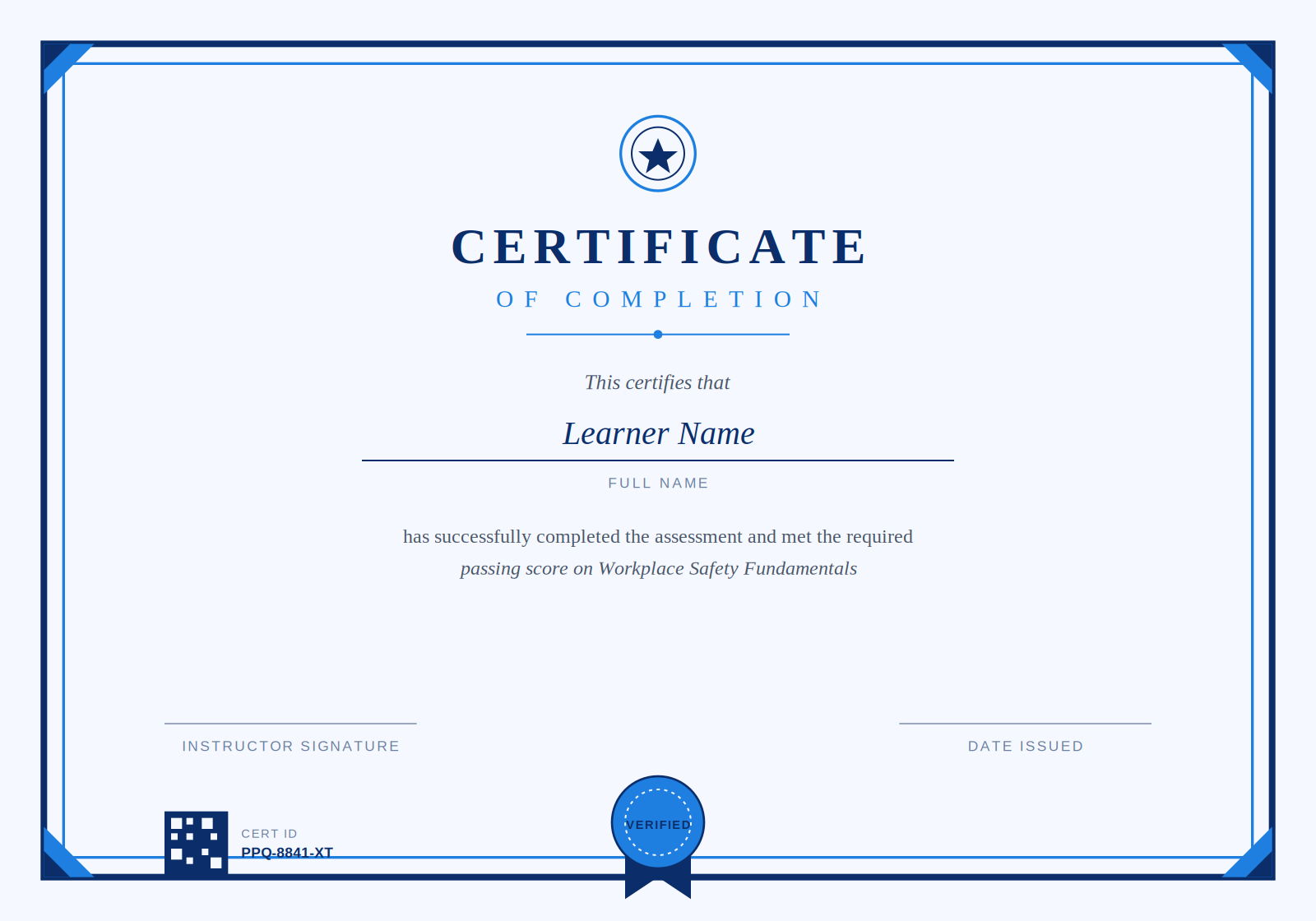
A basic anatomy of a certificate: identity, proof of passing, and a signature line
Why Are So Many People Suddenly Searching for This?
Because the manual version stops working the moment volume shows up. I think most people don’t go looking for online test certificates until the exact night they realize doing it by hand for the fortieth person isn’t sustainable. Before that, a basic certificate generator for exams and a Word template feel fine.
What I keep seeing reported, in forums and in support tickets alike, is a pretty consistent list of frustrations:
- Time: personalizing names, scores, and dates one at a time for a large group eats an entire afternoon
- Errors: manual entry produces typos, mismatched templates, and the occasional certificate with the wrong exam title on it
- Branding: built-in LMS templates often look generic, which is a problem if the exam is meant to feel premium
- Automation gaps: getting a certificate to fire automatically after a Google Form or WordPress quiz is harder than it should be
- Fraud: a plain PDF is trivial to edit, and there’s usually no way for an employer to check if it’s real
- Scale: none of the manual workarounds hold up once you’re issuing certificates weekly instead of once a semester
Not every one of these will apply to your situation. A university issuing online exam certificates twice a year has different problems than a compliance team certifying two hundred employees every month. I’ve seen both, and the fixes genuinely aren’t the same.
What Do You Need to Decide Before You Design Anything?
Most people open Canva first. I’d actually argue that’s backward. Before you touch a template, you need answers to three questions, and skipping this step is the single most common reason people redo their certificate design twice.
What counts as passing? A flat score cutoff is simplest, but some exams require weighted scoring across sections, which changes which data your certificate generator needs access to.
Who owns the branding? If this represents your company or institution, get the logo, the signature image, and the color codes before you start designing, not after someone in legal asks why the seal looks slightly off.
How will people receive it? An email attachment, a download link, or a page they can revisit later each implies a different technical setup. This is the decision that determines whether a free certificate generator for exams covers you, whether you can create certificates online with a lightweight add-on, or whether you actually need dedicated exam certification software.
How Do You Actually Create Certificates for Online Exams and Tests?
There isn’t one right answer here. It genuinely depends on volume, and I’ve watched people over-engineer a solution for twelve certificates a year when a template and a mail merge would have taken twenty minutes.
Start With the Free Route If Your Volume Is Small
If you’re issuing a handful of certificates per month, Canva or Google Slides with a downloaded template works fine. You manually swap in names and export as PDF. It’s not elegant, but if all you need is to create certificates online for a small group, this is genuinely the right amount of effort, and I’d rather see someone spend zero dollars here than buy software they’ll barely use.
Automate the Trigger Once Volume Grows
This is where most people get stuck, and it’s also where the biggest time savings live. Tools like Google Forms paired with add-ons, or Zapier and Power Automate connected to a quiz platform, can generate and email online exam certificates the moment someone crosses your passing threshold. The setup takes an afternoon. After that, it runs itself.
Platforms built specifically for assessments tend to fold this in natively. ProProfs Quiz Maker, for example, issues certificates automatically once a learner clears the score you set, which removes the Zapier middle step entirely for anyone whose exams already live there. That single change is usually what turns a Sunday-night task into something nobody on the team thinks about anymore.
Move to Dedicated Exam Certification Software When Automation Isn’t Enough
If you need bulk generation from a spreadsheet, verification links, expiry tracking, or integration with an existing LMS, that’s the point where a no-code add-on starts to strain. A basic certificate generator for exams won’t cover all of that at once. Dedicated exam certification software handles it as one system instead of three stitched together, and it’s usually where compliance-heavy teams end up regardless of how they started.
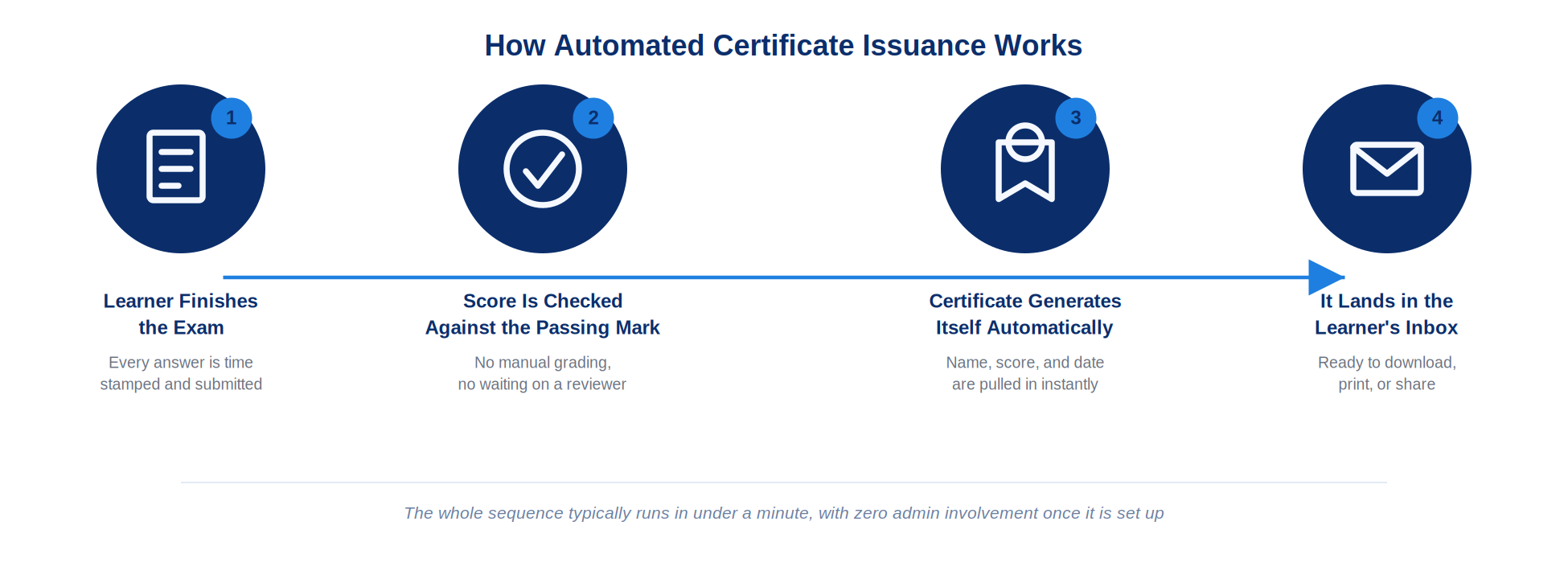
The path most automated setups follow, from submission to inbox
What Do Most People Get Wrong About Automating This?
They obsess over the template and barely think about the trigger logic. I get it, the design is the visible part. But the trigger is where online exam certificates actually break: a quiz that allows retakes without resetting the certificate flag, a scoring rule that doesn’t account for partial credit, or a webhook that fires twice and issues duplicate certificates to the same person.
I’ve seen a client’s automation quietly issue the same certificate three times to one learner because nobody tested what happens on a retake. Nobody noticed for two months. That’s the part worth testing before you trust the system, not the font choice on the seal.
If you can only fix one thing before launch, test the retake scenario. Everything else is comparatively low stakes.
How Do You Make a Certificate Hard to Fake?
A certificate with no security features is basically an image file with someone’s name on it. That’s fine for a fun internal award. It’s not fine for online test certificates that an employer might actually need to check. Most dedicated platforms bundle these security and certification features in with the exam builder itself, which is worth checking before you bolt on a separate verification tool.
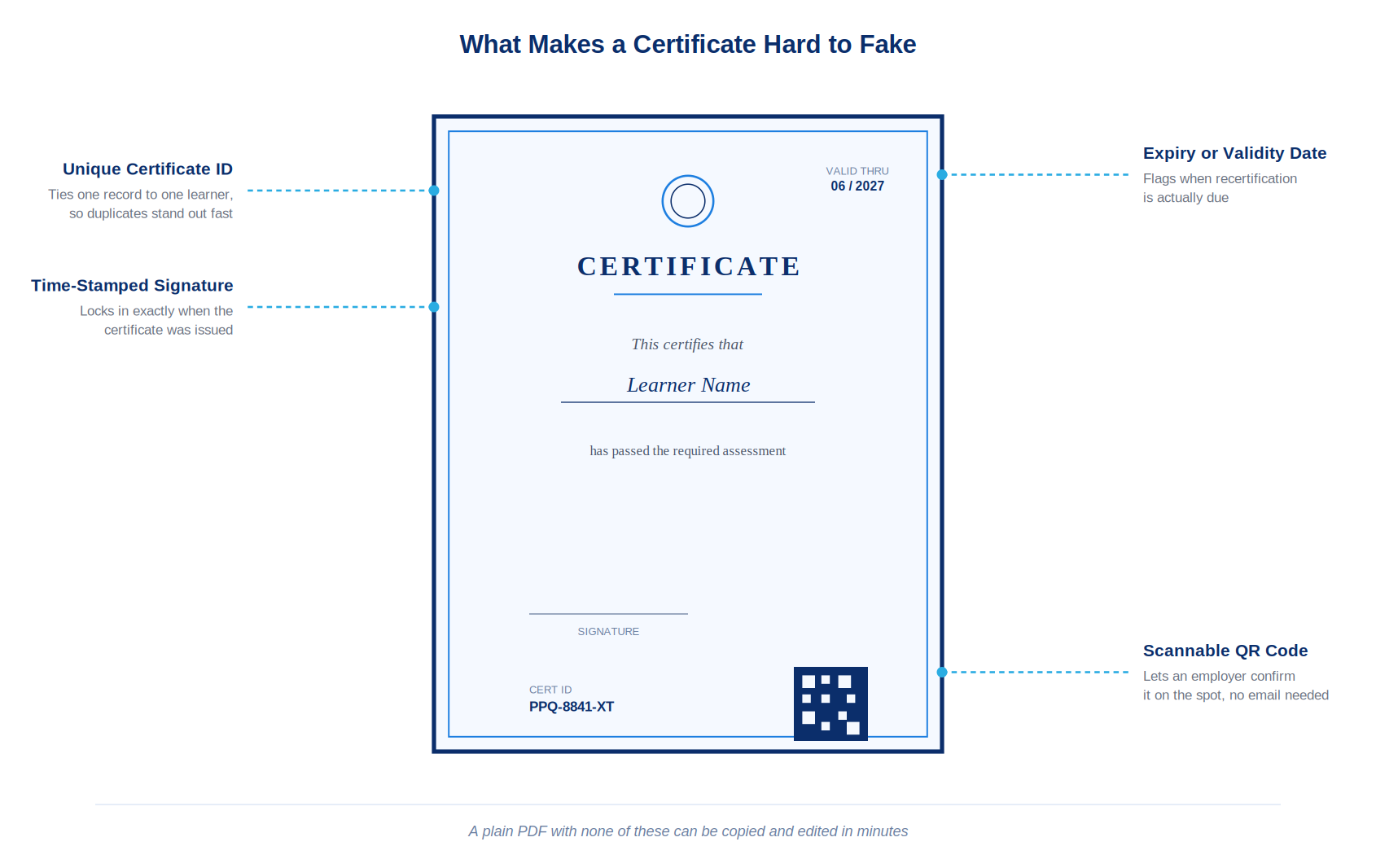
The details that separate a real certificate from an easily edited PDF
A few things make a real difference:
- A unique certificate ID: ties one document to one learner record, so a duplicate stands out immediately
- A scannable QR code: lets an employer or third party confirm authenticity in seconds, without emailing anyone
- A time-stamped signature: locks in exactly when the certificate was generated
- An expiry or validity date: matters more than people expect for anything tied to compliance or recertification
Not every certificate needs all four. A personality quiz result doesn’t need a QR code. Online test certificates tied to workplace safety or compliance probably need most of them. Match the security to what’s actually at stake if the document gets faked.
What Happens to the Certificate After It’s Issued?
This is the part a lot of guides skip, and I think that’s a mistake, because it’s usually where online exam certificates quietly fall apart at scale. A certificate that works beautifully for fifty people can become a mess at five thousand if nobody planned for what happens next.
Recertification is the obvious one. If a certification expires, someone needs a reminder system, or you end up with a workforce that’s technically out of compliance and doesn’t know it. Storage matters too. Learners lose downloaded files constantly, so a way for them to re-access or re-download their own record later saves you a surprising number of support emails.
Mobile matters more than people design for. Most learners open their certificate on a phone first. If it renders as a tiny unreadable PDF on a five-inch screen, you’ve technically issued the certificate and functionally failed the moment that matters most to the recipient.
The Certificate Isn’t the Finish Line
Here’s the thing I’d want someone to tell me before I spent that Sunday night retyping names. The certificate itself is the easy part. The trigger logic, the verification, and the plan for what happens six months after someone downloads it, that’s where the actual work lives. Get those right and the design almost doesn’t matter. Get them wrong and no amount of gold foil on the template will save you from an employer who can’t confirm the thing is real.
Start with whatever tool matches your actual volume today, not the volume you imagine having next year. You can always move up to automated certificate issuance once the manual version starts costing you real time. Most people wait too long to make that switch, not too little.
Frequently Asked Questions
What is the easiest way to create certificates for online exams?
For low volume, a free template in Canva or Google Slides works fine. You manually enter names and export as PDF. Once you're issuing more than a handful per month, an automated exam certification software setup saves considerably more time.
Can I automatically generate certificates from Google Forms?
Yes, using add-ons like Certify'em or a Zapier connection that triggers on form submission. It requires initial setup, roughly an afternoon, but runs without intervention afterward once the scoring logic is tested properly.
Do online exam certificates need to be verifiable?
Not always, but they should be if the certificate carries real weight, like compliance or professional certification. A unique ID or QR code lets an employer confirm authenticity without contacting you directly for verification.
What information should an online test certificate include?
Name, exam title, date issued, and the score or grade achieved are the essentials. Add a unique ID and signature if the document needs to hold up to outside scrutiny or verification.
How do I create certificates online for free?
Google Slides and Canva both offer free certificate templates you can customize and export as PDF. This works well for low volume; it becomes tedious once you're issuing certificates for a large group weekly.
What's the difference between a certificate generator for exams and one for course completion?
An exam certificate typically requires a passing score, so the generator needs access to grading data. A course completion certificate often just confirms attendance or finishing content, with no score requirement attached.
How do I stop people from faking a certificate?
Add a unique ID, a QR code linking to a verification page, and a time-stamped signature. None of these are foolproof alone, but together they make editing or duplicating the document meaningfully harder.
Should certificates expire?
For compliance-related certifications, yes, generally. An expiry date prompts recertification and keeps your records honest about who's currently qualified. For casual or personality-based quizzes, expiry rarely matters.

Let ProProfs AI Build a Quiz

 We'd love your feedback!
What did you like & how can we make it even better?
 Thanks for your feedback!
 Ask Your Question
Have a question? Get expert help to make your decision easier.