
I’ve looked at a lot of “auto-graded” assessments that weren’t really auto-graded. Someone called them that. The platform called them that. And then every Monday, someone was manually fixing what the system got wrong over the weekend.
Not every operation looks like this. But enough of them do that it’s worth being honest about why it keeps happening before we get into setup.
This is useful if you are:
- A teacher managing 80 to 400 students across sections and tired of grading the same question hundreds of times
- A training manager running recurring compliance assessments and tracking completion manually in a spreadsheet
- An academic administrator trying to standardize how assessments work across departments
- A curriculum coordinator who inherited a Google Forms-based testing process and knows it isn’t scaling
- Someone building assessed learning paths who needs scores to mean something
What Are Auto-Graded Tests, Actually?
Auto-graded tests are digital assessments where the platform scores responses automatically upon submission, based on pre-configured answer keys, scoring rules, and grading logic, without requiring manual review for objective question types.
That last part is doing a lot of work. “Without requiring manual review for objective question types.” Because the minute you throw essays into the mix, you are not in auto-graded territory anymore. You are in AI-assisted grading territory, which is a different thing with different tradeoffs. I’ll get to that. But I keep seeing people design assessments with 60% written responses and then wonder why their “automated” process still takes two days.
Automatic test grading, when it’s set up correctly, does two things that genuinely matter. It returns results to students the moment they finish. And it hands you aggregate data you could never generate manually. Both of those things change how you can use assessment. Not just how fast you grade it.
What Can a Machine Actually Grade?
I think a lot of the frustration people have with auto grading software comes from asking it to do something it wasn’t built to do. So before you configure anything, it’s worth knowing where the line is.
The question types that auto-grade reliably:
- Multiple choice, single and multi-select
- True/false
- Fill-in-the-blank with exact match or keyword logic
- Matching
- Drag-and-drop ordering
- Hotspot
- Comprehension passages with objective sub-questions
The ones that don’t:
- Essays and long-answer responses
- Audio and video responses
- File uploads, code submissions, anything where the correct answer isn’t a discrete selection
Most platforms handle the first list cleanly. The second list requires either manual grading or an AI layer that reads responses against a rubric. Some platforms, like ProProfs Quiz Maker, include that AI layer for essays. It evaluates the response, assigns a score, and leaves a comment. You can review flagged responses or just sample-check. It works better than I expected, honestly. But it’s not the same as grading a multiple-choice question.
If your test mixes both types, plan for that split before you start building. Don’t design first and figure out the grading logic later.
Setting Up Auto-Graded Tests Without Making Mistakes You’ll Fix in Week Two
Most people treat setup like a configuration task. Pick a platform, add questions, set the right answer, and share the link. That’s it.
That’s usually a mistake.
Not catastrophically. But the places where auto-graded tests quietly fail are almost always in the decisions you made during setup that felt like defaults: the grading mode you left on the standard setting, the feedback you skipped because adding explanations seemed optional, the security configuration you planned to add “before the real exam.”
Here’s what I actually think through before any test goes live.
Picking a Platform That Was Built for Assessment
The platform choice matters more than it should. Most online test-grading tools fall into two categories: form builders with a scoring layer on top, and actual assessment platforms where grading logic is part of the architecture. The difference becomes obvious fast once you try to do anything beyond right/wrong scoring.
Form builders, Google Forms being the most common, don’t support partial credit, per-question point weighting, answer-specific feedback, or negative marking. They grade. That’s about it. If that’s enough for what you’re doing, fine. But if you’re running assessments that need to measure more than recall, you’ll hit the ceiling quickly.
What I look for in an online test grading tool:
- Multiple grading modes (regular, partial, custom) configurable at the question level
- Per-question point weighting so harder questions carry more weight
- Configurable passing scores, not just fixed percentage cutoffs
- Instant feedback with answer explanations, not just right/wrong indicators
- Reporting at the question level, not just overall scores
If a platform can’t do those things natively, the workarounds tend to accumulate.
Watch: How to Choose the Best Quiz Software to Build the Best Assessments
Choosing the Right Grading Mode
This is the decision I see made wrong most often, and it’s usually because nobody explained the tradeoffs.
- Regular grading awards full points only when a student selects every correct option and none of the wrong ones. Strictest mode. Appropriate for pass/fail compliance checks or contexts where partial knowledge shouldn’t count.
- Partial grading awards proportional credit based on correct selections. Useful for checkbox questions, matching, and fill-in-the-blank. A student who gets three of four correct elements right knows something. Scoring them the same as a student who got none right misrepresents what you measured.
- Custom grading gives you complete control: different point values per answer option, the ability to penalize specific wrong answers differently, and weighted scoring for responses that indicate specific misconceptions. It’s the right choice for diagnostic assessments where you want the scoring to tell you more than just a total.
I think most people default to regular grading for everything and never revisit it. That works for straightforward knowledge checks. For anything more nuanced, it creates scoring artifacts you’ll eventually have to explain to a student or a department head.
Feedback Configuration
Automated grading without feedback is a missed opportunity. I feel strongly about this one.
The score tells students what happened. The feedback tells them why. And the why is what changes behavior on the next attempt, or on the next exam. There are two types worth configuring:
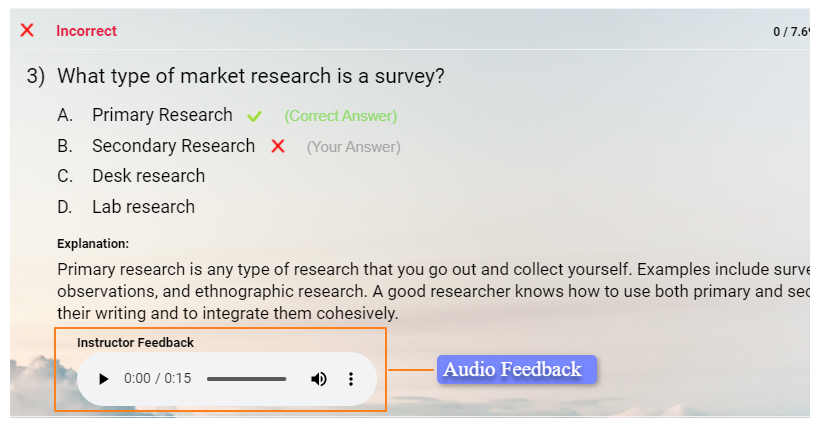
- Answer-level feedback appears when a student selects a specific option. “You chose B. The correct answer is D because the regulation was updated in 2022.” This targets the misconception directly while the student still has the question in front of them.
- Score-based feedback triggers based on a score range. “You scored below 70%. Review module 3 before your next attempt.” Useful for routing students without sending individual emails.
Most people configure neither of these because adding explanations feels like extra work. It is extra work. It is also the part that makes auto grading software more valuable than manual grading, not less. A returned paper from five days ago doesn’t deliver feedback at the right moment. A score with an explanation at the moment of submission does.
Security Settings
The instinct is to build the test first and handle security before the actual exam. I’ve seen this go wrong.
Security settings affect how questions are delivered. Changing them after students have started can break the experience mid-session or produce inconsistent results across cohorts. Configure them before you share the link.
What’s worth setting up:
- Question randomization: Different question order per student. Reduces the value of answer-sharing.
- Answer option randomization: Shuffles A/B/C/D per student. Knowing “B is right” doesn’t help if B is in a different position.
- Question banking with pooling: Build more questions than any single test uses, then draw a unique subset per student or per attempt. A 40-question test pulling from a bank of 100 means no two tests are identical.
- Tab-switching detection: Flags or ends the session if a student navigates away.
- Time limits: Per quiz or per question. Per-question limits are more effective for preventing mid-question lookups. Most people set only the overall time limit and leave the per-question option alone. I think that’s a gap worth closing for anything high-stakes.
You don’t need all of these on every test. A low-stakes practice quiz doesn’t need webcam proctoring. A certification exam probably does. Match the configuration to the stakes. Don’t over-engineer formative assessments and under-engineer summative ones.
Watch:
Reporting Before You Share the Link
Before the link goes out, confirm your platform will capture what you’ll actually need later:
- Individual scores and completion timestamps
- Per-question accuracy rates across the full group
- Time-on-task per question
- Pass/fail distribution
The pass/fail distribution is the most underused piece of data I see. It tells you whether a question is too hard, too easy, or ambiguous. A question that 80% of students miss is either poorly written or a concept your instruction didn’t land. Those are two different problems with two different solutions. Reporting tells you which one to investigate. You can’t figure that out from a stack of graded papers.
Testing Before Launch
Run the full student experience yourself. Submit a complete attempt. Check that scoring calculates correctly, feedback appears on the right answers, the passing score triggers the right outcome, and time limits behave as expected.
Ten minutes. Do this. Discovering a misconfigured grading rule after 200 students have submitted is not a small problem.
The Open-Ended Question Problem
Here’s what most training managers do with open-ended questions in auto-graded tests: they avoid them entirely.
Understandable. Also, a real coverage gap if your assessments are supposed to measure reasoning, applied thinking, or communication. A test that only has multiple-choice questions isn’t always measuring what you think it is.
Two approaches I’ve actually seen work.
1. Assisted Grading With a Human Review Pass
You define a rubric. The AI reads each response, assigns a score, and leaves a comment. You review flagged responses or sample-check at a rate that feels manageable.
It’s not fully automated. But it’s significantly faster than grading every response from scratch, and the consistency is better than most humans manage across 200 essays. Platforms like ProProfs Quiz Maker have this built in for essay and long-answer questions. The AI handles the bulk of it; you handle the edge cases.
That’s a reasonable division of labor.
Watch: How to Automate Quiz Scoring & Grading
2. Separating the Test Into Two Parts
Run the objective portion with full automation. Handle the subjective portion on a 24-hour turnaround. Students see their objective score immediately; the final grade posts after your review.
More work. But transparent and defensible, which matters when a student disputes a grade.
What Doesn’t Work
Keyword matching without a rubric for essay questions.
Students figure out the keywords fast. You end up with responses that hit every trigger word and demonstrate no actual understanding of anything. If you’re using keyword logic, pair it with a minimum word count and flag outlier scores for manual review.
Even that isn’t foolproof. I’ve seen it gamed.
Should You Feel Bad About Automating Grading?
This keeps coming up. Educators worry about being perceived as lazy, or cutting corners, or somehow not doing the job correctly because they’re using automatic test grading tools.
I find this exhausting.
When you grade the same multiple-choice question 180 times by hand, you are not doing something only a human can do. You’re doing something a machine can do more consistently, faster, and without the fatigue errors that show up around question 140 out of 180.
The argument for automating routine grading isn’t an efficiency argument. It’s a quality argument.
Instant feedback on auto-graded tests produces better retention than delayed feedback. That’s not a vendor claim; it’s well-documented in the learning science literature. A student who sees what they got wrong while they still remember the question processes that information differently than one who gets a graded paper back five days later.
So the question isn’t whether to automate. The question is what you do with the time you get back.
Options:
- Read the question-level data and improve your assessment
- Talk to the students who keep scoring below 70%
- Redesign the module that’s producing a 40% miss rate on question 7
- Leave work on time
That last one is also valid. You don’t have to turn the efficiency gain into more work for yourself.
Partial Credit and Negative Marking: Two Levers Nobody Uses
Both are available in most auto grading software. Both are underused.
I’m not entirely sure why.
Partial Credit
Appropriately, any time binary scoring misrepresents knowledge.
A student who correctly identifies three of four compliance requirements in a multi-select question knows more than a student who gets none right. Scoring them identically is a measurement failure, not a grading philosophy. The score stops reflecting what the student actually knows, and that matters if you’re using it to make instructional decisions.
Use it for matching, checkbox, and fill-in-the-blank questions. That’s where it does the most work.
Negative Marking
Deducts points for wrong answers. Discourages guessing.
I’d use it selectively: high-stakes certification, standardized test prep, situations where uninformed attempts should carry a cost. For routine formative assessments, it usually just adds test anxiety without improving what you’re measuring. The score starts reflecting risk tolerance as much as knowledge.
That’s usually not what you want.
The Default Problem
Neither of these requires a complicated setup. They’re configuration choices at the question level.
Most people leave them both at the platform default because changing defaults feels risky and the default seems fine. It’s usually fine. It’s occasionally the reason a score doesn’t mean what you think it means.
Worth a second look before your next assessment goes live.
What to Do With the Data After the Test
This is where I think most implementations fall apart.
You configure the test correctly. Students complete it. Scores come in. And then nobody looks at the question-level report. The data just sits there.
Three Things I Check After Every First Run
1. Which questions had the lowest accuracy rates?
Either the question is badly written, the concept wasn’t covered adequately in instruction, or it’s genuinely hard. Those are different problems with different solutions. The data doesn’t tell you which one. It tells you where to look.
2. Which wrong answer choices were selected most frequently?
If 60% of students chose the same wrong answer on a question, something is off. Either your distractor is too convincing, or your instruction created a specific misconception. That’s correctable. But you have to look at the answer distribution to see it.
3. How completion time distributed?
A significant portion of students finishing in under half the allotted time usually means the test is too easy, the time limit is too generous, or both. I’ve also seen it mean the questions were ambiguous, and students gave up reasoning through them. Different cause, different fix.
The data is there. You just have to look at it.
Treating auto-grading software as a grade-delivery mechanism and ignoring the reporting is roughly like buying a car and only using the horn. Technically functional. Misses the point entirely.
The Part I Don’t Want to Overstate
Auto-grading handles scoring. It doesn’t handle judgment.
Those are different things.
A student who scores 65% might have broad, shallow gaps across the whole assessment. Or they might have deep knowledge in eight of ten areas and one specific blind spot, dragging the whole score down. Those are completely different situations. The score doesn’t tell you which is which.
The question-level report gets you closer. But someone still has to interpret it.
The Version I’d Push Back On
The one where the system handles everything and the instructor reviews nothing.
That’s not an assessment process. That’s a score-delivery mechanism. The value of auto-grading software is that it handles the part of the assessment that doesn’t require expertise, which frees you to spend time on the part that does.
Your situation may be different. Some contexts genuinely run better with less human review in the loop: low-stakes practice quizzes, high-volume screening, formative check-ins. I’ve seen exceptions.
But as a general principle, the time automation saves should go somewhere. What that somewhere is depends entirely on you.
The Time You Were Spending on Grading Was Never the Point
The setup I’ve described takes an hour or two the first time, maybe longer if you’re building a large question bank. After that, every student who completes the test gets their results in seconds. You get a clean report that tells you more than a stack of hand-graded papers ever could.
What you do with that report is where the actual work is. The scoring was never the intellectually demanding part of assessment. Figuring out why question 7 has a 40% miss rate and what to do about it; that part still requires you.
Auto-graded tests don’t make assessment easier. They make assessment faster, more consistent, and more data-rich. What you do with the data is still entirely up to you. In my experience, that’s exactly where most people underinvest.
Frequently Asked Questions
What is an auto-graded test?
An auto-graded test is a digital assessment that scores student responses automatically using a pre-configured answer key and grading rules. Objective question types like multiple choice and fill-in-the-blank grade instantly on submission; open-ended responses may require manual or AI-assisted review depending on the platform.
Can auto grading software handle essay questions?
Some platforms, including ProProfs Quiz Maker, include AI-powered essay grading that evaluates responses against a rubric you define and assigns scores automatically. For high-stakes assessments, most administrators use it as a first pass and manually review flagged or borderline responses.
How do I prevent cheating on auto-graded tests?
Use question randomization, answer option shuffling, question banking with pooling, per-question time limits, and tab-switching detection. Configure these before launch. Adding security settings retroactively after students have already started creates inconsistent experiences and is harder to manage.
What's the difference between partial grading and regular grading?
Regular grading awards points only when all correct answers are selected and no incorrect ones. Partial grading awards proportional credit based on correct selections. Use partial grading for matching, checkbox, and fill-in-the-blank questions where partial knowledge is meaningfully different from no knowledge.
What is negative marking and when should I use it?
Negative marking deducts points for wrong answers to discourage guessing. It fits high-stakes certification and standardized test prep contexts where uninformed attempts should be penalized. For routine formative assessments, it typically adds anxiety without improving measurement quality.
Do I need technical experience to set up auto grading software?
No. Platforms designed for education and training, like ProProfs Quiz Maker, handle everything through an interface without requiring code or technical configuration. The learning curve is mostly in understanding grading modes and feedback logic, not in the technology itself.
What happens when a student retakes an auto-graded test?
Most platforms record each attempt separately. If you've configured question banking and pooling, different questions can be served per attempt. You can restrict retakes, require waiting periods between attempts, or allow unlimited attempts for practice-mode assessments.
How do I know if my auto-graded test is configured correctly?
Submit a complete test attempt yourself before sharing the link. Verify that scoring, feedback, and pass/fail logic behave as configured. After the first real run, review question-level accuracy in the report to catch misconfigured answers or misleading distractors you didn't notice during testing.

Let ProProfs AI Build a Quiz

 We'd love your feedback!
What did you like & how can we make it even better?
 Thanks for your feedback!
 Ask Your Question
Have a question? Get expert help to make your decision easier.